


Can not fix the Mozilla Firefox icon 18 on the Quick Launch Windows 7.

After automatic update Mozila firefox 17 to 18 Mozila firefox lost Mozila Firefox icon on the Quick Launch Windows 7 Ultima. I can not restore it. In the shortcut menu item is missing "Lock the taskbar". Please tell me the solution.
All Replies (6)
Right-click the icon and choose Pin this program to taskbar.
"Lock the taskbar" is an unrelated option that appears in the right-click menu for the taskbar itself, not individual taskbar icons.
I want to fix your question . If you right-click on the icon Mozila Firefox located in the system tray - not appears on the shortcut menu "pin a program to the taskbar." So I can not fix the program icon in the system tray. An earlier version of Mozila Firefox for this to work.
I want to fix my question.Applying the right click mouse on the icon Mozila Firefox, located in the system tray - not appears on the shortcut menu "pin a program to the taskbar." So I can not fix the program icon in the system tray. An earlier version of Mozila Firefox I could fix the icon in the taskbar.
1. Exit Firefox.
2. Open Windows Explorer.
3. Navigate to the Firefox installation folder. It's either of the following, depending on whether you have 32-bit Windows or 64-bit Windows, respectively.
C:\Program Files\Mozilla Firefox
C:\Program Files (x86)\Mozilla Firefox
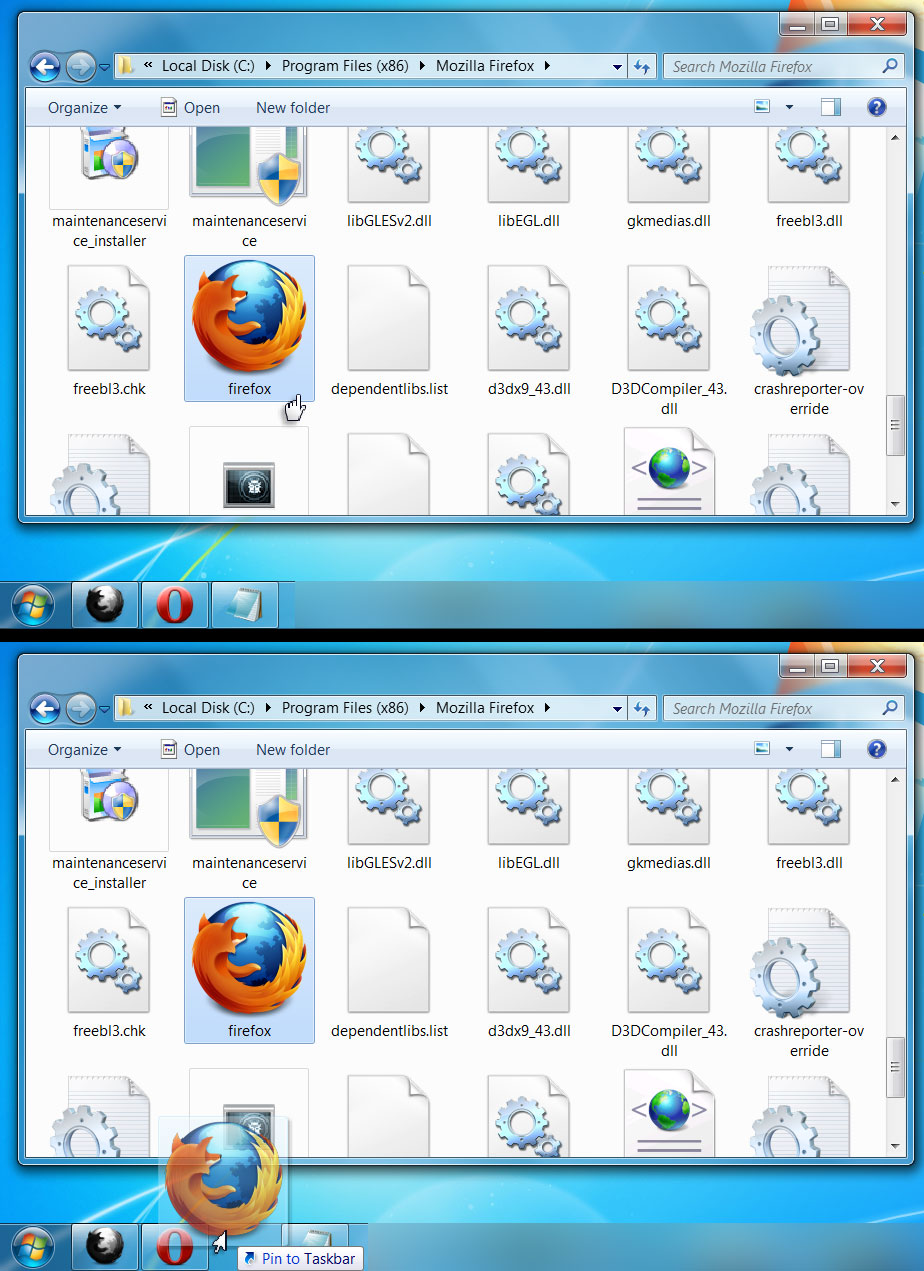
4. From that window, click and drag the firefox icon onto the taskbar.
The Firefox icon appears on the taskbar (the long area on the edge of the screen).
The system tray or "systray" is the tiny area near the clock on the taskbar. The Firefox icon doesn't normally appear there, unless you have an extension like MinimizeToTray revived installed. The "Pin to this program to taskbar" option does not appear for that icon.
Thanks for the tip !Did everything you recommended, but the icon does not want to be fixed in tree.After dragging and dropping the tray,when you release the right mouse button , the icon disappears.
I solved the problem fixing icon in the tray. Prevent the establishment of a program RegOrganaizer. In the program Reg Organizer has deactivated the option:"Do not show the arrow in the lower left corner by the program shortcuts to programs for Windows". Icon Mozila Fire Fox remained in the tray!