why Firefox 18 behind proxy server is refusing all https connections?

I used to have Firefox 17 and everything worked ok but I just installed Firefox 18 in my Windows XP sp3 environment and I cannot connect to https sites through company proxy. Company proxy requires LM/NTLM authentication, proxy server is an IPCOP machine (squid proxy.) After updating to Firefox 18 for every site that uses an https connection the response is: The proxy server is refusing connections
              Firefox is configured to use a proxy server that is refusing connections.
 Check the proxy settings to make sure that they are correct.
 Contact your network administrator to make sure the proxy server is
   working.
The log of squid shows lines with denied connection because of required authentication parameters (domain/username and password) 1357912572.640 1 (my ip address) TCP_DENIED/407 1586 CONNECT www.orange.ro:443 - NONE/- text/html As you can see no domain/username were filled in log. here is a line with permission granted from another browser 1357920874.657 1348 (my ip address) TCP_MISS/200 2549 CONNECT www.orange.ro:443 (mydomain\myusername) DIRECT/109.166.184.137 - I modified sensitive data
Thank you
All Replies (7)

Hello stmirel,
Thank you for posting here on the Mozilla Support Forums! We appreciate you as a user of Firefox!
Are you experiencing this issue on another browser too or just Firefox?
Thank You!
Chosen Solution
I'm seeing a lot of proxy issues being reported by Firefox 18 users. So you're not the only one with this problem.
For the time being, I would advise you to go back to Firefox 17.0.1 until Mozilla fixes this bug.
Link:
http://www.mozilla.org/en-US/products/download.html?product=firefox-17.0.1&os=win&lang=en-US
http://www.mozilla.org/en-US/products/download.html?product=firefox-17.0.1&os=osx&lang=en-US
We, too, are currently seeing this issue. It can easily be reproduced and is temporarily fixed by rolling back to FF17.0.1. If I can be of any help fixing this issue, please let me know.
This is a bug with how Firefox 18 handles some proxies. It will be fixed in Firefox 18.0.1, which should be out next week hopefully.
Only this browser

I have the same problem after updating from Firefox 19.0.2 to 20 in Windows 7. Our internal reporting portal uses Windows Authentication, and with 19.0.2 everything worked fine, but after update connections from Firefox are refused. Both Chrome and IE work fine.
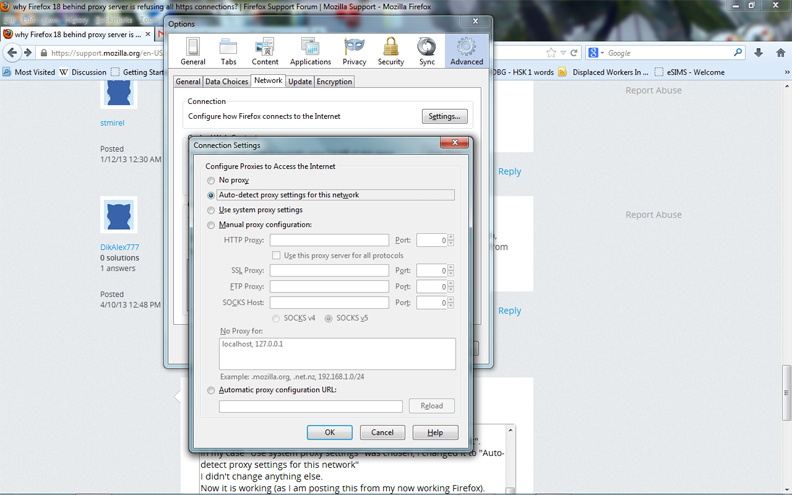
I encountered a similar problem with Firefox starting with the white page stating the "...unable to connect..proxy server..." issue. I have found the links given to not be helpful if you are not able to connect to any Internet pages including Safari, and (do I dare say it) Internet Explorer. The solution I used was as such: * go to Tools the click on Options in the dropdown list
- click on Advanced
- choose the Network tab
- In the box that says Connection, click the Settings button (next to Configure how Firefox connects to the Internet)
When that opens, look at "Configure Proxies to Access the Internet". In my case "Use system proxy settings" was chosen, I changed it to "Auto-detect proxy settings for this network" I didn't change anything else. Now it is working (as I am posting this from my now working Firefox). I hope I explained it simply, and I hope that this solves your problem. Good Luck!