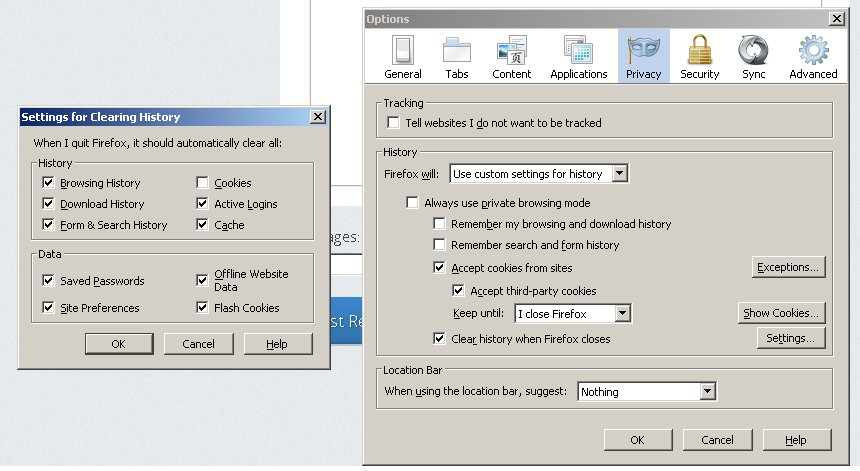
Since I installed the new version 17.0.1, third party cookies will not stay selected after I close the browser...

Simply -- third party cookies will not stay selected after closing the browser and I have to select it for each time to use certain cookies from websites...
All Replies (6)

Have you checked Enhanced Tracking Protection in Firefox for desktop ?
Under privacy I have to keep checking "accept third party cookies" every time I start a new web browser.
If you do not keep changes after a restart then see:
I tried creating a new profile and this did not work...
You may need to create an allow exception to keep specific cookies.
In case you are using "Clear history when Firefox closes":
- do not clear the "Cookies" and the "Site Preferences"
- Tools > Options > Privacy: History: [X] Clear history when Firefox closes > Settings
- https://support.mozilla.org/kb/Clear+Recent+History
Note that clearing "Site Preferences" clears all exceptions for cookies, images, pop-up windows, software installation, and passwords.
Besides that, when I select (by tick) in cookies (see attached .jpg) and then click ok - then you re open "setting for clearing history" the cookie tick box is cleared. I used to have a long list of cookies that I did not want and now there is no way to prevent cookies a) from staying on my system and b) being able to manage them from one foxfire session to the next.