


This Connection is Untrusted: accounts.google.com - can't add exception

I'm trying to use a ssl proxy with accounts.google.com.
Usually, firefox warns me about invalid certs, however it let me add an exception if I wanted to connect to it anyway.
But, if i want to connect to accounts.google.com, it blocks me, and it doesn't let me add that exception.
Why it happens only with this subdomain?
Chosen Solution
You may also have to Import the root certificate of the proxy via Tools (Alt + T) > Options > Advanced > Encryption > View Certificates > Authorities. Options > Advanced
All Replies (9)
Hi,
Please also try after deleting the cert8.db and cert_override.txt files in the Firefox Profile Folder. Firefox will regenerate the cert8.db file at the next startup while the second file will be generated when an exception is added.
Modified by Vivek
I tried that, same results.
Thanks
Here is the warning, the "I Understand the Risks" section and the "Add Exception ..." button are missing.
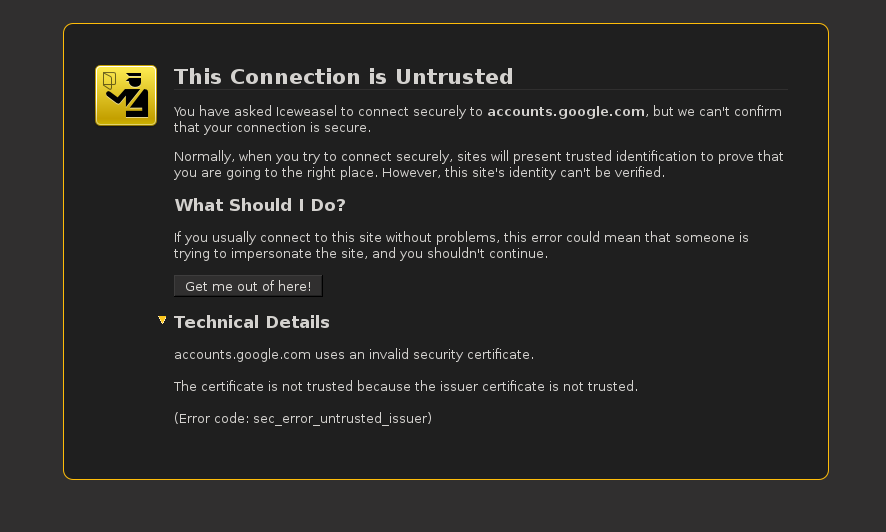
Modified by Midix666
Chosen Solution
You may also have to Import the root certificate of the proxy via Tools (Alt + T) > Options > Advanced > Encryption > View Certificates > Authorities. Options > Advanced
Start Firefox in Use Troubleshoot Mode in Firefox to check if one of the extensions or if hardware acceleration is causing the problem (switch to the DEFAULT theme: Firefox/Tools > Add-ons > Appearance/Themes).
- Don't make any changes on the Safe mode start window.
- https://support.mozilla.org/kb/Safe+Mode
Make sure that you do not run Firefox in permanent Private Browsing mode.
How do you get the root certificate of the proxy that you will need to import?
Same problem just started happening on my windows 7 laptop today with firefox 9.0.1 - I'm applying the update now .... can't seem to force an update just says I'm on the release update channel - I'll leave the laptop on for a while. OK - updated to firefox 13.0.1 - still have same issue.
Internet explorer displays google.com just fine, seems to be an issue with firefox.
I renamed cert8.db and I don't see a cert_override.txt - no effect - google.com still is not trusted.
Scanned for viruses with za, didn't find any
I'm not sure why, but date and time were off by a couple of years. Fixed the date and time and the issue of google.com not being trusted with ff went away. ,