


I keep finding words on web pages (including my own) written in green and doubly underlined (described as 'Text enhance') that provide a hyperlink to "Groupon". HOw does this happen and how can I stop it?

I keep finding words on web pages (including my own) written in green and doubly underlined (described as 'Text enhance') that provide a hyperlink to "Groupon". Why does this happen and how can I stop it?
All Replies (14)
"'How to get rid of green double underlining
You need to install the "Adblock Plus" extension along with subscribing through its options to both "EasyList" and you might also install "Fanboys" filter.
In addition some filters you add yourself, I thing google analytics will be blocked by those, but if not add the following filters of your own.
- http://www.google-analytics.com/*
- |http://ad. doubleclick. net/*
Known Adblock Plus subscriptions
You should also install a hosts file on your system which will help with all browsers and applications.
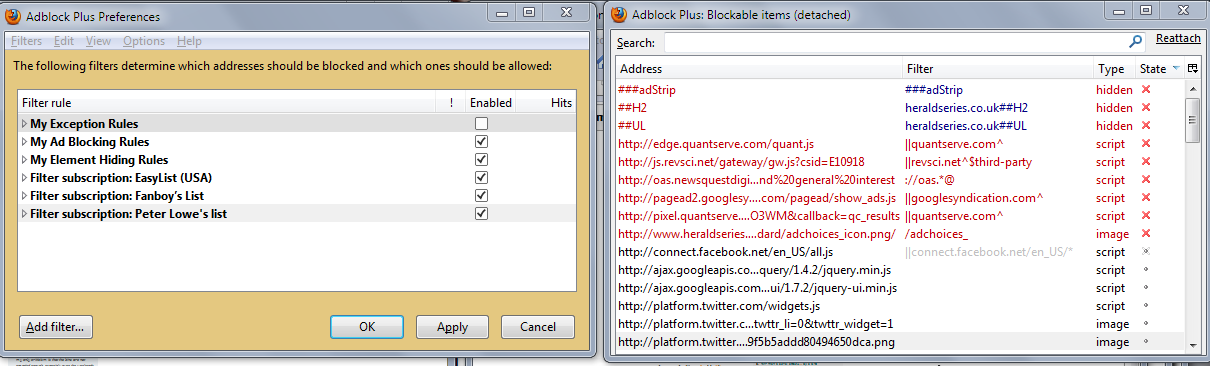
Adblock Plus - Open blockable items list - Ctrl+Shift+V (right click on icon) shows all the urls on a page and if blocked by a filter shows the filter
- http://img213.imageshack.us/i/2010020591647pm.png/
- http://img651.imageshack.us/i/adpblockableitems.png/
- http://img3.imageshack.us/img3/671/adblockplustvguide.png


If that doesn't help, post the webpage url, and if it is public I'll help you with the filters. When your problem is solved, please mark as solved, and anything else that should be made known to other users.
Modified by David McRitchie
I'm having this problem too and it is really annoying
Here's a page with the links on Abingdon Herald
I have adblocker installed and Easy List and Fanboys but I still have the links.
Modified by orangefoot
I have just cured this by removing an extension that I had not consciously added to my add ons. It is a Media plug-in by GameplayLabs.
Go to Tools -> Add-ons -> Extensions and see if you have it. If you do, remove it and restart Firefox.
I hope this helps you.
@orangefoot Install companion extension "Element Hiding Helper for Adblock Plus"
Generated these two filters: controls --W(widen), N(narrow), B(blink),L(lock), S(select)
- heraldseries.co.uk##H2
- heraldseries.co.uk##UL
I just installed Peter Lowe's subscription as well, it will make no difference in what you see but I recognize what is being blocked as trackers, I'll probably keep it. I was actually looking to see if there was any special UK filter.
Go to the following web page http://text-enhance.com/ then click where it asks if you want to opt out. That link takes you to http://www.textsrv.com/optout.php where you check a box to opt out & type the reCAPTCHA words shown.
Note: If you clear your browsing history, you may have to repeat this process like I have had to do.
Modified by Thorbeard
That Opt Out feature probably sets a Cookie. So if you would clear your Cookies, you would need to re-visit that web page and opt-out all over again.
The best way I've found is to get rid of Firefox all together, who in their right mind would think this is something people would actually want all over their websites?
I had really liked Firefox up until this point.
I'm going to try Chrome I think... I have got better things to do than try and turn off stupid stuff that I don't need or want. I just want to look at the net with as little interference as possible.
Hello, we apologize that you are having trouble with the TextEnhance product. If you are seeing these links, then a web publisher has decided to offer them to you. If you would like to opt-out of seeing these links, visit: http://optout.textsrv.com/optout.php
For FAQs and additional help on removing Text Enhance, please visit http://support.text-enhance.com
I dont want to "OPT-OUT"....i want it gone permanently!!
In my case it was an add-on called Codec-C that caused this problem.
Codec-C is offered to you from a number of sources under the guise of an essential plug-in but is 100% malware - removing it will not affect anything apart from solve the TextEnhance problem.
Go to Tools|Add ons and delete Codec-C!
Good luck
Giles
Modified by BigOrienteer
When I disable "Shockwave" the underlined text disappears. The problem with that is that you need "Shockwave" for other functions. Firefox needs to get on this right way.
Its a good news bad news situation, the good news is there is a cure for this unwanted headache - Simply click on the Tools button on the Firefox browser, a drag down menu appears, click on the Add-ons button/tab another menu page appears, click on extension button/tab a couple of items appear disable codecv 1.0 problem solved hurray good news - The bad news is, along with codecv 1.0 made by JustPlugIt, there is a host of other freeware that can/will cause you this same problem, you might just have one freeware program causing this problem - if youre lucky, if youre unlucky there might be two, three or four programs so you are just going to have to use trial and error to find the bad guys. ( notice I said freeware humm God forbid we actually had to paid for these things) Not all freeware are bad, some are good, here are some of the good guys leave them alone - Ant Video Downloader, DownThemAll, Java console , update service.
I encountered this problem this morning. This was happening because of a program running in the background called Playbryte that I think was put onto my system while I tried to download a FTP free software that can unzip a compressed file in a remote server. Although I stopped installing it half way through, it managed to put droppings like Playbryte, yontoo, etc. Beware of such freebies.
By the way, I use Chrome. As soon as I killed the pgm from chrome settings>tools>task manager the double bar links were gone. I then had to remove it from Chrome settings>tools>extensions, as it was not in installed program list.
Modified by ughosal
It is NOT the case that the web publisher has decided to offer these links. If you look at the source HTML they aren't there. Plus I tried this out with a locally installed webserver and my own content and they still appeared.
They're being generated within the browser at run-time.