


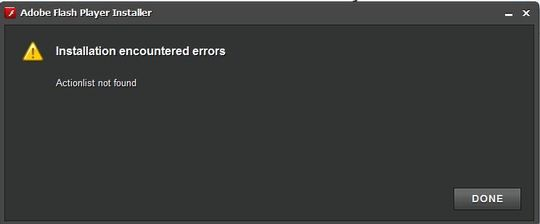
When trying to update Adobe Flash Player, message says no ActionList found.

When I try to view videos on CNN home page, it tels me that the video is optimized for flash player 10, and when I click on the appropriate buttons to download that, it tells me "ActionList not found".
Chosen solution
There are two versions of Flash, one for IE (ActiveX) and another (Plugin) which is used by other browsers, such as Firefox. I don't see the Flash plugin in your list of installed plugins.
1.Download the Flash setup file from here:
Adobe Flash - Plugin version.
Save it to your Desktop.
2. Close Firefox using File > Exit
then check the Task Manager > Processes tab to make sure firefox.exe is closed,
{XP: Ctrl+Alt+Del = Processes tab}
3. Then run the Flash setup file from your Desktop.
Read this answer in context 👍 15All Replies (6)
Chosen Solution
There are two versions of Flash, one for IE (ActiveX) and another (Plugin) which is used by other browsers, such as Firefox. I don't see the Flash plugin in your list of installed plugins.
1.Download the Flash setup file from here:
Adobe Flash - Plugin version.
Save it to your Desktop.
2. Close Firefox using File > Exit
then check the Task Manager > Processes tab to make sure firefox.exe is closed,
{XP: Ctrl+Alt+Del = Processes tab}
3. Then run the Flash setup file from your Desktop.
YES!!!!!!!!!!!!! Finally now I can view videos on CNN. It took several tries, but I kept at it nad it finally worked. Thank YOU!

i have IE 8 and same message. NEED SOLUTION!
forgot to mention i am not admin so i got the admin to do it for me and no actionlist found message
(For Vista Users)
Download the latest version http://get.adobe.com/flashplayer/
Save it on desktop and right click on the installer and chose Run as Administrator (Worked for me) Hope it helps!
The Problem is: Actionlist not found
Solution: Try this direct download link, and the problem is solved
http://www.adobe.com/products/flashplayer/fp_distribution3.html
If you still have problems with you type of windows, try the following likg:
http://www.jiagouyan9.com/archives/firefox-flashplayer-install-issue-actionlist-not-found.html/
Modified by popefreedom