How to delete temporary internet files

Easy to find in IE under tools/options but cannot find it in Firefox
All Replies (6)
Chosen Solution
"Clear the Cache": Tools > Options > Advanced > Network > Offline Storage (Cache): "Clear Now"
Unfortunatly, that doesn't show up on my version of FF or I am just not seeing it. I don't have a Tools button. Where is it located, because I am not seeing it.
Thank you in advance
On which platform are you?
Instead of Tools > Options use:
- Mac: Firefox > Preferences
- Linux: Edit > Preferences
- Windows: Firefox > Options
Press F10 if the menu bar is hidden on Windows and Linux or use "Firefox > Options/Preferences"
Windows Firefox
Thank you
Modified by curiouscardinal
Also Firefox does not use the temporary internet files that IE uses but rather a Cache.
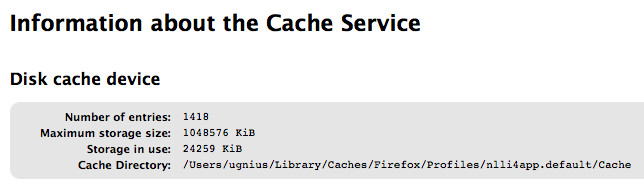
You can type about:cache in Location (address) bar to view and see where it is located.
For the complete list of files Firefox download to the computer you can see by typing about:cache on your address bar. It will show you exact file names, storage in use, number of entires and exact location with sizes and dates. Attached example