

How do I hide the FF4 title bar under Linux (to have it look like FF4 on Windows, or indeed Google Chrome)?

It's great that the menu can now be displayed in the tab bar with tabs-on-top, but it would be even better if the titlebar itself could be hidden! I believe this is already the case on FF4/Windows 7. Maybe I have just not discovered how to turn on this feature?
Chosen Solution
You can hide the titlebar in a very easy way if you are using Compiz.
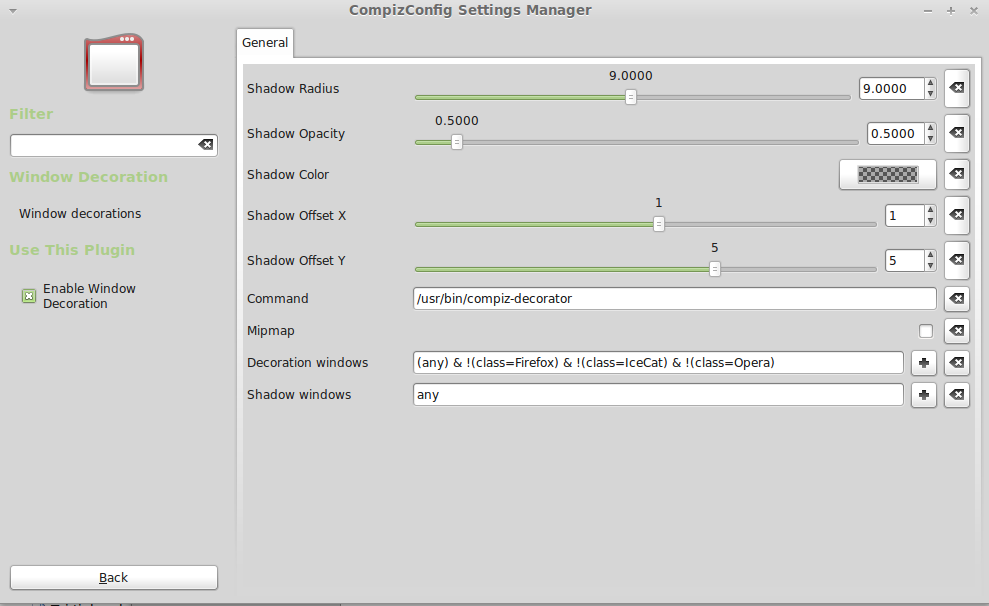
Just open CompizConfig preferences and find "Windows decoration" Now, in the line called "Decoration windows" type this: (any) & !(class=Firefox)
All Replies (21)
You can't hide the title bar on Linux, that only works on Windows.
You can look at the Autohide extension: "Preview of the next version (Fx 4 only)"
- Autohide: http://www.krickelkrackel.de/autohide/
Then this should be considered a feature request! (After all, if Chrome can do it on Linux...)
Will give the add-on a try, though it appears to only affect full screen mode where the title bar is hidden anyway?
You can use Autohide in zombie mode (Shift and F11) to remove the chrome (title bar) without going to full screen. You can click the More info button on the Autohide page.
Why don't you add that addon to addons.mozilla.org?
I can hide the Firefox4's titlebar under linux. First, you must install the extension named userChromeJS-1.3. URL:http://downloads.mozdev.org/userchromejs/userChromeJS-1.3.xpi
Now, edit ~/.mozilla/firefox/XXXXXX.default/chrome/userChrome.js
The content:
(function() {
   var win_ctrl = document.getElementById("window-controls");
   win_ctrl.setAttribute("fullscreencontrol", "false");
   win_ctrl.setAttribute("hidden", "false");
   var mainWindow = document.getElementById("main-window");
   mainWindow.setAttribute("hidechrome", "true");
})();
That's all. ^_^
nice hack :) Unfortunately, it's a little extreme, as it also removes the possibility to resize, move, or minimize the window...
Chosen Solution
You can hide the titlebar in a very easy way if you are using Compiz.
Just open CompizConfig preferences and find "Windows decoration" Now, in the line called "Decoration windows" type this: (any) & !(class=Firefox)
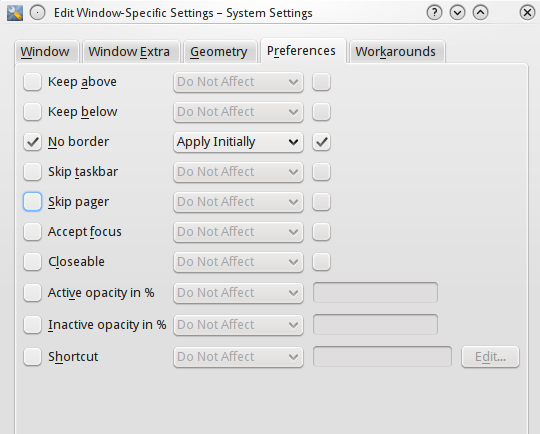
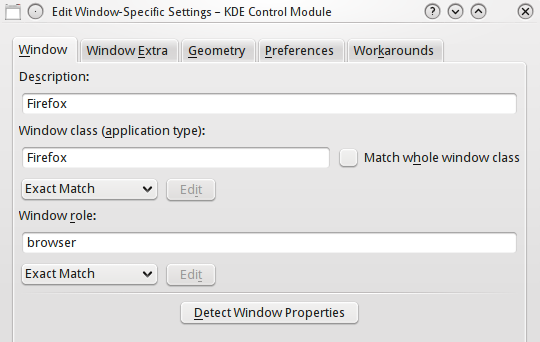
Something similar can be done in KDE (Configure Desktop -> Window Behaviour -> Window-Specific, and add a new setting for Window class "Firefox" there).
This of course also removes the minimize button. So if FF had a "minimize" button one could pull to the toolbar, one would have a decent workaround...
Modified by aelilea
https://addons.mozilla.org/en-US/firefox/addon/toolbar-buttons/ Minimize and Close Buttons. Both works, just checked.
https://addons.mozilla.org/en-US/firefox/addon/drag-button/ This one should also work very soon.
Modified by Mantas
Excellent! There's an add-on for everything...
Just to add for completeness, the built-in "fullscreen" button (should you need it and not just press F11 already) beats "maximize" any day anyway.
The following KDE Window settings only remove the title bar from the browser window, while leaving other windows opened by Firefox (e.g. dialogs like Preferences) intact.
aelilea,
The built-in FullScreen mode automatically Maximizes the browser window, where Autohide's Zombie mode will give a "Full Screen" look without changing the size of the browser window that the user has set. For "political" reasons, I doubt of the developer of Autohide will ever have that extension anywhere except for his own website. I have been using Autohide for like 6 years now, the 2nd extension that always install in a new Profile; ChromEdit Plus is the 1st.
aelilea, I think I found the same rule for Gnome: (any) & !(class=Firefox & role=browser)
It seems that Autohide's author has even closed down the site? Can you give a latest copy? Thanks.
Settle,
Where would i put this code in gnome to make use of it? I've looked through the conf editor, preferences etc.
CompizConfig > Decoration windows. It is written in my first message.
I have an addon to hide the titlebar that works in LINUX (again), tested with gnome desktops (Ubuntu,Mint): "Hide Caption Titlebar Plus" - http://tiny.cc/hidec (There is a new version in "Development channel". See Options-dialog for more configuration settings.) Enjoy :-)
Go to full screen mode by pressing F11, then right click on top area where you open tabs and uncheck HIDE TOOLBARS option.
You get as good experience as Windows 7