


How to turn off automatic updates.

Since I have updated firefox I now get automatic updates, as I have a poor/slow connection and because I simply do NOT want updates automatically installed I want to find out how to turn off this annoying"feature".
Chosen solution
1.At the top of the Firefox window, click on the Firefox button (Tools menu in Windows XP) and then click Options. 2.Click the Advanced panel. 3.Click the Update tab. The auto-update options are displayed.
Read this answer in context 👍 18All Replies (5)
See Updating Firefox - Configuring update options for details.
Your above posted system details show outdated plugin(s) with known security and stability risks.
- Shockwave Flash 10.0 r32
- Next Generation Java Plug-in 1.6.0_14 for Mozilla browsers
Update the Java plugin to the latest version.
- http://java.sun.com/javase/downloads/index.jsp (Java Platform: Download JRE)
Update the Flash plugin to the latest version.
Chosen Solution
1.At the top of the Firefox window, click on the Firefox button (Tools menu in Windows XP) and then click Options. 2.Click the Advanced panel. 3.Click the Update tab. The auto-update options are displayed.
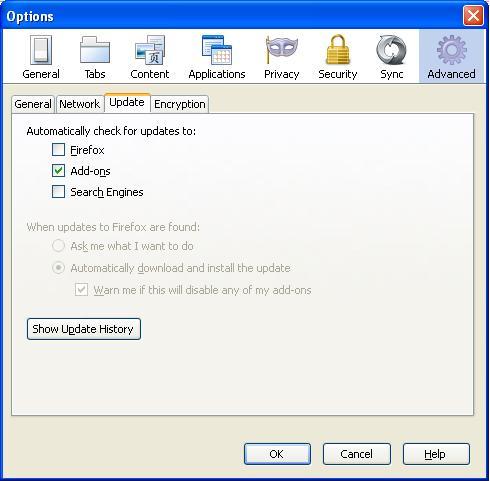
Modified by Naveen
I want to turn it off because I am fed up with the daily updating of firefox. Its pathetic. I want to go back to Firefox 3.6.23 actually. I've downloaded it at FileHippo and do NOT want these updates to happen after that.
I understand you. This new (version) updates from firefox is really really annoying. Previously you knew only the version changes may affect your pluggins/etc and would easily do the minor ones. But know, version 7 is in fact either 3.4.2 or 4.0.0 which is stupid. I am trying other browsers now and will switch out soon.