


Conduit search has hijacked my firefox browser how do I remove it

How do I remove Conduit search from my firefox browser. It is not located in the add-ons and removing firefox and reinstalling it has not removed the Conduit search.
This happened
Every time Firefox opened
== Kids were on computer and now it is there.
Chosen Solution
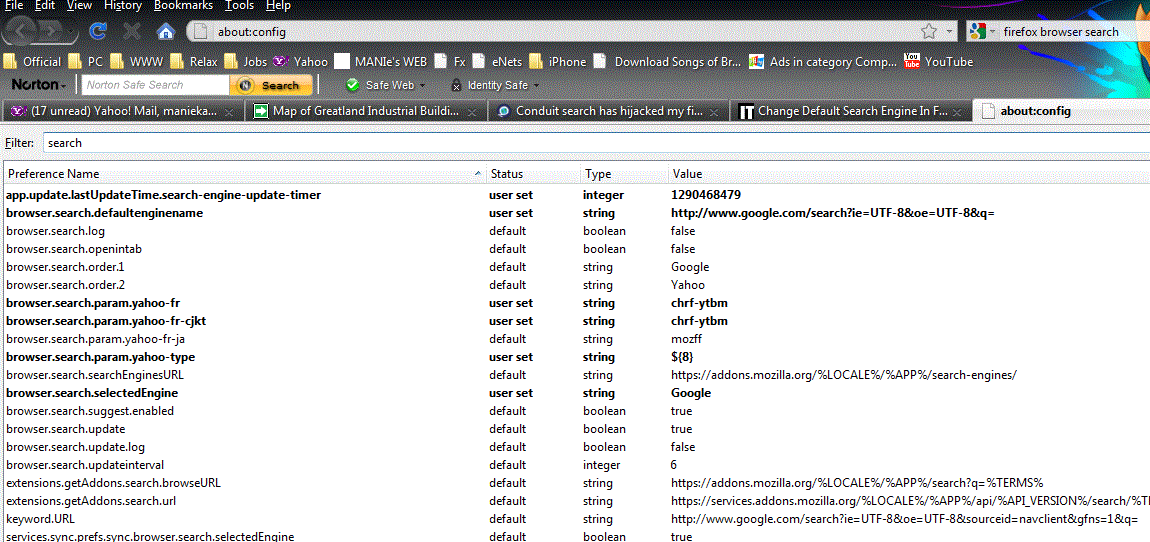
- Open your Firefox browser and type “about:config” in address bar
- Now you can see a list of items “Preference Name” and its values. Now type "search” in the filter box on top of that window...
- Check all strings contents as "CONDUIT" - and rightclick-reset..
Thats all done.. I done the same..
Modified by David Tenser
All Replies (13)
Several tried to but no one seemed to understand the real problem. I COULD, because it was mine too. So it follows the only ultimate solution: 1. Open Firefox 2. On the address bar, type – about:config in the URL. Press Enter. 3. You will be warned about Warranty. Click on “I’ll be careful…” 4. On the Filter dialog box type – search.conduit 5. It will display all related entries. Right-click on Preferences Name and Reset.
It worked for me, after trying a dozen of "fake" solutions. ;)
Muchas gracias! Tenía el mismo problema y gracias a vos lo resolví!
Thank you very much! I had the same problem and now it's solved thank to you!
Chosen Solution
- Open your Firefox browser and type “about:config” in address bar
- Now you can see a list of items “Preference Name” and its values. Now type "search” in the filter box on top of that window...
- Check all strings contents as "CONDUIT" - and rightclick-reset..
Thats all done.. I done the same..
Modified by David Tenser
Thank you maniekandan5, I deleted all conduit referenced lines and that seems to have worked.
I used the Uninstall in Windows! After that, I did a search for conduit and I deleted everything I found! Rebooted After reboot I clicked into the FireFox window just below the blue bar at the top and I clicked on the Menubar. Then I used Tools...Options and General tab and I inserted the home page of my choice...now everything is OK! I hope this helps those that need it!!!
I had this thing take over as well on my machine. Very annoying! It did not show up in "Uninstall Programs" and when I tried to use "Tools" in Mozilla, it removed the toolbar and I couldn't get it back. Maniekanda's recommendation was spot on and successful. I have my browser back now just the way I want it.
Thank you for your help. So far Conduit is gone and Firefox is back.
Try http://apps.conduit.com/conduitengine/Uninstall/
It works on my windows XP.
Hi. You should go to the
{Home drive like 'C:'}\{Users folder like 'Users'}\{Username}\AppData\Roaming\Mozilla\Firefox\Profiles\{Your Random ID Folder}\
Open prefs.js, user.js files and look for homepage variable through these two files and u can see what is the value of them. Change 'em as everything u want.
it keeps returning, I have tried this solution at least 50 times. It works untill you log off then conduit returns. Any permanent solution suggestions besides or in addition to this one
i followed all the instructions, but its still returning, cant get rid of it pls help, i sent an angry e-mail to conduit, they still haven't replied yet. My toolbar is in russian and its pissing me off. it came with a torrent i installed :( now i cant use my FF. Any permanent solution would be appreciated. Thank you
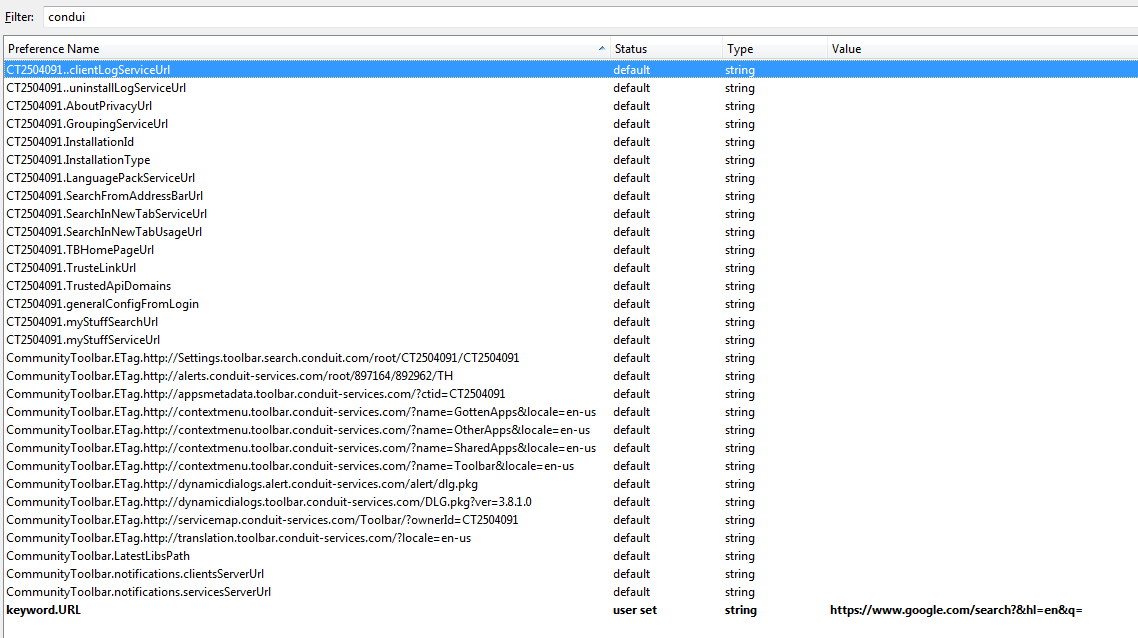
What worked for me was the about:config approach. When I searched for conduit, along with all other conduit settings, something named keyword.URL came up. I changed its value to http://www.google.com/search?hl=en&q=
I also used the Reset approach for all other conduit values for good measure.
See attached screenshot for a live example.
I tried the remedies previously posted, and also tried the uninstall/reinstall FF with the control panel. All failed. I also am also exchanging email with ashampoo, so far no success.
SUCCESS! I uninstalled FF using the Revo uninstaller in the most thorough mode and then reinstalled FF.
Hopes this helps