


How do I set Google as the default search engine in Firefox 5? I have tried several fixes but I keep getting a Yahoo search instead of Google.

I want to use Google as my search engine but no matter what settings I change the default search engine is always Yahoo.
Also I would like to have the feature back where when I open a new tab it shows frequently used pages that I can click on and open.
Ausgewählte Lösung
First, thank you to dmcritchie. His solution was helpful. However, I didn't want to uninstall my Yahoo Toolbar because I have buttons, bookmarks, etc. that I don't want to migrate.
For those of you, like me, who wish to continue using your Yahoo Toolbar as well as use the Google Toolbar, here is another solution:
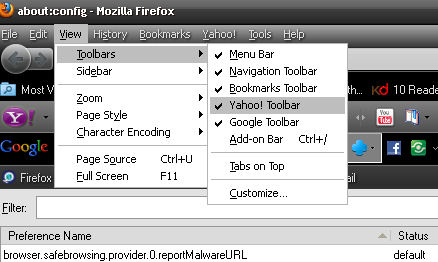
Rather than uninstalling the Yahoo Toolbar, simply hide it. Go to Command Bar, select View > Toolbars > then, uncheck Yahoo Toolbar. (Refer to first image)
Then....
- Open a new tab.
- Go to the address bar and type in auto:config and hit the enter key.
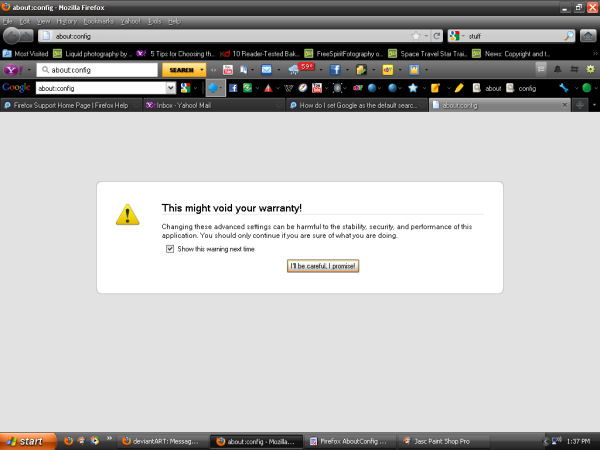
- A warning box will appear. Close the box by clicking on the "I'll be careful, I promise" button. (See second image)
When text comes up,
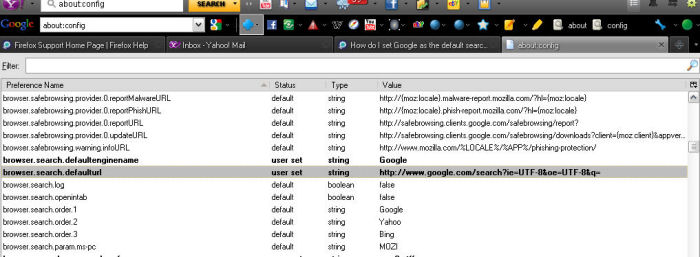
- Scroll down until you find "browser.search.defaulturl" It will be in bold letters. (Third image, with selection highlighted by me)
- Right click and select the first option which should be "Modify", then
- Type in (or Copy & Paste) the following:
http://www.google.com/search?ie=UTF-8&oe=UTF-8&q=
Next,
- Scroll down until you find "keyword.URL" It will be in bold letters.
- Right click and select the first option which should be "Modify", then
- Type in (or Copy & Paste) the following:
http://www.google.com/search?ie=UTF-8&oe=UTF-8&q=
Finally,
- Scroll down further until you find "yahoo.ytff.search.popup_src" Again, it will be in bold letters.
- Right click on the phrase and select "Modify"
- Type (or Copy & Paste) in the following:
http://www.google.com/search?ie=UTF-8&oe=UTF-8&q=
- Close the tab
And you're done.
This will allow you to keep all of the buttons and bookmarks that you have on your Yahoo Toolbar without the nasty side effect of having Yahoo hijack your searches and give you those darned 404 Search Error pages.
Hope this helps.
P.S. While you are making changes to auto:config, be sure to copy the values you are changing into a Word Pad document for later recovery. Be clear about what "Preference Name" you accessed and what "Value" you modified. That way, if you have to, you can always go back and return everything to its previous state. I titled my document "Firefox AboutConfig Changes".
Good Luck!
Geändert am von rocknriter
Alle Antworten (16)
Remove the Yahoo Toolbar
- "Ctrl+Shift+A" (Add-ons Manager)
- Select Puzzle piece on left-side for Extensions List
- Find "Yahoo Toolbar" and click on "Uninstall" button
Then to fix the default search engine used at the Location Bar, change the value of keyword.URL in about:config to one of the values shown in Location Bar search at MozillaZine.
- Google Search (Google search results page)
http://www.google.com/search?ie=UTF-8&oe=UTF-8&q=
- type in about:config into the location bar
- if the warning message nonsense comes up uncheck the box before dismissing the dialog message
- filter on keyword
- right-click on keyword.URL and choose "modify" then paste in the Google search engine string of your choice.
More information on configuration variables available in about:config entries and for users not familiar with the process there is about:config (How to change).
Shame on you firefox changing my search options in your upgrade. Might reconsider which browser I use. The fact I had to follow such an involved process to turn off a tool bar and reset my default browser is very low - half the people wont be able to do this. This is microsoft tactics.
Ausgewählte Lösung
First, thank you to dmcritchie. His solution was helpful. However, I didn't want to uninstall my Yahoo Toolbar because I have buttons, bookmarks, etc. that I don't want to migrate.
For those of you, like me, who wish to continue using your Yahoo Toolbar as well as use the Google Toolbar, here is another solution:
Rather than uninstalling the Yahoo Toolbar, simply hide it. Go to Command Bar, select View > Toolbars > then, uncheck Yahoo Toolbar. (Refer to first image)
Then....
- Open a new tab.
- Go to the address bar and type in auto:config and hit the enter key.
- A warning box will appear. Close the box by clicking on the "I'll be careful, I promise" button. (See second image)
When text comes up,
- Scroll down until you find "browser.search.defaulturl" It will be in bold letters. (Third image, with selection highlighted by me)
- Right click and select the first option which should be "Modify", then
- Type in (or Copy & Paste) the following:
http://www.google.com/search?ie=UTF-8&oe=UTF-8&q=
Next,
- Scroll down until you find "keyword.URL" It will be in bold letters.
- Right click and select the first option which should be "Modify", then
- Type in (or Copy & Paste) the following:
http://www.google.com/search?ie=UTF-8&oe=UTF-8&q=
Finally,
- Scroll down further until you find "yahoo.ytff.search.popup_src" Again, it will be in bold letters.
- Right click on the phrase and select "Modify"
- Type (or Copy & Paste) in the following:
http://www.google.com/search?ie=UTF-8&oe=UTF-8&q=
- Close the tab
And you're done.
This will allow you to keep all of the buttons and bookmarks that you have on your Yahoo Toolbar without the nasty side effect of having Yahoo hijack your searches and give you those darned 404 Search Error pages.
Hope this helps.
P.S. While you are making changes to auto:config, be sure to copy the values you are changing into a Word Pad document for later recovery. Be clear about what "Preference Name" you accessed and what "Value" you modified. That way, if you have to, you can always go back and return everything to its previous state. I titled my document "Firefox AboutConfig Changes".
Good Luck!
Geändert am von rocknriter
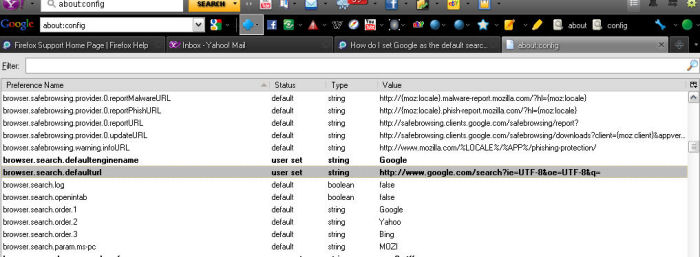
Don't know why the third image disappeared from this site.
Here it is again.
Oh my GOD! Thanks SSSSSSSOOOOOOOOOOOOO much. Never use Yahoo again. Will DELETE everything from yahoo. OOOHHHUUUU.
Thank you rocknriter!!! That fixed my problem. At least until the next update. LOL
I really wish FF would find a way not to change all my customization every time they upgrade the software.
Thanks again!
What if there ISN'T a "browser.search.defaulturl" perameter listed?
What if there ISN'T a "browser.search.defaulturl" parameter listed?
That would be good because it has a default value of
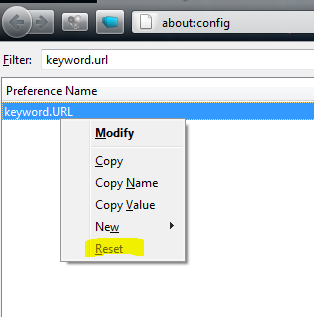
Just modifing the keyword.URL worked for me, I simply right clicked it and chose Reset, closed the browser and reopened and I have my Google back!!!
Geändert am von GMan
I am having another problem. If I search by typing in the address bar, a Google search comes up, which is what I wanted, but if I go from the Mozilla homepage search box, a Yahoo search comes up. In about:config I am seeing the following three lines in bold:
yahoo.ytff.general.dontshowhpoffer;true (the only option that comes up here is "Toggle," which toggles between 'true' and 'false,' which didn't fix the problem)
yahoo.ytffp.installer._u;yahoo.ytffp.installer._u;797166663cf147d18e27bcd3c08fb100 (has the option to modify, but putting in the Google string didn't do anything)
yahoo.ytffp.installer.nd;1 (also has the option to modify, but the type is integer, not string, so I didn't touch it)
Any ideas?

Is there any way to make this change permanent? I cannot tell you how many times I have changed several areas. I have changed the keyword.url, the other areas suggested above, as well as any place that includes Yahoo. It works for the day, but soon (I don't know for sure if it is after any reboot...guess I should check) I am right back at Yahoo taking over my location bar search. I'm eager for more ideas. TIA.
I just wanted to note that I did a reboot and I have that annoying Yahoo back as my location bar search engine. The regular search box stays with Google and has since I reset it some time ago, but resetting/pasting a change in the location bar search (about:config) seems to last only until reboot. I am using Firefox 5.0. And I am currently running a Windows search for all occurrences of Yahoo on my C: drive...not sure what I'll do with the info, but is seems appropriate to search. :-)
You can foil most attempts to change your about:config setting of keyword.URL by setting the preference in user.js file within your profile, which you can modify while Firefox is up, simply add the following two lines (the first of which is a comment).
// override unauthorized attempts to change keyword.URL
user_pref("keyword.URL","http://www.google.com/search?ie=UTF-8&oe=UTF-8&q=");
user.js does not exist by default you have to create the file in your Firefox folder which you can get to quickly through about:support then click on "Open Containing Folder:" and create or modify user.js
More information on user.js in
This is not something that would happen to me as I never allow any external search to occur at the Location Bar except through a keyword shortcut, so there are fewer accidents to be made when searching. I probably havewell over one hundred specialized search keyword bookmarks specifically relating to search engines and most make use of Google.
Geändert am von David McRitchie
Menu Bar has to be "on" to change the default search engine. Under Options, turn on Menu Bar. Then click the Yahoo symbol on the search bar.
For those of you who have the search engine on - about:home - the default Firefox 4+ homepage switched to something other than Google, try this.
With the about:home page loaded, paste this in the Location Bar and hit Enter.
javascript:{localStorage["search-engine"]="{\"name\":\"Google\",\"searchUrl\":\"http://www.google.com/search?q=_searchTerms_&ie=utf-8&oe=utf-8&aq=t&rls=org.mozilla:en-US:official&client=firefox-a\"}";void(0);}
This is excellent advice, thanks.
It took me a few hours to turn to a forum to find out how to change the search engine in the menu bar..... it is NOT obvious nor easy.
It beggars belief why it is so difficult to change the search engine back to Google, my preferred chioce, from Yahoo when I didn't change it in the first place.
Someone else wrote that this sort of practice smacks of Microsoft. I will add to that Apple.
Mozilla should take note and not get too big for their boots.
We, the users, are not very happy when we are taken down paths we don't want to go down.