


Why do my tabs intermittently keep changing from being beside to below the orange button? I want them to stay beside the orange button, to save a row of room on the screen.

Firefox 4.0 - tabs are below the orange button, I want them to stay beside it to save a row of space.
Ausgewählte Lösung
You get the tabs on the title bar if you maximize the Firefox window.
You can also look at the pref browser.tabs.drawInTitlebar on the about:config page.
Alle Antworten (7)
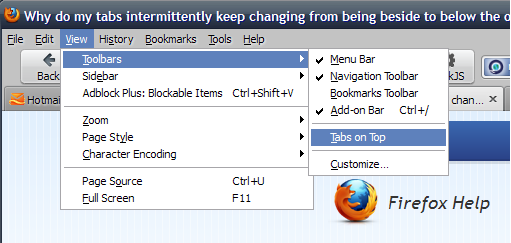
Do you have Tabs_on_top checkmarked? If it's not checkmarked, tabs will drop below the buttons. See screenshot.
I do have tabs on top checkmarked... here's how it looks (see photo).... The tabs were beside the orange button before...
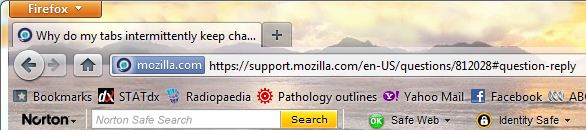
OK, I see what you mean now.
Can you try running Firefox in Use Troubleshoot Mode in Firefox please. If it functions properly in that configuration, then one of your add-ons is the culprit.
Unfortunately it appears the same in safe mode...
OK, it sounds like you've got another toolbar up there. So go to View | Toolbars | Customize. You'll see a panel open which should also reveal any additional toolbars which have been added. You can drag that into that panel which will remove it from the top.
Ausgewählte Lösung
You get the tabs on the title bar if you maximize the Firefox window.
You can also look at the pref browser.tabs.drawInTitlebar on the about:config page.
That's fixed it! Didn't notice my FF had be minimised! Thanks.