


FF4 doesn't show <title>-tag any more without menu bar :-(

<title> is an important information, IMHO. But without menu bar I can't see this any more :-(((
Alle Antworten (14)
It's still displayed in the tabs.
Anything in the <title> tag on any page is shown in the tab as well as on the Windows Taskbar. If you would like, you can show the traditional menu bar by clicking on an empty spot of your toolbar and checking the Menu Bar option.
OK, haven't seen this. But...
- I use (and display) tabs not all the time.
- My taskbar isn't fixed, and faded out, when the mouse isn't in this area.
- Tabs and taskbar are often to small to show the complete title.
IMHO title is too important to ignore. Even without tabs, there should be enough space in the title area (Left of the new "Firefox"-Button, for example).
Martin
For those of us who want tabs below everything else but no menu bars, there's a huge empty titlebar which could perfectly be used to display the title. The tab buttons and taskbar buttons are small and often can only display a small part of the title.
If you hover over the Tab, the entire page Title should appear as a tooltip.
I arrived here because I'd like to see the window info up top too as I don't have the tabs positioned there
Regardless of whether you have your "Tabs on Top" or below the Bookmarks Toolbar or the Navigation Toolbar, the web page title appears in the Tab and the full Title will appear on mouse-over as a Tooltip.
You can set the pref browser.tabs.drawInTitlebar to false on the about:config page.
To open the about:config page, type about:config in the location (address) bar and press the "Enter" key, just like you type the url of a website to open a website.
If you see a warning then you can confirm that you want to access that page.
There shouldn't be a need to mouse over the tab to see what the title is. The space is wasted otherwise, so why not display the title there whether or not the menu bar is also displayed?
I attached a picture showing exactly what I'm talking about, excuse the quick ms paint job.
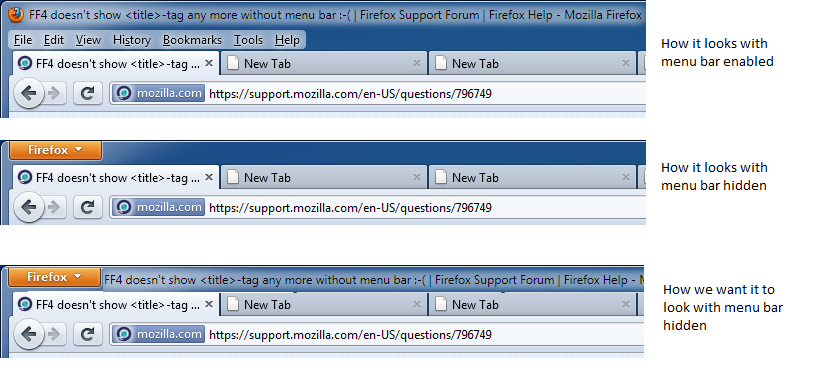
Yes! That picture shows exactly how it should be.
I can't believe it wasn't done right in the first place, since there is absolutely nothing else in that space--and viewing the menu bar just to get your page title back where it belongs is a complete waste of space.
It just doesn't make any sense, regardless of whether tool tips pop up when you mouse over them or not. People have looked to the top for the title for years... it wasn't broken.
Try the personal-titlebar extension:
You may need to use code userChrome.css to set a background color for better readability.
@namespace url("http://www.mozilla.org/keymaster/gatekeeper/there.is.only.xul");
#personal-titlebar * {
color:#000 !important;
background-color:#eee !important;
text-shadow:none !important;
font-size:13px;
}
Geändert am von cor-el
I find this problem particularly frustrating, but being a developer I did something about it: I wrote the "Aero Window Title" extension which puts the page title back in the menubar where it belongs. You can get it from AMO here: https://addons.mozilla.org/en-US/firefox/addon/aero-window-title/
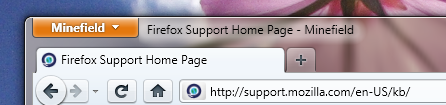
Thanks, BSMedBerg, for being creative. (The issue you're fixing is still present in Firefox 12.)
Note: when the menu bar is set to stay visible, your fix is brilliant :) showing as -- WHITE text against my dark blue title bar (easy to see). However, when the menu bar is turned off, your text becomes -- BLACK text against that dark blue.... (not easy to see).
Could your fix also make that title WHITE (or confirgurable) when the menu bar is turned off?
Thanks. Humbly, -- Doug
It's really sad how Firefox gets worse and worse with each new update.
It used to be my favorite, now I use Chrome :(
Why on earth should you have to write an extension for this??!?
Geändert am von jahroy