

This thread was archived.
Please ask a new question if you need help.

Solved
Archived
Why can’t I choose Ecosia as my default search engine?

Ecosia is not an option when I want ti set my default search engine in Firefox on iOS?
Ecosia is not an option when I want ti set my default search engine in Firefox on iOS?
Chosen Solution
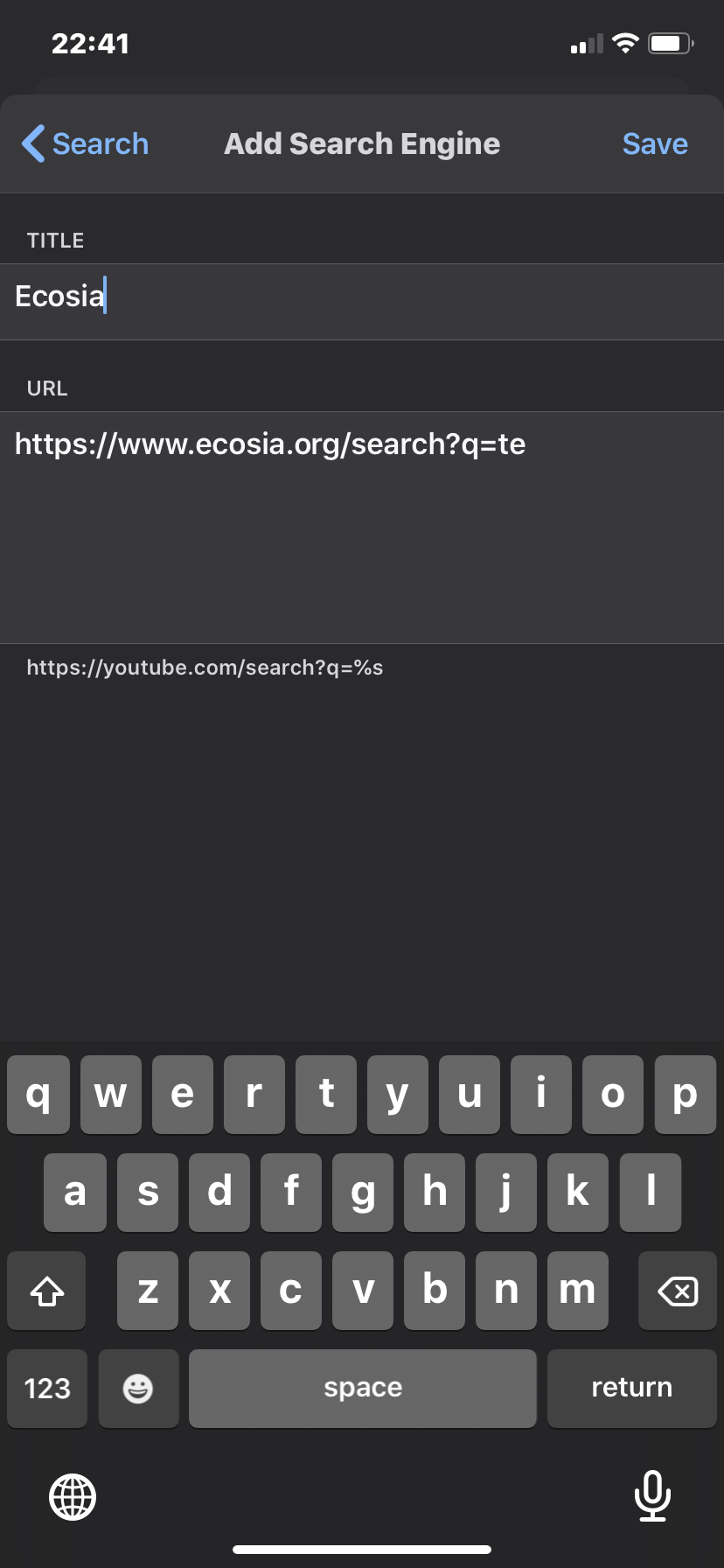
- Tap Settings in the menu panel.
- Tab Search > Add Search Engine
- Add a Title Ecosia
- Add URL: https://www.ecosia.org/search?q=%s
- Tab Default Search Engine > Select Ecosia

Modified by user1693610
All Replies (5)
Hi MD
This article will help you to add Ecosia as a default search engine in Firefox for iOS:
https://support.mozilla.org/en-US/kb/add-search-engines-firefox-ios
Modified by Paul
No 'add search engine' option anywhere. Neither above the keyboard as suggested, nor in settings of Firefox itself
Modified by MD
Chosen Solution
- Tap Settings in the menu panel.
- Tab Search > Add Search Engine
- Add a Title Ecosia
- Add URL: https://www.ecosia.org/search?q=%s
- Tab Default Search Engine > Select Ecosia
Modified by user1693610
Thank you, worked a treat!
perfect