aiwa bud bluetooth to work in desktop mozilla
aiwa bud bluetooth to work in desktop mozilla
Open
2


aiwa bud bluetooth to work in desktop mozilla
Why cant I see some YouTube Videos. I get a black screen.
When I try to watch youtube, firefox will repeatedly rotate from portait to landscape. This is not what I want and there are no settings I can find to stop this. I cannot… (funda kabanzi)
When I try to watch youtube, firefox will repeatedly rotate from portait to landscape. This is not what I want and there are no settings I can find to stop this. I cannot find a solution anywhere. I would like to view content the way I want, not landscape just because it is youtube.
I open Facebook videos and can not get any audio.
Has anybody else experienced a similar problem? Or can you help me trouble shoot this issue please? I'm busy playing audio in a tab of the browser. The sound quality is g… (funda kabanzi)
Has anybody else experienced a similar problem? Or can you help me trouble shoot this issue please?
I'm busy playing audio in a tab of the browser. The sound quality is good (rich, full, deep). Next, I open a new window by any means (Ctrl+N / Open link in new window / Menu > New window) As the new window appears, the current audio playback becomes tinny / lower quality. After a 3 seconds, the normal good sound quality starts again.
I'm currently using Bluetooth connected headphones and this happens on different headphones. I have to find some wired headphones first before I can try that. This happens with every new window that I open, regardless of the number of open tabs in current windows or how many previous open windows I already have. This happens regadless if audio enhancements of the output device are enabled or not. Spatial sound is set to off. Windows is set to 'do nothing' & will not adjust the volumes of different sounds when I'm using my PC to place or receive telephone calls.
OS: Windows 11 with latest patches Firefox: latest & older builds Hardware drivers: All manufacturer drivers applied
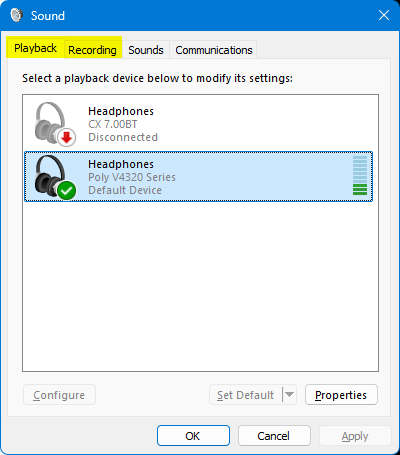
PS I can replicate this issue by changing between the 'Playback' & 'Recording' tab in the Sound Control Panel applet. That is to say, the same decrease in audio quality happens when I change from the Playback tab to the Recording tab. Audio quality improves again when I change from the Recording tab to the Playback tab https://assets-prod.sumo.prod.webservices.mozgcp.net/media/uploads/images/2026-09-12-15-38-23-1accad.png
PPS My new windows are set to open on 'about:support'
PPPS Can't reply to previously archived question : https://support.mozilla.org/en-US/questions/1525613
sound level has gone low for some reason
Idk how to
how do you cast to your tv?
so i found a strange problem that when i connect headphones to my computer i have a very quiet sound on firefox videos (youtube an ect.). it is not a low volume on my com… (funda kabanzi)
so i found a strange problem that when i connect headphones to my computer i have a very quiet sound on firefox videos (youtube an ect.). it is not a low volume on my computer or headphones settings, in other browsers everything works smoothly, i dont know why is is only a problem here in firefox
просто не работают видео ютуб
I just refreshed my FireFox and now the playback controls on my keyboard and Bluetooth headset no longer work with Amazon Prime videos. Windows 11.
When assigning a URL to the mediaplayer object it started appending the current path to the URL. Did not do that in prior version. You can see it automatically puts the … (funda kabanzi)
When assigning a URL to the mediaplayer object it started appending the current path to the URL. Did not do that in prior version. You can see it automatically puts the current browsing URL and then the URL that is assigned. So the file will not load. GET https://www.swingtechnologies.com/https://www.swingtechnologies.com/UploadVideos/clarkj@pobox.com/S200629_019 A.mp4 [HTTP/2 404 8ms]
how to mute all the media playing in browsers without using main system sound controls
YouTube videos are always choppy
I am do not get sound using audio recorded with akamai player with Fire Fox browser. I tried the same link using Edge browser and the audio works. I have tried clear… (funda kabanzi)
I am do not get sound using audio recorded with akamai player with Fire Fox browser. I tried the same link using Edge browser and the audio works.
I have tried clearing the cache, but still no sound.
How do I resolve this issue using Fire Fox as my default browser? Is there an audio extension that is needed?
Hello Team, I am having issues with Mozilla Firefox and Nightly Browser sound. If I use another browser, the sound is perfect. I have been using Firefox for years now an… (funda kabanzi)
Hello Team, I am having issues with Mozilla Firefox and Nightly Browser sound. If I use another browser, the sound is perfect. I have been using Firefox for years now and am accustomed to it, as well as Nighty, for all browsing needs.
Regards, Roopesh
YouTube videos are always choppy”
Здравствуйте. При воспроизведении видео на каком либо сайте в полноэкранном виде не скрывается панель задач виндовс. На других браузерах работает как надо. Менял где толь… (funda kabanzi)
Здравствуйте. При воспроизведении видео на каком либо сайте в полноэкранном виде не скрывается панель задач виндовс. На других браузерах работает как надо. Менял где только можно, даже в безопасном режиме также. Как её можно убрать?
I was answering questions so they direct me to play an audio but I can’t get to open it
No videos play. I created a brand new fresh profile, but that didn't help. It seems like maybe there was a recent update, because they worked before. On tubi it says the … (funda kabanzi)
No videos play. I created a brand new fresh profile, but that didn't help. It seems like maybe there was a recent update, because they worked before.
On tubi it says the widevine crashed and I submitted a crash report for it.
I can't to play the free videos of the moon like this one: https://commons.wikimedia.org/wiki/File:0491_Moon_Travel_01_30_24_00.webm
I am unable to uninstall firefox from the computer because I don't have permissions to do that.
I was hoping someone would have a simple suggestion that could fix it.