


Profile completely dissapeared.
Got up this morning and stared up Thunderbird as I always do but got a 'new account dialog'. All of my emails, folders, settings, etc. are gone. Went through the Help - Trouble shooting process to find the old profile. There are three profiles listed in 'About Profiles' and if I launch with any of them, all I get is a new setup. Freaking out here as I have 10 of thousands of emails, in multiple email accounts, in a relatively complex folder structure which includes online and local folder storage. I have a feeling that Thunderbird updated last night and is the cause of this problem.
Running Windows 10 Pro v 22H2, build 19045.6332 . Thunderbird 140.3.1esr (64-bit)
All Replies (14)
Some questions:
- post the number of files and total size, for each profile directory using In Windows Explorer or some other tool
- what antivirus software do you use?
- pop accounts?
- do you have backups?
- have you solved your other issues https://support.mozilla.org/en-US/user/cb900f1/questions ?
I think I've found the right profile folder (it's 12 Gb) as it contains mail file names that match my local folders. But when I select that profile to 'boot' Thunderbird, I still get the 'first use' dialogue.
Okulungisiwe ngu Bucko
Sorry, forgot to mention:
Using Windows Defender.
IMAP only accounts
Can't remember the last time I made a backup, but it was a long time ago.
Your 'other issues' link doesn't go anywhere.

Looks like a corrupt prefs.js file which has been renamed in prefs-x.js and replaced by a virgin prefs.js file (about 6 to 7kB size). In TB go to menu Help > Troubleshooting Information > Profile Folder > Open Folder... then quit TB. In the profile folder look for any prefs.js or prefs-x.js files and report them with their names and their sizes
Okulungisiwe ngu Mapenzi
Wayne Mery said
https://support.mozilla.org/en-US/user/cb900f1/questions
Ahhh yes, I see. Not really sure issues I have raised previously have been resolved or not - I can't remember specifics around when those problems occurred - however, I haven't experienced any particular weirdness (other than the current problem).
Bucko said
Found an 6 kb pref.js and a 82 kb prefs-1.js file.
The 6 kb file is the "virgin" prefs.js file TB created when it considered the 82 kb file corrupted and renamed it in prefs-1. js file
If you have a backup copy of your profile folder , copy the prefs.js file from there and - TB closed - paste it in your actual profile folder and restart TB. Most times people have no backup of their data. If this is true for you we'll play "double or nothing": Open the TB profile folder, quit TB, delete the 6 kB prefs.js, simply rename the big prefs-1.js file in prefs.js and restart TB. This is a bet, most people loose it but I have seen some examples that the prefs.js file that TB had renamed was not corrupt.
If this doesn't work you'll have to recreate all your accounts. If you have IMAP your messages will be back as soon as TB synchronises with the server. If you use POP there will be some accessory labour to be done
Okulungisiwe ngu Mapenzi
Mapenzi said
Open the TB profile folder, quit TB, delete the 6 kB prefs.js, simply rename the big prefs-1.js file in prefs.js and restart TB. This is a bet, most people loose it but I have seen some examples that the prefs.js file that TB had renamed was not corrupt.
</blockquote>
So I did this - thanks so much for the tip - and things are kind of back - I'm still checking. None of my configuration was restored - maybe that has nothing to do with the prefs.js file. Anyway, although painful, it's still relatively easily rectified.
One problem I see with the inbox (and maybe other folders I haven't checked yet) is in the sorted by date vies, I can't uncollapsed the date range headers to see the emails that I know are there. You can see in the attached snip that the date folder headers show emails but when I uncollapse them, no emails are shown - except for the top 'Older' section- those emails I can see.
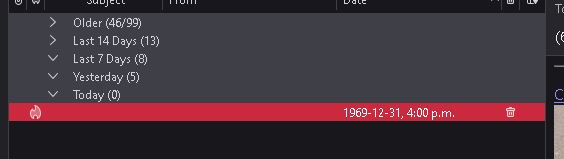
Just to add to this. I don't seem to be able to turn off the 'group by sort' switch to see if the hidden emails show up in an ungrouped view of the inbox.
OK. re; the uncollapsing date ranges - I think this was due to a setting in the view to 'unread' - which I've never set, so maybe related to the recent profile settings issue.
Okulungisiwe ngu Bucko
What do you mean by "none of my configurations was restored"? Your email account configurations? So renaming the big prefs-1.js file in prefs.js and restarting Thunderbird did not restore all your accounts, messages, calendars, ... etc. ? Concerning the mail view: go to View > Sort by > and choose another option than 'Grouped by sort'
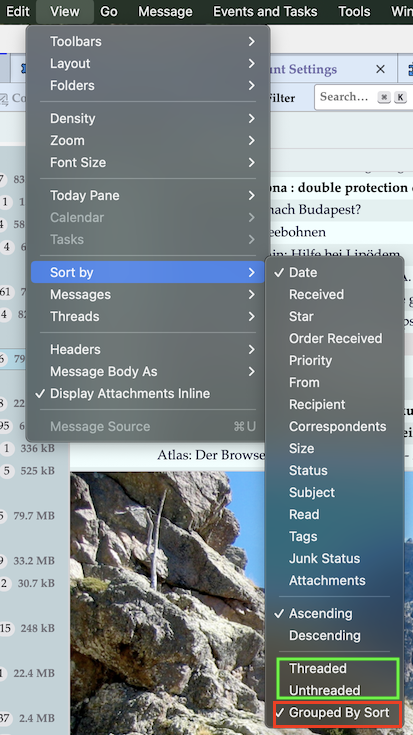
Okulungisiwe ngu Mapenzi
Mapenzi said
What do you mean by "none of my configurations was restored"? Your email account configurations? So renaming the big prefs-1.js file in prefs.js and restarting Thunderbird did not restore all your accounts, messages, calendars, ... etc. ? Concerning the mail view: go to View > Sort by > and choose another option than 'Grouped by sort'
Yes, renaming the prefs-1 to prefs seems to have worked as far as regaining the accounts go (I think, haven't gone through everything but I think it's probably all good).
Sorry for the confusion; I should have used the term 'views' instead of configuration. I use a rather extensive view setup that utilizes several 'tabs' with distict views of particular folders. None of that was recovered and I had to 'rebuild' those tabs and views. Not particularly diffiuclt, but a bit challenging as I didn't necessairly recall how I set those views up - but eventually I figured it all out.
The 'Grouped by sort option is still a bit odd thoug. I can't unselect 'group by sort' option. Not really an issue as I want all of my views grouped by sort so not a problem for me.
The other related thing that was odd: as i mentioned in a previous post in this thread, I was having difficulty seeing emails which were hidden - turned out I had the view (or filter?) set to show unread only so setting that to 'show all' revealed the hidden emails. The goofy thing is that when the unread only option was set, more recent emails were not visible - because they were 'read' - but older emails that were also 'read' were showing up.
Bucko said
The other related thing that was odd: as i mentioned in a previous post in this thread, I was having difficulty seeing emails which were hidden - turned out I had the view (or filter?) set to show unread only so setting that to 'show all' revealed the hidden emails. The goofy thing is that when the unread only option was set, more recent emails were not visible - because they were 'read' - but older emails that were also 'read' were showing up.
The Quick Filter function is source of frequent erroneous message "loss". If you think that one of your folders doesn't display all messages your first reaction should be to disable Quick Filter.