Excessive number of Firefox processes appear in Task Manager when Firefox is started with only one tab active

Greetings...
I have noticed in my Windows 10 Task Manager that Firefox has an excessive number of processes active when Firefox is started with only one empty tab. By excessive, I found eleven (11) Firefox processes today, and I have yet to even start using Firefox.
I have only a simple Theme enabled and no Extensions enabled in my Firefox. I have tried deselection of the "Use recommended performance settings" but this does not appear to help. Disablement of my Theme increased the number of Firefox processes.
Any idea how I can significantly reduce the number of Firefox processes that appear in my Task Manager when I use Firefox? I really prefer to use Firefox as my go-to web browser, but lately it has become troublesome at times.
Thank you in advance for your help with the above problem. Take care...
...ted
All Replies (1)
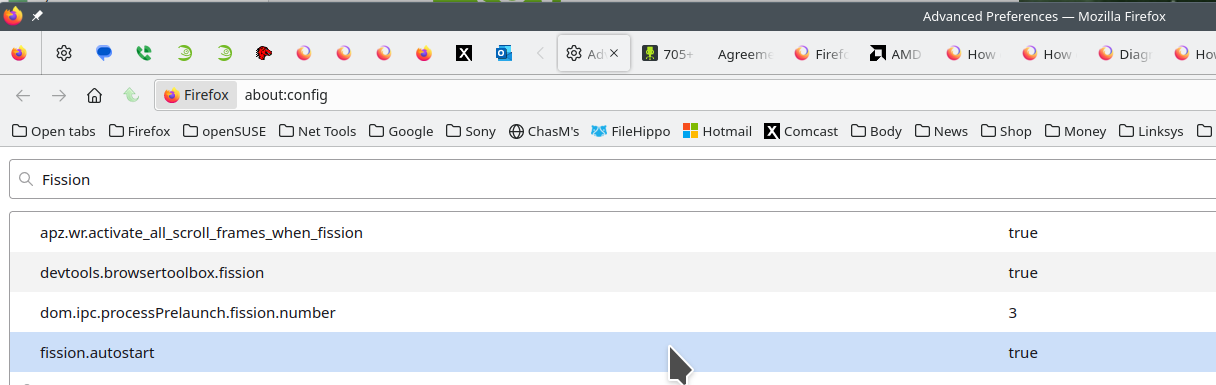
FISSION: The links are sites explaining the Firefox's Project Fission. This is the reason for the processes you see in task manager. You can turn fission off by setting it to false on the about:config page. see screenshot Here is more info. https://www.ghacks.net/2016/02/15/change-how-many-processes-multi-process-firefox-uses/
Introducing Firefox’s new Site Isolation Security Architecture https://hacks.mozilla.org/2021/05/introducing-firefox-new-site-isolation-security-architecture/
Firefox's Project Fission: better security and more processes https://www.ghacks.net/2019/02/07/firefoxs-project-fission-better-security-and-more-processes/