


防止技術支援詐騙。我們絕對不會要求您撥打電話或發送簡訊,或是提供個人資訊。請用「回報濫用」功能回報可疑的行為。

了解更多
Open

Blurry text in tabs

laurent.pireddu

Hello,

Ever since the last Firefox update (on October 30th for me), the text on my inactive tabs has been painfully blurry (picture attached). I previously restored Firefox to default and seemed to have pinpointed a certain extension as the culprit, as well as a file within the profile named addonStartup.json.lz4. Deleting both seemed to have done the trick. However, my issue is now back, I can't find the previous file anywhere in the profile, deleting all the files in the profile that were created on the day when the problem reoccured doesn't fix it either. So I'm kind of at a loss. I have tried to set "gfx.font_rendering.cleartype_params.force_gdi_classic_for_families" to "Arial,Consolas,Courier New,Microsoft Sans Serif,Segoe UI,Tahoma,Trebuchet MS,Verdana" and "gfx.font_rendering.cleartype_params.force_gdi_classic_max_size" to 15 in about:config ; as this is an old fix I've seen for an older similar problem, to no avail.

Thanks in advance for your help!
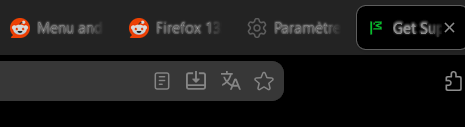
Hello, Ever since the last Firefox update (on October 30th for me), the text on my inactive tabs has been painfully blurry (picture attached). I previously restored Firefox to default and seemed to have pinpointed a certain extension as the culprit, as well as a file within the profile named addonStartup.json.lz4. Deleting both seemed to have done the trick. However, my issue is now back, I can't find the previous file anywhere in the profile, deleting all the files in the profile that were created on the day when the problem reoccured doesn't fix it either. So I'm kind of at a loss. I have tried to set "gfx.font_rendering.cleartype_params.force_gdi_classic_for_families" to "Arial,Consolas,Courier New,Microsoft Sans Serif,Segoe UI,Tahoma,Trebuchet MS,Verdana" and "gfx.font_rendering.cleartype_params.force_gdi_classic_max_size" to 15 in about:config ; as this is an old fix I've seen for an older similar problem, to no avail. Thanks in advance for your help!
附加的畫面擷圖

由 laurent.pireddu 於 修改

如果您還沒有帳號,您必須先登入帳號 來回覆文章。還沒有帳號的話,只能發問新問題。