


How do I see my browsing history on a specific date?

I used to be able to see my browsing history on a specific date until a recent update. Control H gives me browsing history, but even selecting "by date" or "by date and and site" doesn't give me the specific dates, only months, which is not what I need.
所有回覆 (4)

選擇的解決方法
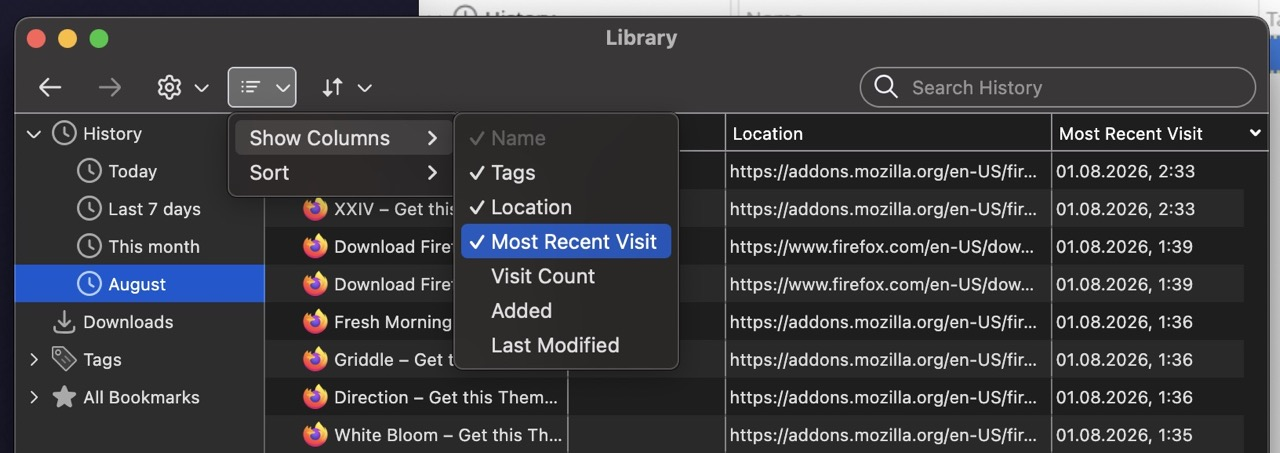
Try Ctrl+Shift+H instead. That opens Firefox’s History Manager/Library, where you can use Views → Show Columns → Most Recent Visit and sort the list by that column.
If you’re trying to find visits on one exact date, the Library is the better place to do it. Just keep in mind Firefox normally shows the most recent visit for a particular URL, not every single time you visited it.
that's my point. Control H used to bring up the library. From a user' standpoint, these changes without an easy way to discover them are time wasting.
Are you looking for this column that you might need to add to the list?
Oh so it's about the keyboard shortcut? (the one you mention has been triggering the sidebar history for years, the library panel is with Shift by default) — if you want to map the keys differently, check Customize keyboard shortcuts in Firefox