


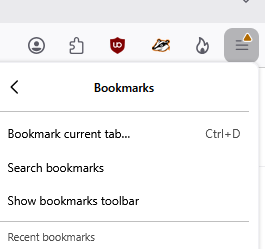
Getting rid of the 'Recent bookmarks' list permanently

Hi all. I can tell from a quick google search that this question has been asked MANY times, but I can't find step-by-step instructions for noobs like me who are new to the advanced features utilized to fix this issue. Please, if you wouldn't mind... Can someone provide step-by-step instructions to help me resolve this? I'm running version 154.0.1. I don't want to delete the bookmarks themselves; just that list (permanently). I appreciate your help!
選擇的解決方法
Thanks again for your reply. I took the plunge and tried a css solution I found online, and it worked. The 'Recent bookmarks' list is finally gone but the bookmarks themselves remain intact. That's all I was trying to do. I also learned a bit about css. Interesting. Anyway, once again, I appreciate the replies!
所有回覆 (4)
Hi,
I don't think you can customize the Firefox menu... Why do you want to remove this?
Hi, and thank you for your reply. While I'm pretty sure Firefox provides no easy way to remove this list, I do know others online have complained about this same thing and found ways to remove it via userChrome.css, but I'm wary of entering any code changing my browser unless that info comes from a reputable source, like these forums. I want to remove the list because, like most of the others who've complained about this, it makes privacy more difficult by retaining a list of websites visited via bookmarks, and that list remains regardless of your privacy settings. I can clear search history, of course, but I can't clear bookmark 'history'. Why does Firefox provide no option to clear it, I wonder, or de-activate it altogether if it's not wanted?

The list?
Not sure about your image, see mine??
Click on Bookmarks > Manage bookmarks > Select all (or what you want) delete.
or do you mean mean get rid of the link to them?
I imagine you could modify the menu via css, you will have to find the ID of the menu and child etc. of what you want to {display:none]
選擇的解決方法
Thanks again for your reply. I took the plunge and tried a css solution I found online, and it worked. The 'Recent bookmarks' list is finally gone but the bookmarks themselves remain intact. That's all I was trying to do. I also learned a bit about css. Interesting. Anyway, once again, I appreciate the replies!