


I can't locate the dark mode toggle in Thunderbird since upgrade.

I was a satisfied user of the Thunderbird e-mail client. I especially enjoyed the ability to toggle into darkmode when browsing and reading my e-mail. The previous toggle I used to activate that feature is missing, and I cannot locate a work around to turn it back on. Any assistance would be greatly appreciated. Thanks
所有回覆 (6)

The dark message mode toggle can be enabled and disabled in Settings. See <Settings | General | Message reader style> and you'll find the control there.
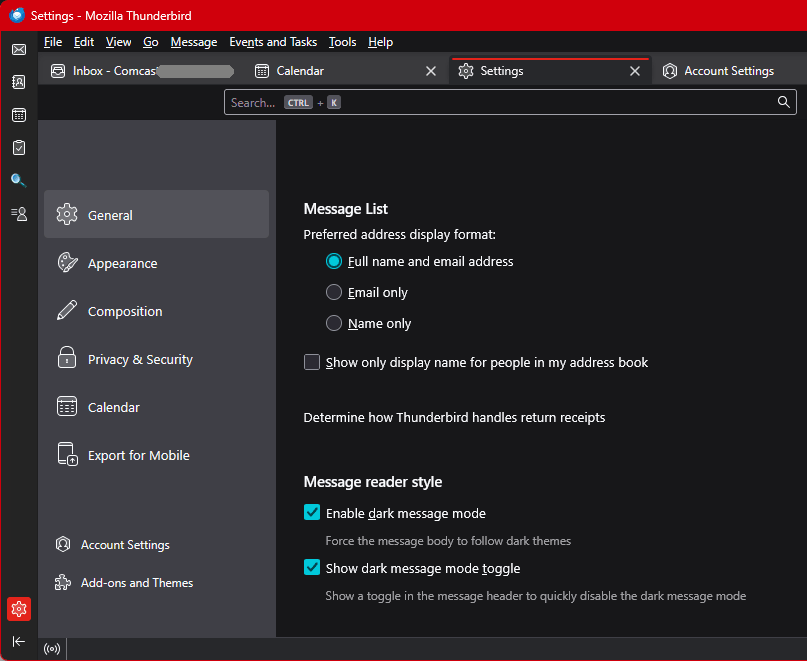
由 Lin 於 修改
The settings were exactly where you indicated they would be. They were both already selected and I was able to check and uncheck them at will. The disappointing thing is the application does not reflect the change. The toggle doesn't appear in the message header, and dark mode isn't triggered regardless of how often I change the settings you guided me to.
You might try Thunderbird in troubleshooting mode and see if the problem persists. Look under the "Help" menu.
I also tried turning on the troubleshooting mode as someone suggested. That didn't alter the behavior either.
So, the silence doesn't feel like a positive development. Do I need to take an additional step to submit this as a potential bug?
I don't know more, and I don't know if this is a bug. You can report it here: https://bugzilla.mozilla.org/enter_bug.cgi?product=Thunderbird&component=Untriaged