Sidebar

A sidebar has appeared out of nowhere. I removed all extension on that sidebar and it still doesn't go away. I already have a bookmark bar and extensions at the top bar. I don't want another sidebar at every firefox window. How do I remove the sidebar, please.
被選擇的解決方法
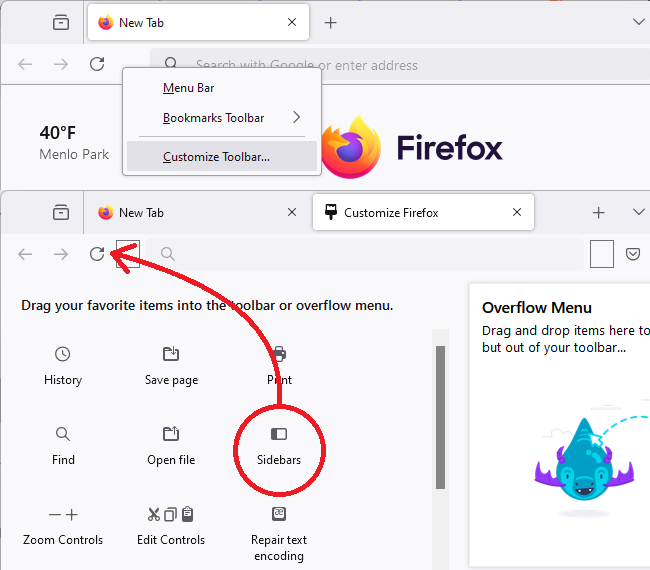
I was able to find sidebar from "More Tools" -> "Customize toolbar" -> Look for sidebar (If you can't see it then its already at the toolbar somewhere.)
I was able to disable it from there.
從原來的回覆中察看解決方案 👍 2所有回覆 (6)
Go to menu ≡ -> Settings -> Firefox Labs and turn off Sidebar.

WARNING from the moderator team: Changing Firefox preferences from the about:config page can sometimes break Firefox or cause strange behavior. You should only do this if you know what you're doing. Please read Firefox advanced customization and configuration options to learn more.
I had the same problem. To remove the sidebar completely, go to about:config, search for "sidebar.revamp", and set it to false (click on the "toggle" button).
由 Paul 於 修改
Hi
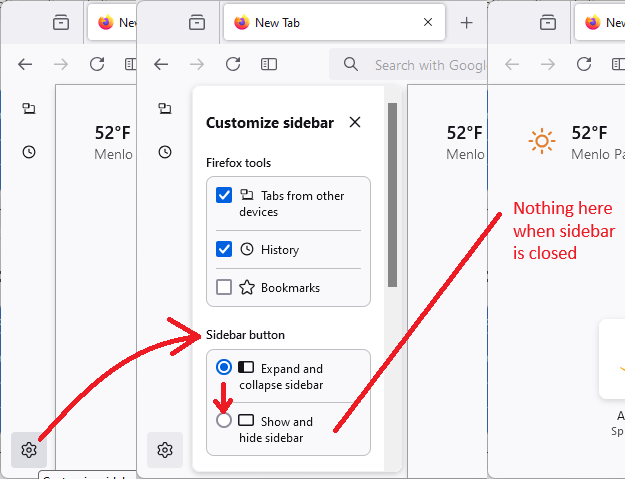
If you select the cog wheel icon at the bottom of the sidebar launcher, you should see an option to "Show and hide sidebar". Selecting this will hide the sidebar.
選擇的解決方法
I was able to find sidebar from "More Tools" -> "Customize toolbar" -> Look for sidebar (If you can't see it then its already at the toolbar somewhere.)
I was able to disable it from there.

I would appreciate a solution that removes this new abomination. I don't need a sidebar taking up part of my browsing window. Who on Earth came up with this sad idea? lol
Hi Mad Rabbit, Firefox always had a sidebar, but it has a new design that expands from and collapses back to a button bar instead of hiding completely. If you want to hide it completely, that's a two-step process:
(1) Change the setting for what the Sidebars toolbar button does, and (2) Click the Sidebars toolbar button to hide the sidebar
Sidebar Button Setting
Click the gear wheel at the bottom of the vertical button bar, then change the behavior of the button from expand/collapse to show/hide. I'm attaching a picture for reference:
After you make that change, you can use the X to close the "Customize sidebar" panel.
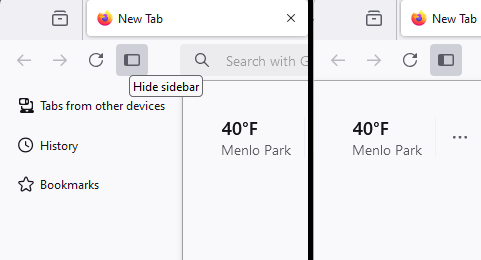
Click the Sidebars button
This button should be near the back/forward/reload buttons:
If yours is missing, you can add it using the Customize feature (Customize Firefox controls, buttons and toolbars). I'm attaching a picture for reference:
Success?