

此討論串已被封存。
如果您有需要幫助,請新增一個新問題

Solved
封存
Shrink vertical space between shortcut icons on new tab page

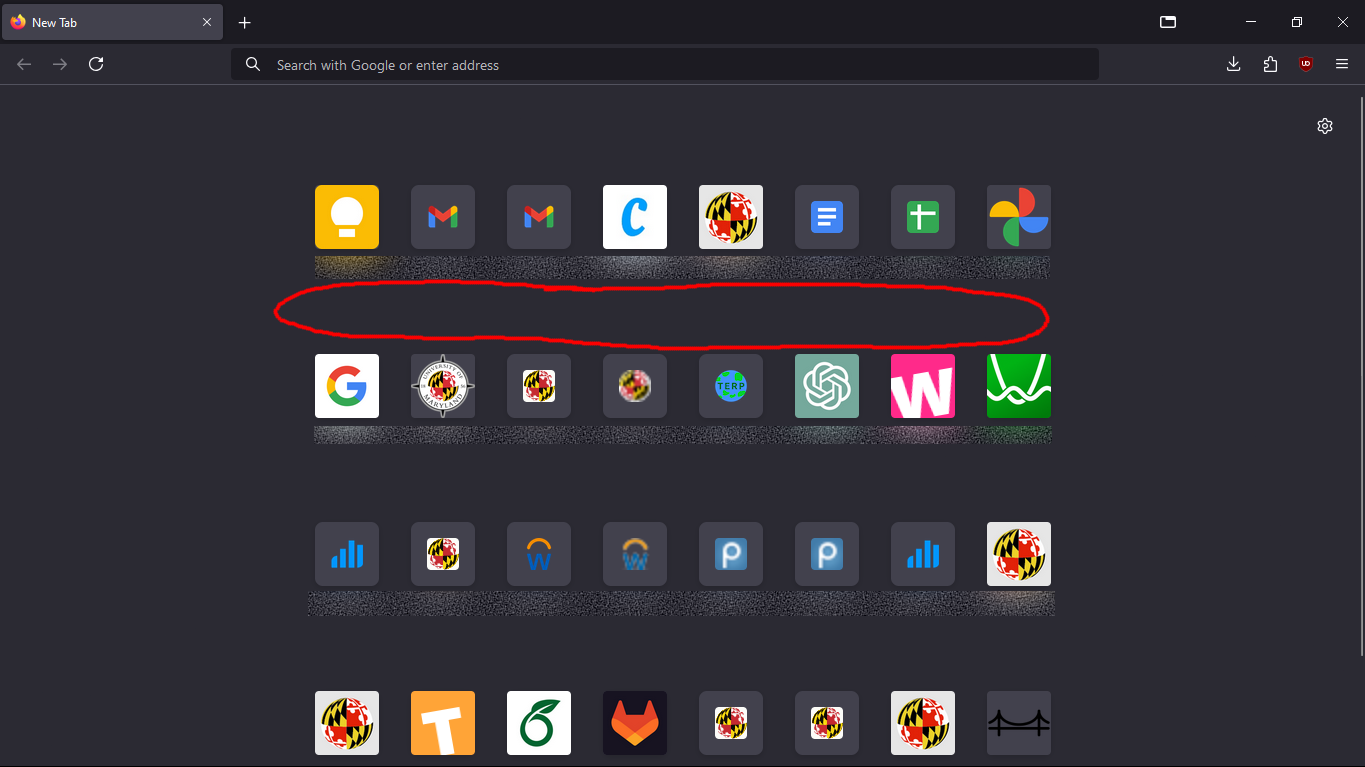
How to shrink this vertical space? (see attached image)
Ever since 131.0.0 my shortcut icons got all messed up so I am trying to restore the original look. I've already removed the giant Firefox logo and made my icons larger. Now I need to condense them so I don't have to scroll to see them all.
Here's what I have so far in my userContent.css:
/* Minimize the size of the logo and wordmark on the Home/New Tab pages */ @-moz-document url(about:newtab), url(about:home) {
 .logo {
   background-size: 0px !important;
   height: 0px !important;
   width: 0px !important;
 }
 .wordmark {
   background-size: 0px !important;
   height: 0px !important;
   width: 0px !important;
   margin-inline-start: 0px !important;
 }
 /* Expand the shortcut icon images to max size on the Home/New Tab pages */
 .top-site-outer .tile .icon-wrapper {height:100% !important; width:100% !important;}
}
How to shrink this vertical space? (see attached image)
Ever since 131.0.0 my shortcut icons got all messed up so I am trying to restore the original look. I've already removed the giant Firefox logo and made my icons larger. Now I need to condense them so I don't have to scroll to see them all.
Here's what I have so far in my userContent.css:
/* Minimize the size of the logo and wordmark on the Home/New Tab pages */
@-moz-document url(about:newtab), url(about:home) {
.logo {
background-size: 0px !important;
height: 0px !important;
width: 0px !important;
}
.wordmark {
background-size: 0px !important;
height: 0px !important;
width: 0px !important;
margin-inline-start: 0px !important;
}
/* Expand the shortcut icon images to max size on the Home/New Tab pages */
.top-site-outer .tile .icon-wrapper {height:100% !important; width:100% !important;}
}
選擇的解決方法
This code might be better
@-moz-document
  url-prefix(about:newtab),
  url-prefix(about:home) {
   .top-site-outer .tile .icon-wrapper {
     height: 100% !important;
     width: 100% !important;
   }
   .top-site-outer .default-icon,
   .top-site-outer .search-topsite {
     background-size: 100% !important;
     height: 100% !important;
     width: 100% !important;
  }
  .top-site-outer .search-topsite {
     height: 20px !important;
     width: 20px !important;
  }

 .top-site-outer .top-site-inner > a {padding-block: 8px 0px !important}
 .top-site-outer {margin-block-end: 0px !important}
}所有回覆 (3)
Irreverent post made in error.
由 Joe Freeman 於 修改
Note that there is a pref in about:config to show/hide the logo.
- browser.newtabpage.activity-stream.logowordmark.alwaysVisible
Try this CSS code in userContent.css.
.top-site-outer .top-site-inner > a {padding-block: 4px !important}
.top-site-outer {margin-block-end: 0px !important}
選擇的解決方法
This code might be better
@-moz-document
  url-prefix(about:newtab),
  url-prefix(about:home) {
   .top-site-outer .tile .icon-wrapper {
     height: 100% !important;
     width: 100% !important;
   }
   .top-site-outer .default-icon,
   .top-site-outer .search-topsite {
     background-size: 100% !important;
     height: 100% !important;
     width: 100% !important;
  }
  .top-site-outer .search-topsite {
     height: 20px !important;
     width: 20px !important;
  }

 .top-site-outer .top-site-inner > a {padding-block: 8px 0px !important}
 .top-site-outer {margin-block-end: 0px !important}
}