


Thunderbird 140 can connect to mail.twc.com to retrieve via IMAP, but cannot connect to SMTP to send

I'm confident that this is not a Spectrum/Charter issue as I can log into their webmail client and send mail. I can also use the Mail app on my iPhone and send mail from my user@san.rr.com account. My settings are below and have not changed in many months (when SMTP was still working). I've also checked "Saved Logins" and verified that there are entries for IMAP and SMTP and that the password for both is the same and is correct.
Description: IMAP Mail Server Server Name: mail.twc.com Port: 993 User Name: user@san.rr.com Authentication method: Normal password Connection Security: SSL/TLS
Description: TWC SMTP Server Name: mail.twc.com Port: 587 User Name: user@san.rr.com Authentication method: Normal password Connection Security: STARTTLS
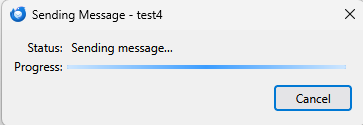
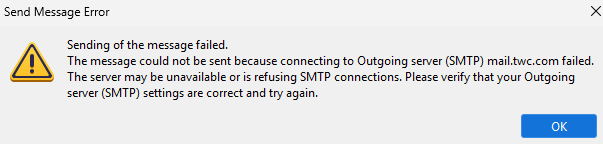
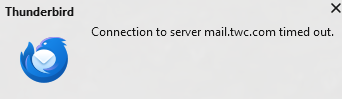
This issue started last week on my Windows 11 PC (which has had updates paused since last month). I was previously using TB 128 and have subsequently updated to 140 and repaired my inbox trying to find this issue. When I attempt to send a message, I see "Status" Sending Message..." and a blue progress bar that never changes (TB_sending.png). The dialog box remains frozen for multiple minutes. I had seen a connection error message to SMTP in the past, but it usually disappeared the same day (see other screenshots). It feels like TB is not making a good STARTTLS handshake with mail.twc.com. I've tried switching to SSL/TLS port 465 and that has the same issues.
所有回复 (1)
选择的解决方案
After some sleuthing with Gemini, Windows, OpenSSL and Thunderbird, I believe that I found and remedied the issue. SMTP connections failed during STARTTLS as the certificate exchange occurred. This led to speculation that packet fragmentation was killing the conversation. For reasons I can't explain, my router was set with an MTU of 1472. Windows was using 1500 so it's a wonder that anything worked. Setting the router MTU to 1500 resolved the issue. Sigh...