


tabs keep crasing

My tabs keep crashing over and over again
所有回复 (2)
选择的解决方案
We're sorry to hear that Firefox is crashing. In order to assist you better, please follow the steps below to provide us crash IDs to help us learn more about your crash.
The crash report is several pages of data. We need the report numbers to see the whole report.
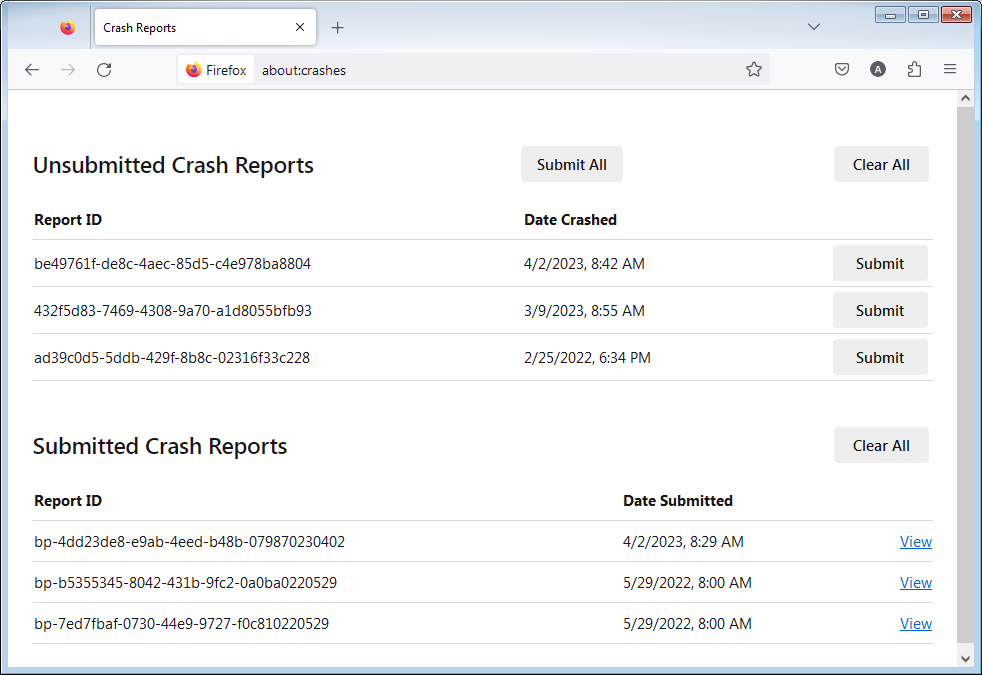
- Enter about:crashes in the Firefox address bar and press Enter. A list of Submitted (and Unsubmitted, if any) Crash Reports will appear, similar to the one shown below.
- Copy the 5 most recent Submitted Report IDs that start with bp- and then go back to your forum question and paste those IDs into the "Post a Reply" box.
Note: If a recent Report ID does not start with bp- click on it to submit the report.
(Please don't take a screenshot of your crashes, just copy and paste the IDs. The below image is just an example of what your Firefox screen should look like.)
Thank you for your help!
More information and further troubleshooting steps can be found in the Troubleshoot Firefox crashes (closing or quitting unexpectedly) article.
I seem to have solved the issue. Besides having many tab crashes I had a small square with several vertical lines with little marks on one side. Is was about 1 by 1 inch and appeared on my main screen. I read how to remove it. I went to Task Manager then to the Process tab and restarted Internet search or browser line. It's been over a day with no further issues. Fingers crossed?