How do I eliminate one of two duplicate email accounts?

We only receive one message for each email, but the column on the left of the screen shows server's name, inbox, drafts, sent, archives, trash, and then repeats it all. When I open Thunderbird troubleshoot, I see two accounts listed. But I do not know how to eliminate the unnecessary duplicate.
所有回复 (1)
Sometimes users get two appearances of the same account, and whatever they do in one is echoed in the other. Under these circumstances, removing either account results in both being removed.
If the account connects using IMAP, I'd just delete it and add it in again; the messages are stored on the server. Nothing is lost.
If you're seeing the echoing effect and the account uses POP, then tread carefully. I'd make a backup of the entire profile so you can get back to where you are now.
https://support.mozilla.org/en-US/kb/profiles-where-thunderbird-stores-user-data
Then I'd copy all the messages I wanted to keep into the Local Folders account, and only then try to remove the duplicated account, using the instructions below.
How to remove an account…
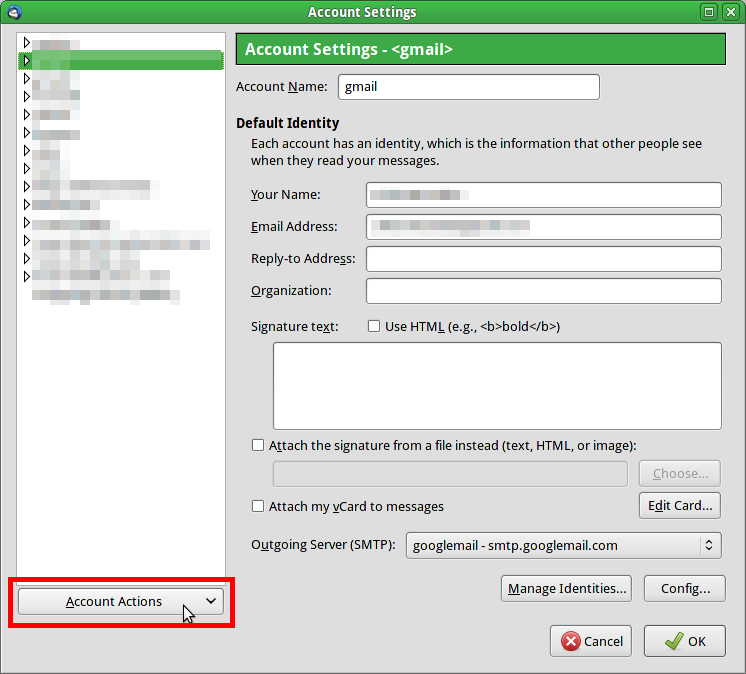
Open Tools|Account Settings. Select the unwanted account. Click the button below the pane - it may be labelled "Account Actions". This yields a drop-down menu, including an item named "Remove Account".
Note that when you remove an account, the account, along with all its folders, disappears, including all the messages inside those folders.