how ton install and get updates
give me tips and stages to make it
Mở
50


give me tips and stages to make it
I tried to update from Mozilla VPN v. 2.36 to v. 2.37 by clicking the Update button in the message I received. I did not shut down the old version first. When I receive… (xem thêm)
I tried to update from Mozilla VPN v. 2.36 to v. 2.37 by clicking the Update button in the message I received. I did not shut down the old version first. When I received the "old version is running" message, I clicked the "automatically close app" selection. All seemed to be going well until a message popped up saying "The feature you are trying to use is on a CD-ROM or other removable disk that is not available. Insert the 'Mozilla VPN' disk and click OK." When I clicked OK, a message said "The path " cannot be found. Verify that you have access to this location and try again, or try to find the installation package 'MozillaVPN.msi' in a folder from which you can install the product Mozilla VPN." I found the folder containing the MozillaVPN.msi file, but when I use it to restart the installation, I end up with the same error message. If I click Cancel instead of OK on the "Insert the disk" message, and error message pops up saying "The older version of Mozilla VPN cannot be removed. Contact your technical support group." Now my old version is gone, but I don't have a new version to use. What should I do now?
update mozilla
The VPN installation does NOT work. I get the drop down with the icon and "To use the Mozilla VPN Firefox extension, please open the Mozilla VPN app first." There is NO … (xem thêm)
The VPN installation does NOT work. I get the drop down with the icon and "To use the Mozilla VPN Firefox extension, please open the Mozilla VPN app first." There is NO Mozilla VPN app on my computer. It is not on desktop, menu, or app list (?).
Thank you in advance for your support. Dale Warnke [redacted email]
iphone: [redacted phone#]
Working on passkey, back and forth, meanwhile, retyping the above several times. I decided to copy it and save it so I won't have to type it again. we are going aroung in circles too many passwords, passcodes; I have 4 windows open and fell I am not getting anywhere(?)
All I want to know is how to get VPN that I paid for finally installed? There is too much confusion on getting this answered. All I want to do is to download(paid for) VPN and install it on FireFox and make
Have I been hacked, or something else?
Thank you in advance for your support. Dale Warnke [redacted email]
iphone: [redacted phone#]
Have I been hacked?
Hello, I just bought a yearly plan of the Mozilla VPN and would like to use it in a docker container using gluetun. However, I'm not able to find where can I see the conn… (xem thêm)
Hello, I just bought a yearly plan of the Mozilla VPN and would like to use it in a docker container using gluetun. However, I'm not able to find where can I see the connection information. Is there a way to obtain the VPN tunnel information to configure my VPN over it? Thank you.
i want to uninstall the 160.0b2 version
I bought the annual subscription to Mozilla VPN and found that it wouldn't install. This Mac runs Sierra, version 10, I don't need VPN on my newer Mac. How do I submit f… (xem thêm)
I bought the annual subscription to Mozilla VPN and found that it wouldn't install. This Mac runs Sierra, version 10, I don't need VPN on my newer Mac.
How do I submit for a refund?
Thanks, Erik
I payed for Mozilla VPN. I downloaded and installed MozillaVPN.msi It does not work. The icon is on the right tool bar but I get a drop down that indicates that i need an… (xem thêm)
I payed for Mozilla VPN. I downloaded and installed MozillaVPN.msi It does not work. The icon is on the right tool bar but I get a drop down that indicates that i need an app I thought I downloaded the app. Here is the message: "Open Mozilla VPN
To use the Mozilla VPN Firefox extension, please open the Mozilla VPN app first. Open Mozilla VPN Get help The is no Mozilla VPN in my program files(?) Please help. Is there two programs that I must install? [redacted email]
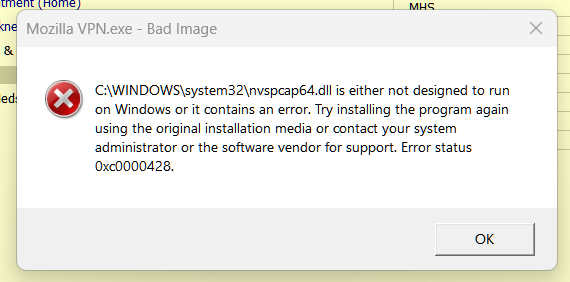
I just updated my Mozilla VPN to version 2.40. Now, whenever the vpn is started, Windows reports that nvspcap64.dll is not designed to run on Windows or it contains an er… (xem thêm)
I just updated my Mozilla VPN to version 2.40. Now, whenever the vpn is started, Windows reports that nvspcap64.dll is not designed to run on Windows or it contains an error. Error status 0xc0000428. I have tried uninstalling and reinstalling to no avail. I restored the nvspcap64.dll from a backup which didn't work either. I have attached a screenshot of the message.
Repeated clicking of the "OK" button on the message will eventually allow the vpn to open, but I'm not sure if it is working correctly.
Can this be fixed?
tell me if I have more than one version open