


Firefox continually crashes on my Windows 10 machine

Firefox (currently 157) continually crashes on my Windows 10 machine. Task Manager shows Firefox downloading sub apps (currently, 11) until memory is full. Then Firefox crashes. Task Manager shows 11 sub apps open right now using 537Mb of memory. I opened in troubleshoot mode. If I open in normal mode, more than 1Gb will be used with 14 or 15 sub apps downloaded. Only two tabs are shown as being opened. This started with one of the earlier updates and newer updates didn't fix the problem. Even emptying the cache didn't help. Do you recommend totally deleting Firefox and starting over from scratch?
Tất cả các câu trả lời (1)
See support.mozilla.org/questions/1419695 — the difference you see is due to unloading addons (that apparently seems to occupy a half of your Firefox resource consumption). Does it work better in Troubleshoot Mode, or the overall performance issues are eventually the same?
If you disable any addons are you still having issues? Are the crashes definitely on out–of–memory?
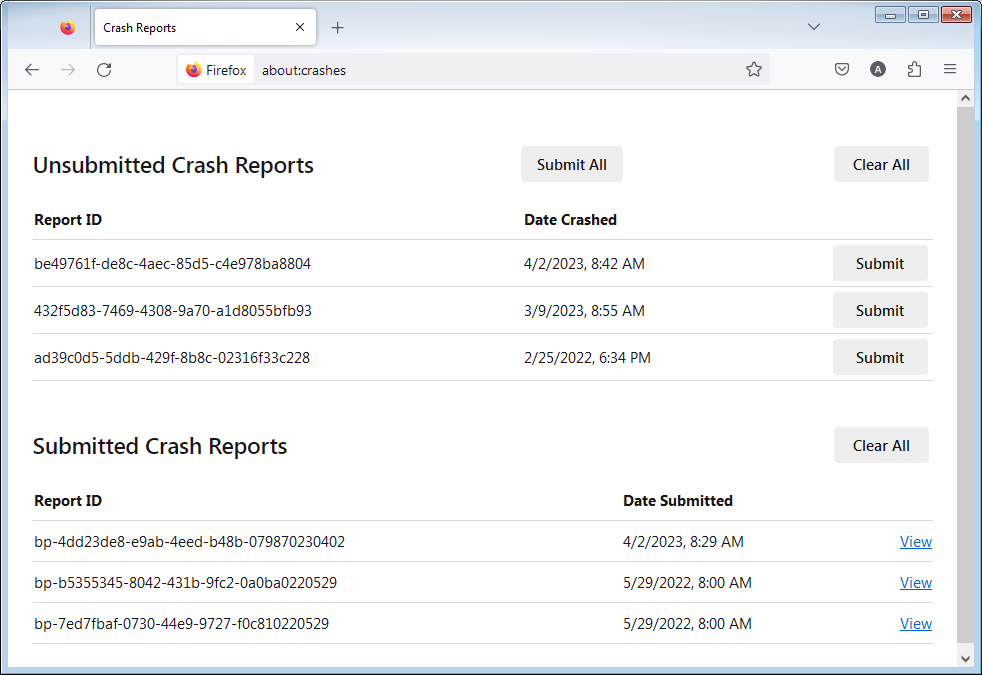
- Enter about:crashes in the Firefox address bar and press Enter. A list of Submitted (and Unsubmitted, if any) Crash Reports will appear, similar to the one shown below.
- Copy the 5 most recent Submitted Report IDs that start with bp- and then go back to your forum question and paste those IDs into the "Post a Reply" box.
Note: If a recent Report ID does not start with bp- click on it to submit the report.
(Please don't take a screenshot of your crashes, just copy and paste the IDs. The below image is just an example of what your Firefox screen should look like.)
More information and further troubleshooting steps can be found in the Troubleshoot Firefox crashes (closing or quitting unexpectedly) article.