

Windows 10 reached EOS (end of support) on October 14, 2025. If you are on Windows 10, see this article.

Tìm kiếm hỗ trợ

Tránh các lừa đảo về hỗ trợ. Chúng tôi sẽ không bao giờ yêu cầu bạn gọi hoặc nhắn tin đến số điện thoại hoặc chia sẻ thông tin cá nhân. Vui lòng báo cáo hoạt động đáng ngờ bằng cách sử dụng tùy chọn "Báo cáo lạm dụng".

Tìm hiểu thêm
Mở

All of my tab groups dissappear after a recent (unwanted) update to 157.0.1 version

m.rizka1234

I'm the kinda person who avoid getting updates cause don't fix it when it ain't broke, but they fix it now it's broke.

My Firefox automatically updating itself to version 157.0.1, which is a normal thing, but the unnormal one was that my tab groups are gone entirely. Like there are none left, which is weird knowing unwanted updates happened in the past with no meaningful changes to me, but this one did, albeit more displeasing.

Is there a way to restore all of my tab groups back? Thanks
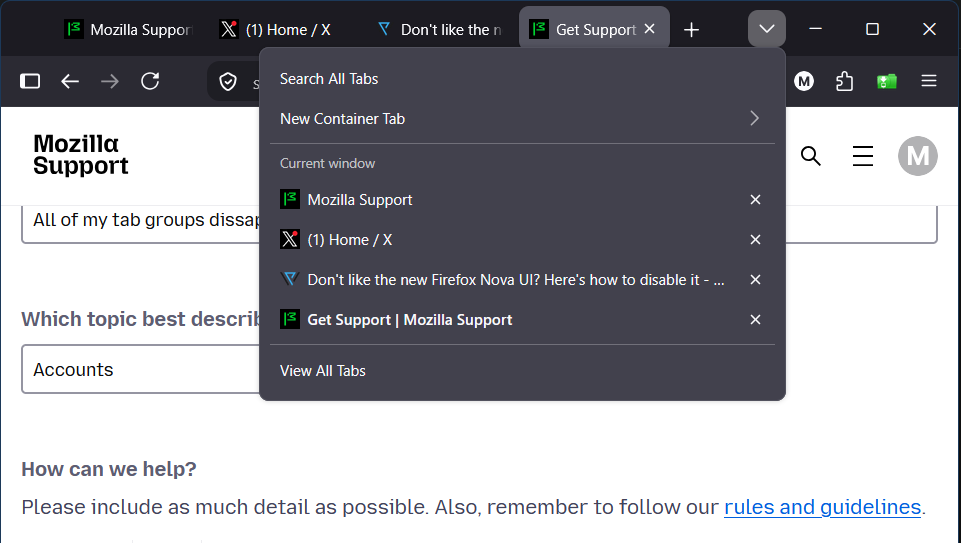
I'm the kinda person who avoid getting updates cause don't fix it when it ain't broke, but they fix it now it's broke. My Firefox automatically updating itself to version 157.0.1, which is a normal thing, but the unnormal one was that my tab groups are gone entirely. Like there are none left, which is weird knowing unwanted updates happened in the past with no meaningful changes to me, but this one did, albeit more displeasing. Is there a way to restore all of my tab groups back? Thanks
Đính kèm ảnh chụp màn hình

Tất cả các câu trả lời (1)

Have you tried to restore the previous session? https://support.mozilla.org/en-US/kb/restore-previous-session

If this is not working, maybe you can try Firefox troubleshoot mode. https://support.mozilla.org/en-US/kb/diagnose-firefox-issues-using-troubleshoot-mode

Đặt một câu hỏi

Bạn phải đăng nhập vào tài khoản của bạn để trả lời bài viết. Vui lòng bắt đầu một câu hỏi mới, nếu bạn chưa có tài khoản.