


Windows 10 reached EOS (end of support) on October 14, 2025. If you are on Windows 10, see this article.

Tìm kiếm hỗ trợ

Tránh các lừa đảo về hỗ trợ. Chúng tôi sẽ không bao giờ yêu cầu bạn gọi hoặc nhắn tin đến số điện thoại hoặc chia sẻ thông tin cá nhân. Vui lòng báo cáo hoạt động đáng ngờ bằng cách sử dụng tùy chọn "Báo cáo lạm dụng".

Tìm hiểu thêm
Đã giải quyết

Version 157.0 tabs and sidebar don't hide

Our Public Posts

I just updated to Firefox Version 157.0 and set up vertical tabs on the left side and love it. I also have "Hide tabs and sidebar" clicked which I assumed would hike the sidebar until I moved my cursor to the left. That doesn't happen. The icons for the various tabs remain displayed. Am I wrong to assume that this setting means the sidebar will be hidden until the cursor is moved to this area?

Thanks for your input.

I just updated to Firefox Version 157.0 and set up vertical tabs on the left side and love it. I also have "Hide tabs and sidebar" clicked which I assumed would hike the sidebar until I moved my cursor to the left. That doesn't happen. The icons for the various tabs remain displayed. Am I wrong to assume that this setting means the sidebar will be hidden until the cursor is moved to this area? Thanks for your input.
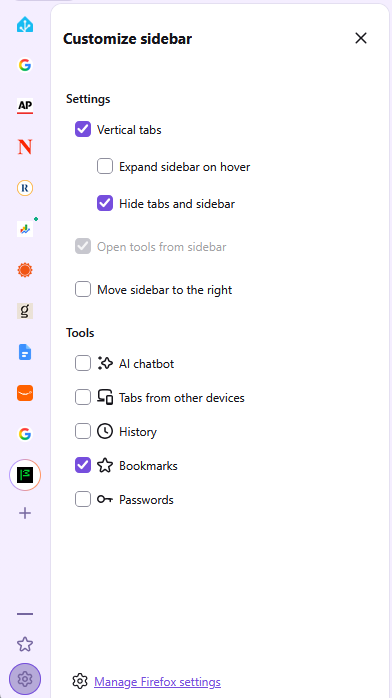
Đính kèm ảnh chụp màn hình

Tất cả các câu trả lời (2)

Giải pháp được chọn

Question solved - I now realize that you must click the top left icon "Hide sidebar" to open and close it.

Hi there,

Thank you so much for coming back to this thread to share your solution and marking it as the answer! By doing this, you're not only resolving your own issue but also helping others who might run into the same problem.

Đặt một câu hỏi

Bạn phải đăng nhập vào tài khoản của bạn để trả lời bài viết. Vui lòng bắt đầu một câu hỏi mới, nếu bạn chưa có tài khoản.