


I can't import/sync my Chrome bookmarks to Firefox

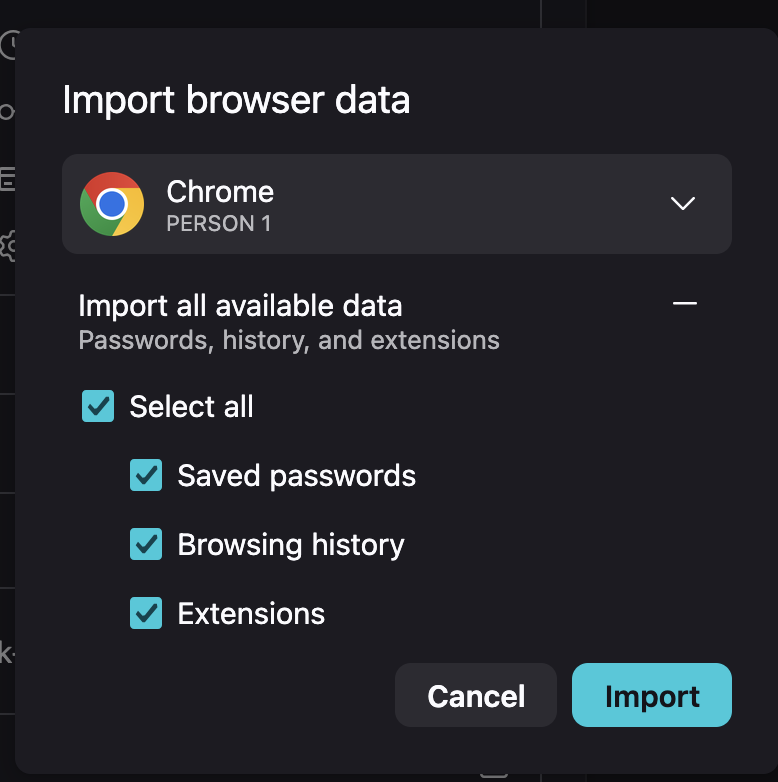
I recently downloaded Firefox and was trying to import all of my Chrome data, including my bookmarks. For some reason when I go to import my browser data, there isn't even a option to import bookmarks. One of my other chrome accounts has the option to import bookmarks (a old work account I no longer use anymore), but my personal account just doesn't have it. Am I missing a step in this process or is there something I need to do on chrome to make my bookmarks accessible to Firefox? I really don't want to go in a manually add all my bookmarks..
Giải pháp được chọn
Can you export the bookmarks from Chrome manually? The HTML format should import in Firefox cleanly.
Tất cả các câu trả lời (6)

Did you see/read this?
https://support.mozilla.org/en-US/kb/import-bookmarks-google-chrome
Yes, I did see that article. The problem is in the import wizard there isn't a option to import my bookmarks (as seen in my screenshot) and when I do directly to the Library window to import it takes me back to the import wizard. For some reason my bookmarks aren't part of the available data so I cannot select it.
Giải pháp được chọn
Can you export the bookmarks from Chrome manually? The HTML format should import in Firefox cleanly.
Sadly I don't use a Mac so hopefully someone else could check the exact steps.
Ah, you're already on Golden Gate, right? Seems there's some encryption/data access wrinkles for the newly protected browser profile paths: bugzilla.mozilla.org/2068462
AH! Yes the HTML way worked! I actually am not on Golden Gate yet because I've been a little lazy in updating my laptop (I'm still on Sequoia). But I'm glad I was able to get them through the HTML way!