

Tránh các lừa đảo về hỗ trợ. Chúng tôi sẽ không bao giờ yêu cầu bạn gọi hoặc nhắn tin đến số điện thoại hoặc chia sẻ thông tin cá nhân. Vui lòng báo cáo hoạt động đáng ngờ bằng cách sử dụng tùy chọn "Báo cáo lạm dụng".

Tìm hiểu thêm
Mở

Firefox crashed after GPU driver update, local profiles, tab groups and open sessions disappeared after forced restart

3502589931

Issue occurred on September 6:When I was running a game and updated my graphics card driver, Firefox was running in the background. My PC went completely black and became unresponsive, so I had to force‑restart the computer.

After rebooting, Firefox reverted to a brand‑new fresh‑install state. All my browser settings, login status, local profiles, browsing sessions, hundreds of open tabs and my categorized tab groups disappeared, only the welcome startup guide showed up.

I logged into my Mozilla account on my Android Firefox device. Some browsing history was synced back. However, synced history cannot restore the original tab session back‑forward page history, nor my manually sorted tab groups. All browser preferences, theme and language settings are also lost.

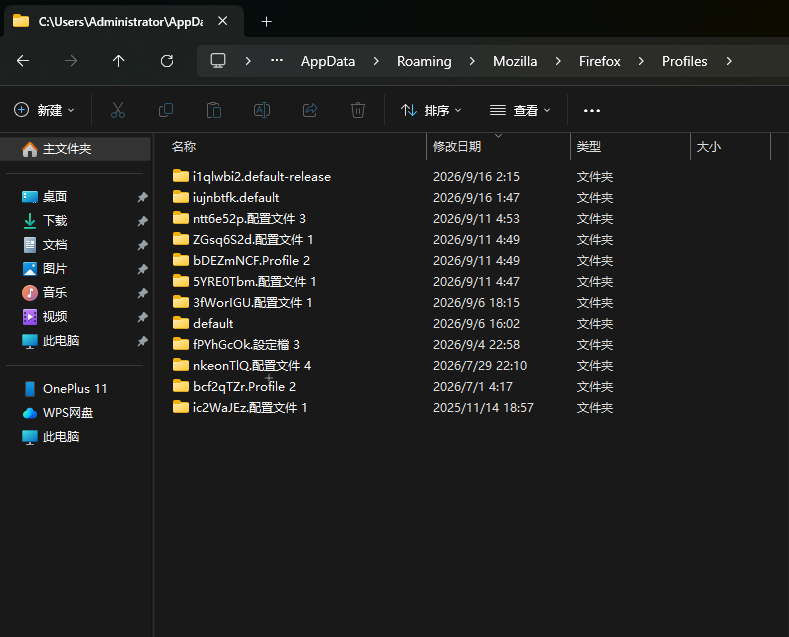
I originally had 4 separate local Firefox profiles on this Windows computer, isolated from each other for different work purposes. Only one profile was logged‑in to my Mozilla account and could partially sync data. The other three local profiles are completely gone. Those extra local profiles were NOT signed into any Mozilla account and were never synced to cloud storage.

In my Mozilla account’s connected devices list, there are two entries both belonging to this same computer: “MARSHAKK” and “Firefox by Administrator on MARSHAKK”, which correspond to my Firefox instance before and after the crash.

I cannot understand the community help articles about session recovery, and I’m unable to locate or restore my old local Firefox profiles and lost tab sessions by myself. Please give me assistance.
Issue occurred on September 6:When I was running a game and updated my graphics card driver, Firefox was running in the background. My PC went completely black and became unresponsive, so I had to force‑restart the computer. After rebooting, Firefox reverted to a brand‑new fresh‑install state. All my browser settings, login status, local profiles, browsing sessions, hundreds of open tabs and my categorized tab groups disappeared, only the welcome startup guide showed up. I logged into my Mozilla account on my Android Firefox device. Some browsing history was synced back. However, synced history cannot restore the original tab session back‑forward page history, nor my manually sorted tab groups. All browser preferences, theme and language settings are also lost. I originally had 4 separate local Firefox profiles on this Windows computer, isolated from each other for different work purposes. Only one profile was logged‑in to my Mozilla account and could partially sync data. The other three local profiles are completely gone. Those extra local profiles were NOT signed into any Mozilla account and were never synced to cloud storage. In my Mozilla account’s connected devices list, there are two entries both belonging to this same computer: “MARSHAKK” and “Firefox by Administrator on MARSHAKK”, which correspond to my Firefox instance before and after the crash. I cannot understand the community help articles about session recovery, and I’m unable to locate or restore my old local Firefox profiles and lost tab sessions by myself. Please give me assistance.
Đính kèm ảnh chụp màn hình

Bạn phải đăng nhập vào tài khoản của bạn để trả lời bài viết. Vui lòng bắt đầu một câu hỏi mới, nếu bạn chưa có tài khoản.