


Cannot sign into microsoft office

I'm trying to login into microsoft office online. It let's me click on the sign in button, a new window opens up but stays blank. I'm assuming that window is supposed to be where I can sign in. However it will remain blank for some time and then disappears not allowing me to sign in. I'm not sure if it was with the new update.
Tất cả các câu trả lời (3)
Hi there, have you tried also on another browser? Are you facing the same issue?
I have tried with another browser and it seems fine. Just want it to work with firefox :(
Enhanced Tracking Protection is a collection of Firefox features that protects your privacy by blocking trackers that follow you online to collect information about your browsing habits and interests. It also includes protection against harmful scripts.
If a site seems broken, you can try turning off Enhanced Tracking Protection for that website:
- Click the shield
 icon at the left of the address bar.
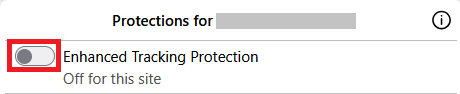
- At the top of the panel, toggle off the Enhanced Tracking Protection switch
 . The site will be added to your Enhanced Tracking Protection exception list, allowing trackers on it, and the page will reload automatically.
-
This will allow trackers to load on that website while keeping you protected on other sites. To learn more, see Enhanced Tracking Protection in Firefox for desktop.