


Tab Session File

What is the file used to store tab sessions, and how can it be restored ?
Tất cả các câu trả lời (20)
See if this helps. --> https://support.mozilla.org/en-US/questions/1477659#answer-1713872
There is a folder called; sessionstore-backups. And within this folder there are files in my case; previous.jsonlz4 recovery.baklz4 recovery.jsonlz4 sessionstore.jsonlz4 upgrade.jsonlz4-20250411030227
In the link to an identical question one is suppose to rename the file upgrade.jsonl.z4-20250411030227 to sessionstore.jzonlz4 and move it up one level in the path and place this renamed file in this location. Restart FireFox and, all my tabs which I was working on will be restored, no matter which profile it is.
I tried this, nothing was restored ?
A screenshot of the folder would be better so we can see the date and size of the files. What date did the issue happen? Firefox may have created a new profile. You can tell by going to your current profile folder and then go up 1 folder to see if there is another profile.
jonzn4SUSE said
A screenshot of the folder would be better so we can see the date and size of the files. What date did the issue happen? Firefox may have created a new profile. You can tell by going to your current profile folder and then go up 1 folder to see if there is another profile.
The issue happened a few weeks ago, here is a screen shot of the profile with the largest size jsonlz4 files. As I mentioned here, in my previous comment. When I rename the file and move it to the current active profile then restart, the tab sessions are not restored ?
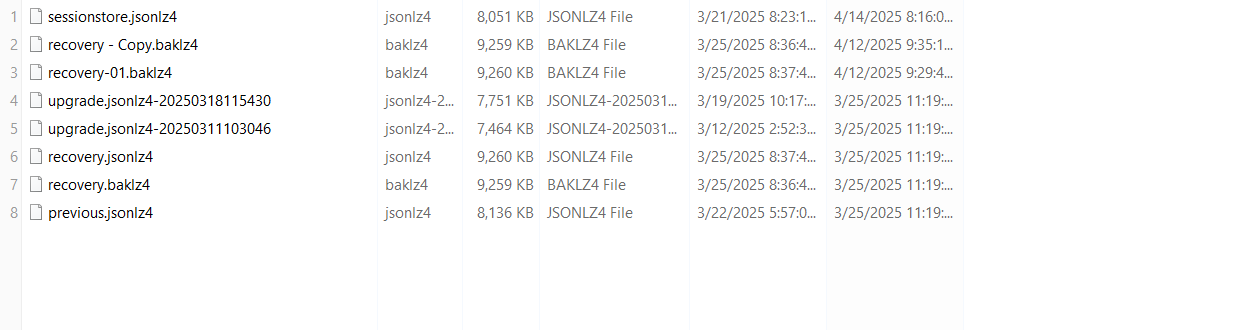
All of those files clearly have something or they would be smaller in size. So you should have closed Firefox, then remove the current sessionstore.jzonlz4 file that doesn't have your tabs. The move your renamed file into the profile folder.
Được chỉnh sửa bởi jonzn4SUSE vào
Hopefully you made a backup of that folder to avoid losing old files after renaming to a name that Firefox updates during your session. You can use my Scrounger tool to back up a file as a web page of clickable links for your open (and closed) tabs: https://www.jeffersonscher.com/ffu/scrounger.html
Christopher said
Restart FireFox and, all my tabs which I was working on will be restored, no matter which profile it is.
No, these folders are profile-specific. If you need to copy files from one profile to another, that is an extra step.
jscher2000 - Support Volunteer said
Hopefully you made a backup of that folder to avoid losing old files after renaming to a name that Firefox updates during your session. You can use my Scrounger tool to back up a file as a web page of clickable links for your open (and closed) tabs: https://www.jeffersonscher.com/ffu/scrounger.htmlChristopher said
Restart FireFox and, all my tabs which I was working on will be restored, no matter which profile it is.No, these folders are profile-specific. If you need to copy files from one profile to another, that is an extra step.
You can only copy the session file to which the profile the session existed, correct ?
How do you copy the session file from one profile to another successfully ? Is it possible using the link you gave to have firefox open all the links at once ?
Được chỉnh sửa bởi Christopher vào
I started FireFox and opened four tabs, then I closed FireFox and to my surprise FireFox did not restore those four tabs.
Does this relate that when FireFox starts it creates its own sessionstore.jsonlz file, therefore it's difficult to override this file. Also this message is for jscher2000, I tried loading a sessionstore.jsonlz into your Scrounger but it didn't work ?
During your session, Firefox doesn't maintain the sessionstore.jsonlz4 file in real time. Instead, it maintains the recovery.jsonlz4 file in the sessionstore-backups folder. During a normal shutdown (when you go to the menu > Exit), then Firefox creates a fresh sessionstore.jsonlz4 file at the main level of the profile folder (not in the sessionstore-backups folder). So if you are replacing the sessionstore.jsonlz4 file, you need to do it after Firefox shuts down and is no longer modifying that file.
Regarding the Scrounger, I'm not sure what went wrong. Usually it can decompress the file pretty easily and show the session data in the box at the top of the page, but when it parses the file, it sometimes goes off the rails and never finishes. There is a slightly updated version on Github that may or may not work better:
https://jscher2000.github.io/Firefox-File-Utilities/scrounger.html
jscher2000 - Support Volunteer said
During your session, Firefox doesn't maintain the sessionstore.jsonlz4 file in real time. Instead, it maintains the recovery.jsonlz4 file in the sessionstore-backups folder. During a normal shutdown (when you go to the menu > Exit), then Firefox creates a fresh sessionstore.jsonlz4 file at the main level of the profile folder (not in the sessionstore-backups folder). So if you are replacing the sessionstore.jsonlz4 file, you need to do it after Firefox shuts down and is no longer modifying that file. Regarding the Scrounger, I'm not sure what went wrong. Usually it can decompress the file pretty easily and show the session data in the box at the top of the page, but when it parses the file, it sometimes goes off the rails and never finishes. There is a slightly updated version on Github that may or may not work better: https://jscher2000.github.io/Firefox-File-Utilities/scrounger.html
I tried the updated Scrounger, it works better. Although if there was a way to automatically load the Scrounged URL into FireFox, rather then load them each manually as the results when copying the sessionstore.jsonlz file isn't the same as when using your Scornger as it only loads so few URL tabs, when using the sessionstore.jsonlz file and restarting Firefox.
Hmm, I would expect all the Open Tabs in Open Windows to load automatically when you swap the session history file. Is it possible the Scrounger is showing closed windows that you can reopen from the menu? Either:
- "3-bar" menu button > History > Recently Closed Windows
- "Library" toolbar button > History > Recently Closed Windows
- (menu bar / Alt+S) History > Recently Closed Windows
Is it possible to get a list of all the tabs open for a window or multiple windows; using gBrowser and store them in a text file and have this command run occasionally ?
You can access gBrowser using a Browser Console script, but I don't know whether you can make a Browser Console script run at predefined intervals. Seems easier to use an extension for this, if one exists.
Is there a documentation for this variable ?
I don't have any documentation. When I enter gBrowser.tabs[0] into the Browser Console command line and look at its properties, I don't see the title and URL. Maybe they are there somewhere, but you also could consider another option. Here's an example gist that shows writing out the open tabs title and URLs from the current session state to a file:
https://gist.github.com/jscher2000/2a389c98aa2f3c70d0ba7bc787a84940
There is no documentation on gBrowser. I was hoping it's possible with gBrowser, it appears as if it is; but there there is no documentation on this variable.
Also I was hoping to possible use gBrowser to get the name and URL of every file on a site if it's a JPG or PDF.
Maybe we're talking about two different things. I'm only familiar with gBrowser as an object in the Browser Console that people use to manipulate the appearance and behavior of Firefox windows. If you want to scrape URLs out of page you have open in a tab, I'm sure there are add-ons for that.
In the tab session file, are tab folders within the tab session file as so that when the session file is restored so are the tab folders for that session ?
Christopher said
In the tab session file, are tab folders within the tab session file as so that when the session file is restored so are the tab folders for that session ?
Do you mean Tab groups in Firefox? Tab Groups are stored in the file since at least Firefox 136. I'm not familiar with tab folders. Maybe those are created by an extension?
I meant tab groups, but are they distinguishable in the session file ? Sorry the answer to this question is, yes. I did not look into a session file before posting.