there is a pop up about the certificates are not meeting Mozilla criteria for safety. It pops up for your own website as well. It pops up time and time again.

I have used Mozilla for years. Now it continues to say certificates are such on all my sites that I can not trust it. This happen even with your site. I am so frustrated with these popups that appear to be coming as part of the Mozilla software that I am using google chrome to even submit this message. I am not sure I can continue using your browser based on these multiple certificate untrusted windows.
Q!: Is this part of your software? or some kind of a malware that has attached itself to your software? Please know that I uninstalled your software and re-installed it and am getting the same question regarding every site that I visit. Once I indicate I trust it -- it still comes back the next time that I go to that site.
thanks paula
Усі відповіді (1)
Вибране рішення
hi paula, first please make sure that the date, time & timezone are set correctly on your system and that firefox is set to directly connect to the internet (that's the "no proxy" setting in the firefox menu ≡ > options > advanced > network > connection - settings...).
if this doesn't solve the issue (or it is already set properly), a possible solution depends on different factors:
- what is the error code shown under technical details on the error page?
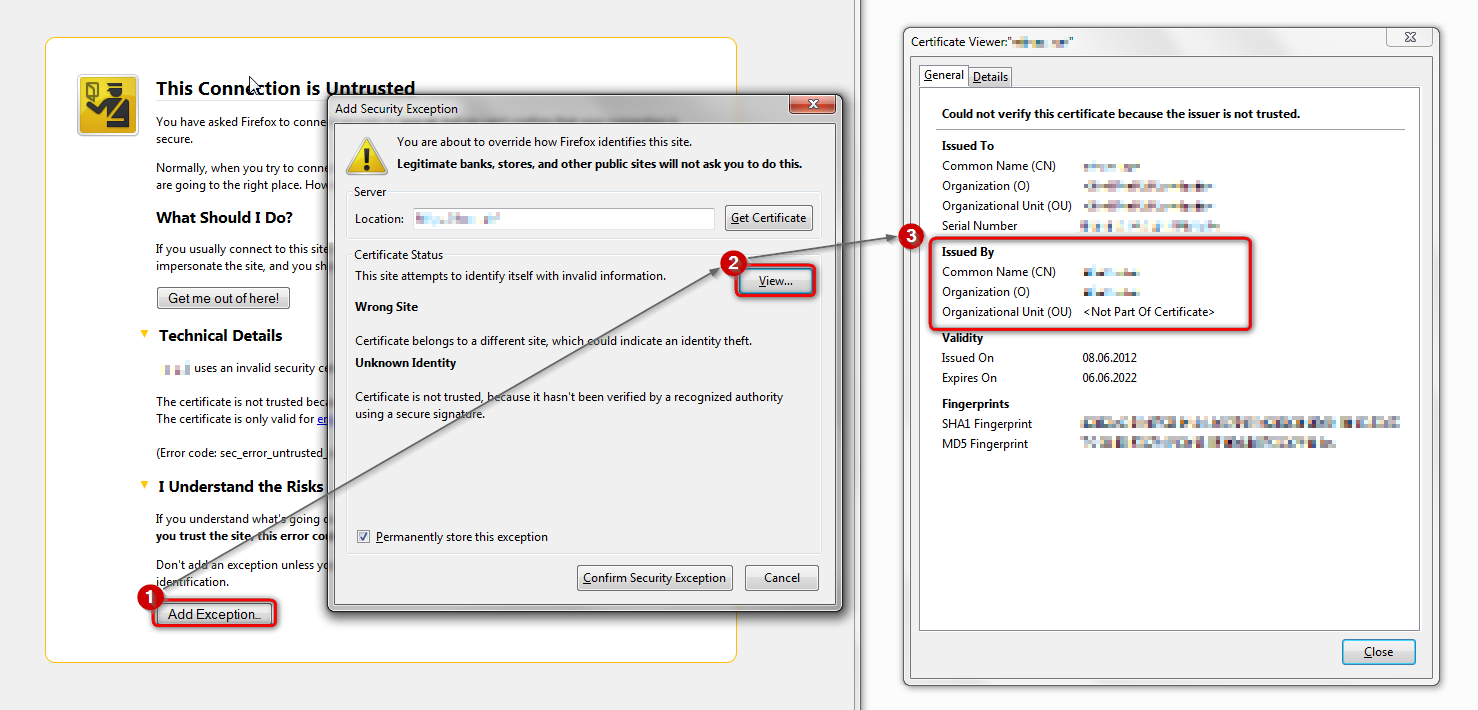
in case the error code equals sec_error_unknown_issuer, please attempt to add an exception on the bottom of the error page (but don't do it for real) and inspect the certificate (see the screenshot attached for instructions):
- which issuer information does the certificate contain?
please report back with those two pieces of information. thank you!