Showing questions for topic:
Showing questions tagged:

Quality of audio output changes when starting a new window

Has anybody else experienced a similar problem? Or can you help me trouble shoot this issue please? I'm busy playing audio in a tab of the browser. The sound quality is g… (மேலும் படிக்க)

Has anybody else experienced a similar problem? Or can you help me trouble shoot this issue please?

I'm busy playing audio in a tab of the browser. The sound quality is good (rich, full, deep). Next, I open a new window by any means (Ctrl+N / Open link in new window / Menu > New window) As the new window appears, the current audio playback becomes tinny / lower quality. After a 3 seconds, the normal good sound quality starts again.

I'm currently using Bluetooth connected headphones and this happens on different headphones. I have to find some wired headphones first before I can try that. This happens with every new window that I open, regardless of the number of open tabs in current windows or how many previous open windows I already have. This happens regadless if audio enhancements of the output device are enabled or not. Spatial sound is set to off. Windows is set to 'do nothing' & will not adjust the volumes of different sounds when I'm using my PC to place or receive telephone calls.

OS: Windows 11 with latest patches Firefox: latest & older builds Hardware drivers: All manufacturer drivers applied

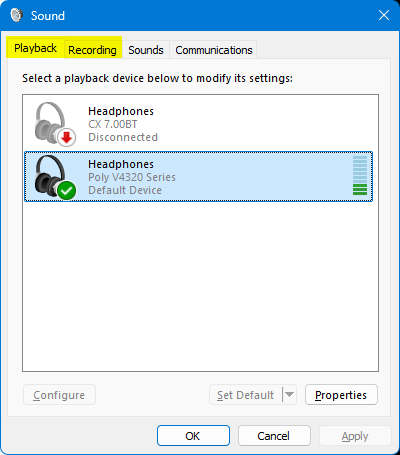
PS I can replicate this issue by changing between the 'Playback' & 'Recording' tab in the Sound Control Panel applet. That is to say, the same decrease in audio quality happens when I change from the Playback tab to the Recording tab. Audio quality improves again when I change from the Recording tab to the Playback tab https://assets-prod.sumo.prod.webservices.mozgcp.net/media/uploads/images/2026-09-12-15-38-23-1accad.png

PPS My new windows are set to open on 'about:support'

PPPS Can't reply to previously archived question : https://support.mozilla.org/en-US/questions/1525613

Solved 1 1 10

When playing a video, the screen often fades to black while playing.

Okay posted this into iOS but never got any proper help, so I'm guessing that was the wrong place to put this. Whilst I'm watching a video, if said video is playing in fu… (மேலும் படிக்க)

Okay posted this into iOS but never got any proper help, so I'm guessing that was the wrong place to put this.

Whilst I'm watching a video, if said video is playing in fullscreen, it'll often fade to black during different parts, as whenever a flash happens or quick cuts (e.g. a film with lightning strikes, causes it to fade to black and it stays like that - then fades back in super slowly). It is SUPER annoying and it causes me to have to rewind if I miss something because of it (only for it to do it again and again)! I don't watch YouTube in fullscreen because of it, but it even does it in streaming services - but worse! I honestly have had enough of this, it is genuinely infuriating.

I'm on MAC air 2022 M2, macOs Tahoe 26.6.2 - and the most recent up-to-date Firefox update: Version 157.0 I usually put off updating Firefox because it signs me out of everything! Meaning I have to resign into all of my school things, streaming, YouTube, and even this page itself!

Now I've gone into a private window and tested it to see if it does the same thing - yes, yes it does do the same thing, I put on the same two YouTube videos and it did the exact same fading in the middle of it at the same exact timestamp!

Took this photo of the movie Cruella because I knew there was loads of flashing lights at one scene. You can see that the video is faded but the rest isn't. The second image is when I click multiple times to try and stop it! But it happens again directly after.

Please help me, this is really annoying and I've put up with it for too long :(

Solved 3 30

Facebook video playing in Firefox stops when clicking windows 11 start button or opening solitaire

Facebook videos in Firefox stop playing when clicking the Windows 11 Start button or opening Solitaire (after recent update) This issue has just started after a Windows 1… (மேலும் படிக்க)

Facebook videos in Firefox stop playing when clicking the Windows 11 Start button or opening Solitaire (after recent update)

This issue has just started after a Windows 11 update and restart. It has never happened before. I usually watch Facebook Reels while playing Solitaire at the same time — yes, I know, I don’t have a life.

This morning, after the update and restart, I opened Facebook and started watching a Reel as normal. As soon as I clicked the Windows Start button to open the list of programs, the video stopped. I then selected Solitaire, which opened to the taskbar. I restarted the video, clicked Solitaire to open the game fully, and the video stopped again. As soon as I minimize Solitaire, the video resumes playing.

I’ve tried all the suggestions I could find via Google, but nothing has worked so far. Note that this only affects videos playing directly on Facebook — videos playing in the Windows Media Player Legacy video player itself are not affected.

Any help would be greatly appreciated… and yes, as mentioned, I clearly don’t have a life 😅 Link to video showing what happens when I select Solitaire in the Taskbar. https://drive.google.com/file/d/1oKLIl3I4f9lfTZvbU-9pJ1gMbOU7h0zm/view?usp=sharing

Regards everyone.

More info... I run two monitors and it seem if I click on whatever I have open in the second monitor the FB video stops. So something has changed after I turned my computer on this morning and updated Windows. I even did a System Restore to a setting two days before this new update and nothing changed still have the problem.

Solved Archived 2 130

Option-shift-space causes page refresh

I've noticed that whenever I press ⌥⇧Space (option-shift-spacebar) in Firefox Developer Edition, it causes the page to refresh. This behaviour seems to be consistent acro… (மேலும் படிக்க)

I've noticed that whenever I press ⌥⇧Space (option-shift-spacebar) in Firefox Developer Edition, it causes the page to refresh.

This behaviour seems to be consistent across devices.

Is there a way to change/disable this behaviour? It is very inconvenient, as it often causes me to accidentally trigger a page refresh when I type an em dash (`—`) in a text input (opt-shift-dash, and then type a space character after it, I'm very likely to hit opt-shift-space by mistake 🙈).

Solved Archived 1 350

browser set up and Youtube issues...suspect update

!. link to youtube only flashes then plays only audio. Full video requires opening link in a new private browser window 2. Typing into search bar for Duck Duck Go in new… (மேலும் படிக்க)

!. link to youtube only flashes then plays only audio. Full video requires opening link in a new private browser window

2. Typing into search bar for Duck Duck Go in new tab page types directly into active bar...

3. Active bar is no longer at the top but is in Bookmarks toolbar...

I suspect some update problem.

Solved Archived 7 270

Live stream and videos no longer work

For years I have been able to watch a foreign TV website, despite having only a DSL connection (I allow only the scripts essential to make it work). Since I did the last… (மேலும் படிக்க)

For years I have been able to watch a foreign TV website, despite having only a DSL connection (I allow only the scripts essential to make it work). Since I did the last update, to 137.0, I cannot watch either the live stream ("General source error") or old programs ("There is something wrong with your internet connection"). This is absolutely consistent; I've lost count of the times I've tried.

I never had problems like this before. At worst, if Windows was running a background process I might have to stop it to keep from having pauses in the program. All I can think of is that you did something in the new version of Firefox that has made video impossible on DSL.

Solved Archived 5 200

no sound from url videos

I have Win 11 dell computer that does not play or pick up sound from web sites videos .I checked and tested my sound using the Microsoft platform & buy playing a dis… (மேலும் படிக்க)

I have Win 11 dell computer that does not play or pick up sound from web sites videos .I checked and tested my sound using the Microsoft platform & buy playing a disc. It works OK

Solved Archived 10 190

Substack video freezing since Firefox 154 update

Since I updated to Firefox v154 (on Windows 11 w/latest updates) Substack videos freeze at random times 15-30 minutes into playback (never right away). If I close the tab… (மேலும் படிக்க)

Since I updated to Firefox v154 (on Windows 11 w/latest updates) Substack videos freeze at random times 15-30 minutes into playback (never right away). If I close the tab and reuse the original link, playback resumes more at less where it froze, but this is very annoying and happens almost every video. Other online videos (e.g. YouTube) don't seem to have this problem -- but I rarely watch hour-long videos outside of Substack, so I can't confirm that the problem doesn't exist elsewhere. This only seems to occur after streaming 15+ minutes so probably a subtle bug.

Solved 2 80

Horizontal Graphical Artefacting in Youtube and other video's

Hello! from this morning and alongside a new Firefox update i've been having graphical artifacts on Youtube/Facebook/Netflix. I've followed all the standard steps. Disab… (மேலும் படிக்க)

Hello! from this morning and alongside a new Firefox update i've been having graphical artifacts on Youtube/Facebook/Netflix. I've followed all the standard steps.

Disabled Hardware Acceleration. Updated Video Drives. Run FF in Safe Mode without plugins. Disabled Router level VPN and Ghostery.

Any ideas?

I'm running FF135.0 Geforce 572.16 Drives (30th Jan) 3070TI. Windows 10 Pro 22H2.

Solved Archived 1 259

video screen is missing

When I load the video the page loads like normal, all comments and everything is there except the video square is not there. cant see the video, anyhow. even if i move my… (மேலும் படிக்க)

When I load the video the page loads like normal, all comments and everything is there except the video square is not there. cant see the video, anyhow. even if i move my mouse cursor on it on the start page, the little video wont play the preview. no video player at all. anywhere.

Solved Archived 1 150

Audio In Tab Cuts In&Out When Not Focused On That Tab

Just built a new PC and using Win11. I like to have a pinned tab in Firefox playing some kind of media to have background noise. Since new build, whenever I am not 'focus… (மேலும் படிக்க)

Just built a new PC and using Win11. I like to have a pinned tab in Firefox playing some kind of media to have background noise. Since new build, whenever I am not 'focused' on that tab and doing other tasks, audio from that tab will cut/fade in and out.

I've been working on this for 16 hours. I've googled, binged, even yahooed. No answers. Checked and rechecked all settings, both system and browser. Uninstalled/Reinstalled *many* applications, including Firefox. My OCD won't let me rest till I have this solved.

Thanks for the help.

Solved Archived 1 230

Video playback on Firefox for Linux Fedora

Hi. There is a problem with video playback when skipping through the video using a playback bar. The video (but not audio) freezes at the spot when one skippes to another… (மேலும் படிக்க)

Hi. There is a problem with video playback when skipping through the video using a playback bar. The video (but not audio) freezes at the spot when one skippes to another part of the video and re-establishes after a while (not so short while) to the part of the video that is currently played. I'm using Linux Fedora.

Solved Archived 6 1017

how to cast videos from my phone to my TV if I got android phone, and I have i basic Sylvania TV without wifi or Bluetooth connection, hmi and a softwaode with fire fox app.

how to cast videos from my phone to my TV if I got android phone, and I have i basic Sylvania TV without wifi or Bluetooth connection, hmi and a softwaode with fire fox… (மேலும் படிக்க)

how to cast videos from my phone to my TV if I got android phone, and I have i basic Sylvania TV without wifi or Bluetooth connection, hmi and a softwaode with fire fox app.link text

Locked Archived 1 60

The taskbar does not disappear when switching the video player to full-screen mode.

Hello! My firefox get a problem: The taskbar does not disappear when switching the video player to full-screen mode (the attached screenshot shows what it looks like). Cl… (மேலும் படிக்க)

Hello! My firefox get a problem: The taskbar does not disappear when switching the video player to full-screen mode (the attached screenshot shows what it looks like). Clicking the browser icon on the taskbar a few times makes the taskbar disappear, but the problem recurs the next time full-screen mode is entered. This happens in all video players. Any solution to fix that?

Solved 3 70