


Windows 10 reached EOS (end of support) on October 14, 2025. For more information, see this article.

Search Support

Avoid support scams. We will never ask you to call or text a phone number or share personal information. Please report suspicious activity using the “Report Abuse” option.

Learn More

Unable to Send on ComuServe Account. Starting today.

  • 1 பதிலளி
  • 0 இந்த பிரச்னைகள் உள்ளது
  • 4 views
  • Last reply by letti001

I saw where there was a same problem liste a couple of months ago but the solution did nto work. As of this morning I can no longer send with my CompuServe Account. There was no change in my settings, and I have had the account in place with Thunderbird for years. I get an error to enter my password again, I do, then no luck. It asks again. When I cancel, I get an alert, sending of the message failed, Unable to authenticate Outgoing Server (SMTP), please check the password and verify the "Authentication method" in "Account Settings|Outgoing Server (SMTP)

I tried change the password authentication from normal to OAuth2. No luck.

No problem with downloading messages; they all come through.

I saved the message to be sent in my Draft Folder and then when going to the web version of CompuServe (really AOL and really Yahoo), my message is saved in the Draft Folder and I can then send it.

Thank you in advance.

Sal

I saw where there was a same problem liste a couple of months ago but the solution did nto work. As of this morning I can no longer send with my CompuServe Account. There was no change in my settings, and I have had the account in place with Thunderbird for years. I get an error to enter my password again, I do, then no luck. It asks again. When I cancel, I get an alert, sending of the message failed, Unable to authenticate Outgoing Server (SMTP), please check the password and verify the "Authentication method" in "Account Settings|Outgoing Server (SMTP) I tried change the password authentication from normal to OAuth2. No luck. No problem with downloading messages; they all come through. I saved the message to be sent in my Draft Folder and then when going to the web version of CompuServe (really AOL and really Yahoo), my message is saved in the Draft Folder and I can then send it. Thank you in advance. Sal

All Replies (1)

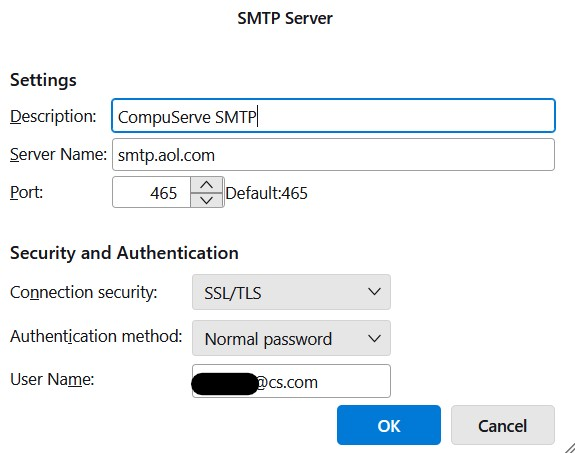
I read elsewhere where somebody wanted screen shots of the settings. I failed to do so. Here they are. Thank you again.

கேள்வி எழுப்பு

You must log in to your account to reply to posts. Please start a new question, if you do not have an account yet.