


how to increase font size for folder names eg, Inbox, sent mail etc

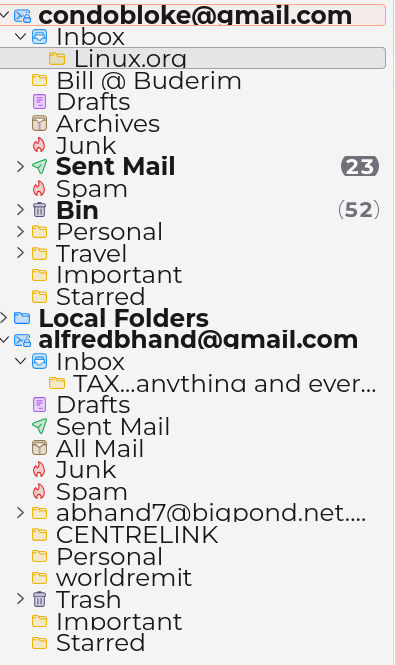
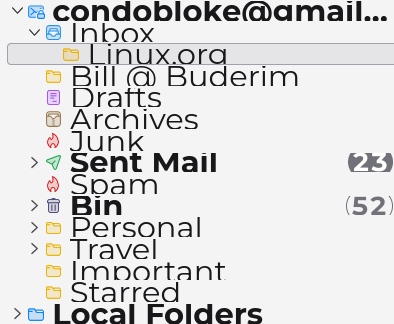
In the recent update Thunderbird 140.4.0 esr , the fonsife of the folder names is noticeably smaller....which makes the folder name appear to be "scrunched up"....very close together. I cannot find a way to increase that font size.
The other side with email correspondents and subjects is fine...the increse of the font size there is easily done. I have attached a screen shot of the list of folders.
I simply wish to increase their font size so it separates the vaarious names and thereby increases the font size used there.
Brian
தீர்வு தேர்ந்தெடுக்கப்பட்டது
It's possible to adjust the font size and density for the folder pane, but you have to choose settings that don't conflict with each other:
https://support.mozilla.org/en-US/questions/1427253
https://support.mozilla.org/en-US/questions/1430472#answer-1616930
Read this answer in context 👍 0All Replies (4)
Try this: click the hamburger menu in upper right and click the font setting option. That setting increases font size of folders
Thanks David, yes that does increase the font size.....but still leaves them too close together. Increasing that font size also increases the body of the emails/the subjects and correspondents etc
It looks like a jumble with the bottoms of various letters cut off. It looks like an amateur typed them in, and didn't allow spoace between the headings
This is not present anywhere else on the Thunderbird app.
Brian
தீர்வு தேர்ந்தெடுக்கப்பட்டது
It's possible to adjust the font size and density for the folder pane, but you have to choose settings that don't conflict with each other:
https://support.mozilla.org/en-US/questions/1427253
https://support.mozilla.org/en-US/questions/1430472#answer-1616930