


How do i get rid of the icons on the top of the webpage. the icons such as youtube, pandora, etc set up in the left hadn corner?

I recently downloaded the Firefox 4. Now every time i go to a website, on the top comes a "toolbar" with icons in the left hand corner. im not sure if these are partnerships of Firefox but i would like to remove it because its annoying each time i got to a website this thing happens.
Alla svar (3)
That is the tab bar that is now displayed at the top of the page.
You can right click the orange Firefox button to open the toolbar menu.
- Click the Menu Bar entry to make the Menu Bar visible.
- Click "Tabs on Top" to remove the check mark and place the Tab Bar at its original position just above the browser window.
- Tools > Options > Tabs: [ ] "Always show the tab bar"
I did that and the thing is still there. i'll clarify my problem.
when i go to a website. Above the webpage there is a large area in this area off to the left hand corner there are icons such as youtube, pandora, facebook in a little box. it happens EVERY time i go to a new web page. its annoying. im about to just delete Firefox and go to Opera. :( ive attach an picture
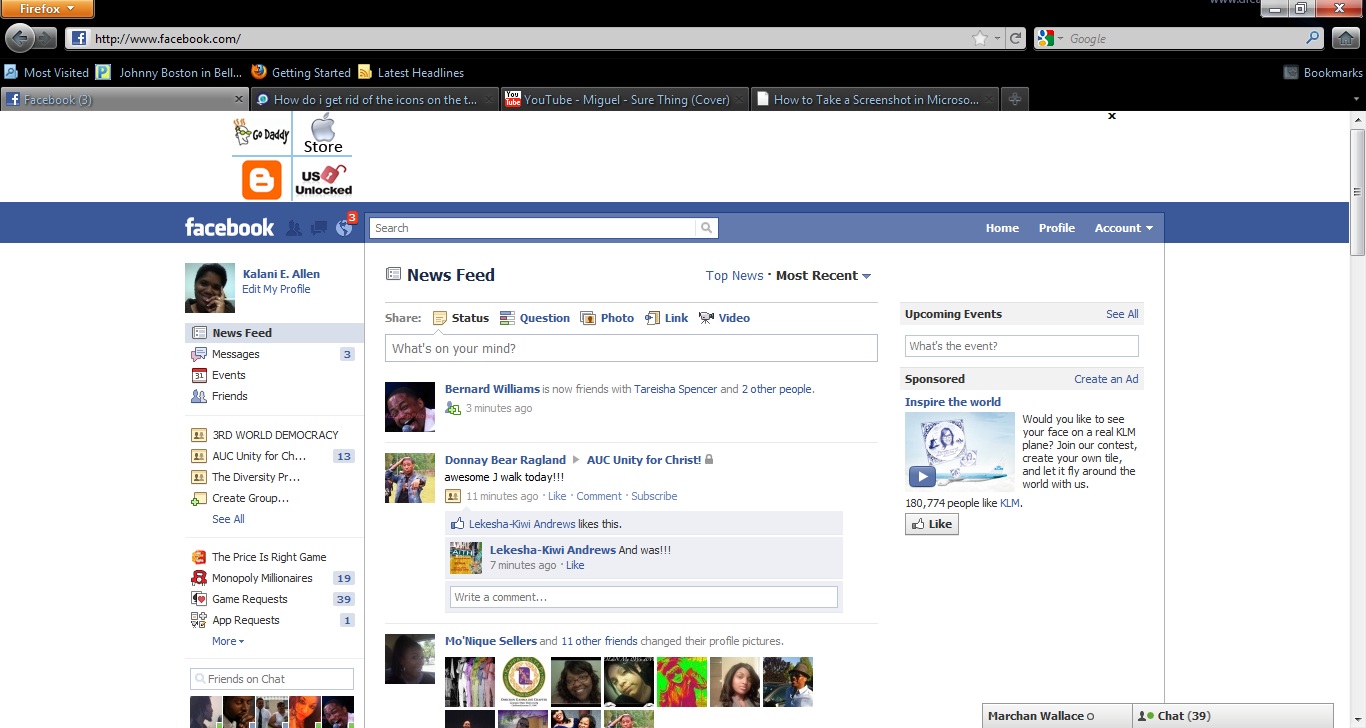
Do you mean the icons just above the blue Facebook banner?
Those are either added by an extension or by malware if you only see them in Firefox.
You can also check the connection settings and make sure that you do not use a proxy.
- Tools > Options > Advanced : Network : Connection
Start Firefox in Use Troubleshoot Mode in Firefox to check if one of the extensions is causing the problem (switch to the DEFAULT theme: Firefox (Tools) > Add-ons > Appearance/Themes).
- Don't make any changes on the Safe mode start window.
- https://support.mozilla.com/kb/Safe+Mode
Do a malware check with some malware scanning programs.
You need to scan with all programs because each program detects different malware.
Make sure that you update each program to get the latest version of their databases before doing a scan.
- http://www.malwarebytes.org/mbam.php - Malwarebytes' Anti-Malware
- http://www.superantispyware.com/ - SuperAntispyware
- http://www.microsoft.com/windows/products/winfamily/defender/default.mspx - Windows Defender: Home Page
- http://www.safer-networking.org/en/index.html - Spybot Search & Destroy
- http://www.lavasoft.com/products/ad_aware_free.php - Ad-Aware Free
See also:
- "Spyware on Windows": http://kb.mozillazine.org/Popups_not_blocked