


Password change and pin

Spectrum had me change my password for one of my accounts on Thunderbird. I changed it with Spectrum. That account was working fine from Nov. 6 until today, Nov. 16; today, it decided that my password wouldn't work. I tried to change it when it asked at the time I was trying to send an email; it wouldn't take. I then went into "saved passwords" and tried to change it; it wanted a pin. This is my** first problem;** Norton has no idea what that is. Thunderbird asked for other sign-in methods including a Yahoo email, but I have no idea what it wants as it doesn't want the password for that Yahoo account. What is it looking for????
I deleted the account from Thunderbird's password manager. After my shutting down and reopening Thunderbird a few times, it finally worked --however, it didn't ask for a password and sent and received email just fine. Thunderbird now doesn't have that account listed in its password manager, but is giving me my mail and sending my mail out without asking me for a password. **This is my second problem.**
Since this is all combined, I'm sending both questions together; otherwise, I wouldn't do so. Does anyone know what's happening and how to get a password back as a necessity for that email account?
Vald lösning
Thank you so much, Toad-Hall! Hopefully, this worked -- that a password is being required. Until Spectrum made their changes, everything was fine. If I added an account and input the wrong password, Thunderbird asked me for the right one; that's how I know passwords had previously been required. All of my accounts are now set according to what you sent me. After I made the change, I checked my incoming mail settings; they also matched your material.
Läs svaret i sitt sammanhang 👍 0Alla svar (8)
> I then went into "saved passwords" and tried to change it; it wanted a pin.
If you got a windows security pop up window then you need to enter the following password. When you start up computer and logon to your User Account using a password in order to see desktop etc - that is the password you need to enter.
If in Thunderbird for some reason you set a Primary Password to stop prying eyes seeing your passwords the it will ask for Primary Password - you need to enter it -(usually people who set a Primary Password share a computer and allow others access to their User Account).
Thank you, Toad-Hall. It's asking for the pin related to one of my Yahoo email accounts (I have no idea how it picked up that account as I don't use it in Thunderbird), not to my Windows log-in. When I click on something like "more options," it doesn't give me any options.
DorothyJ said
Thank you, Toad-Hall. It's asking for the pin related to one of my Yahoo email accounts (I have no idea how it picked up that account as I don't use it in Thunderbird), not to my Windows log-in. When I click on something like "more options," it doesn't give me any options.
You need to post/upload a jpeg image file of that pop up window, so I can check whether it's Windows Security or Primary Password etc.
The 'More choices' will usually say the name of computer\UserName or ask 'Use a different account' meaning a different user account on computer.
When you start up computer, you get asked to logon to see desktop. Many new Windows 11 computers by default try to force people to logon to a Microsoft Account. Do you logon to a Microsoft Account or a User Account set up on computer ?
re :Thunderbird now doesn't have that account listed in its password manager, but is giving me my mail and sending my mail out without asking me for a password.
What have you got set up as server settings? In Thunderbird
- 'Account Settings' for the spectrum account
- In left pane, Select name of spectrum account
- on bottom right click on 'Edit SMTP_Server' button
- Post an image showing what it says.
- Select 'Server Settings'
- post an image showing contents of right side.
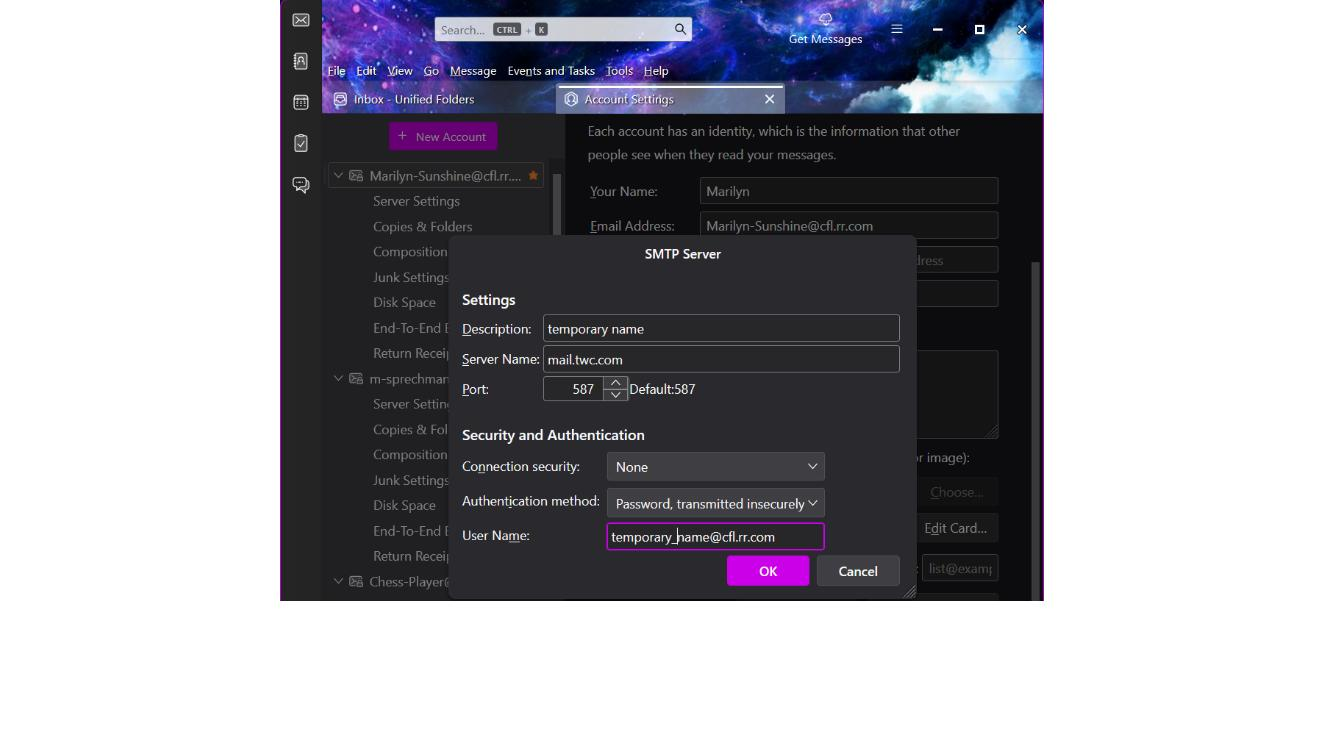
It's not asking for password when you send because you have setting that send insecurely with no authentication. Your SMTP server settings are wrong.
You need to use the following:
- Description: email address same as username
- Server Settings: mail.twc.com
- Port: 587
- Username = full email address
- Authentication Method: Normal Password
- Connection Security: STARTTLS
The password it requires is the same one you use to access the email address webmail account in Spectrum via a browser.
Maybe your incoming server settings are also wrong.
- 'Account Settings' for the spectrum account
- Select 'Server Settings'
- post an image showing contents of right side.
But I would expect them to say the following for a Pop account. Server Type: Pop Mail Server
- Server Settings: mail.twc.com
- Port: 995
- Username = full email address
- Connection Security: SSL/TLS
- Authentication Method: Normal Password
After making the necessary changes to server setting, exit Thunderbird. Allow a few moments for background processes to complete, then start Thunderbird.
Vald lösning
Thank you so much, Toad-Hall! Hopefully, this worked -- that a password is being required. Until Spectrum made their changes, everything was fine. If I added an account and input the wrong password, Thunderbird asked me for the right one; that's how I know passwords had previously been required. All of my accounts are now set according to what you sent me. After I made the change, I checked my incoming mail settings; they also matched your material.