


Virus infected Mozilla files

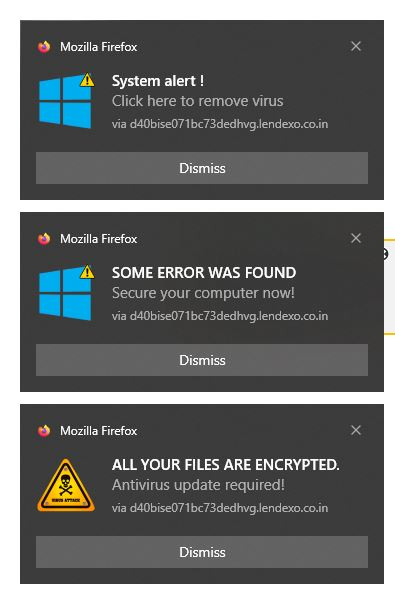
II must have been onto a dangerous site ??? but anyway I was using another browser and Firefox popped up with messages indicating a virus. As I am a retired head of IT, I closed internet and uninstalled Firefox. I then scanned my Pc with 3 different antivirus packages, My default installed is Sophos. Then there is teh standard MS , plus I installed ESET. All cleared my machine with no issues. I then re- installed Firefox, , it picked up my data and the virus message popped up again. I immediately uninstalled it again. I use REVO to uninstall, which scans for left overs, which I delete as well. Now I HAVE TO ASSUME that Revo is NOT clearing ALL FIREFOX files/data off my PC. Please advise where it is and how I can delete it completely, which is causing the messages to pop up again as soon as i install Firefox.
Alla svar (2)
It looks like it is a notification you turned on on a certain site, it is not a real virus warning. See Web Push notifications in Firefox for information how to revoke the permissions for that site (look at your screenshot to the adres noted after via )
--
Tim Maks , SUMO volunteer Please mark the answer with the right solution with "Solves the problem" to help other users with the same issue
selwyn1957 said
I then re- installed Firefox, , it picked up my data and the virus message popped up again. I immediately uninstalled it again. I use REVO to uninstall, which scans for left overs, which I delete as well. Now I HAVE TO ASSUME that Revo is NOT clearing ALL FIREFOX files/data off my PC. Please advise where it is and how I can delete it completely, which is causing the messages to pop up again as soon as i install Firefox.
Normally, it is desirable to preserve your browser data (under %APPDATA%\Mozilla\Firefox) when uninstalling/reinstalling program files. If there is a problem in your profile, typically is it related to settings or add-ons, and you can use the Refresh feature as a shortcut to diagnosing/cleaning those. See: Refresh Firefox - reset add-ons and settings.