


How can I get narrate to work in reader mode?

Upgraded to ver 49. Touted reader mode and narrate. Can't find reader mode or narrate in the help search. How do I get into reader mode and activate narrate. Have a text file that I can call up in the browser and would like it to read paragraphs to me.
Vald lösning
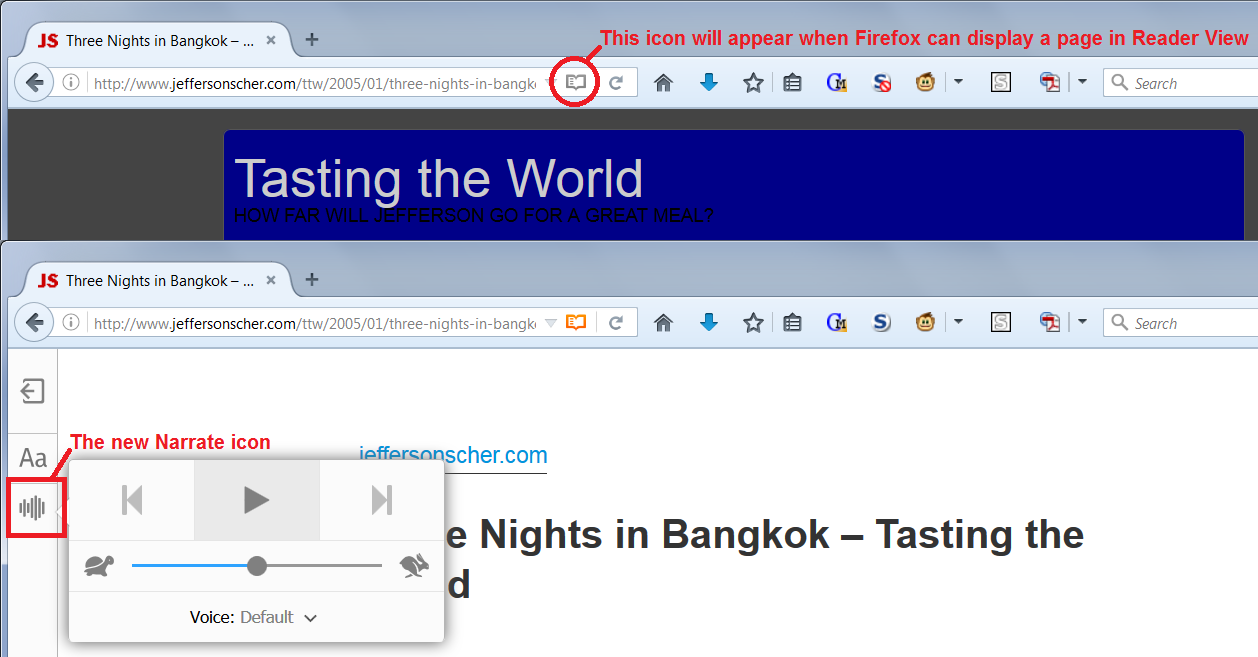
Firefox doesn't enable Reader View on every page. When Reader View is available, you should see a "book" icon in the address bar. Please see the attached screenshot.
When I tried it with a text file, Firefox didn't read the text. This may be due to the particular file I tried or some issue with text files in general. Since the feature is so new, I'm not sure exactly what to expect there.
Edit: Here's the general help article on Reader View for desktop versions of Firefox: Firefox Reader View for clutter-free web pages.
Läs svaret i sitt sammanhang 👍 3Alla svar (3)
Vald lösning
Firefox doesn't enable Reader View on every page. When Reader View is available, you should see a "book" icon in the address bar. Please see the attached screenshot.
When I tried it with a text file, Firefox didn't read the text. This may be due to the particular file I tried or some issue with text files in general. Since the feature is so new, I'm not sure exactly what to expect there.
Edit: Here's the general help article on Reader View for desktop versions of Firefox: Firefox Reader View for clutter-free web pages.
Ändrad av jscher2000 - Support Volunteer
I noticed this extension to let you "force" Reader View for a page without the icon, but didn't try it myself: https://addons.mozilla.org/firefox/addon/activate-reader-view/
Thanks. Did a search of the web and found an article at ghacks.net which outlined the steps to take to enable reader mode. Reader Mode was already enabled fortunately. Went out to a Wikipedia article and saw the little book icon, clicked on it, and was pleasantly surprised to hear intelligible speech. Had the same experience as you -- the file didn't work at all. I'm sure that there is a app out there which does text to speech on files. Just got to find it. Again, thank you very much. John