


Top of website not showing

Hi - My website does not show up in full in Mozilla. The top of the website which also includes some menu items is completely missing. The website was developed in Joomla 2.5. Website address is www.irishsevensummits.com
Vald lösning
Hi Everest2014, you can add the one additional rule to the current set of rules:
.header{
  padding:0px 17px; z-index: 99999; position: relative;
  height:140px;
}
Läs svaret i sitt sammanhang
👍 0
Alla svar (19)

I see everything just fine. however I could be looking at the wrong thing.
You can try these steps in case of issues with web pages:
You can reload web page(s) and bypass the cache to refresh possibly outdated or corrupted files.
- Hold down the Shift key and left-click the Reload button
- Press "Ctrl + F5" or press "Ctrl + Shift + R" (Windows,Linux)
- Press "Command + Shift + R" (Mac)
Clear the cache and cookies only from websites that cause problems.
"Clear the Cache":
- The image "new fx menu" does not exist. > Options/Preferences> Advanced > Network > Cached Web Content: "Clear Now"
"Remove Cookies" from sites causing problems:
- The image "new fx menu" does not exist. > Options/Preferences > Privacy > "Use custom settings for history" > Cookies: "Show Cookies"
Hi - Thanks for the response. I'm afraid those actions are not resolving the issue, the whole top section of the site is still missing. The page starts partway down the slider, so is missing the login box, 4 menu items and the social media links. Looks fine in Chrome, but not in Firefox on mac.
Just to confirm. I can see the top of the page in Opera and Chrome but not in Firefox.
No problems here on Linux.
If you use extensions (Firefox/Tools > Add-ons > Extensions) that can block content (e.g. Adblock Plus, NoScript, Flash Block, Ghostery) then make sure that such extensions aren't blocking content.
Start Firefox in Safe Mode to check if one of the extensions (Firefox/Tools > Add-ons > Extensions) or if hardware acceleration is causing the problem.
- Switch to the DEFAULT theme: Firefox/Tools > Add-ons > Appearance
- Do NOT click the Reset button on the Safe Mode start window
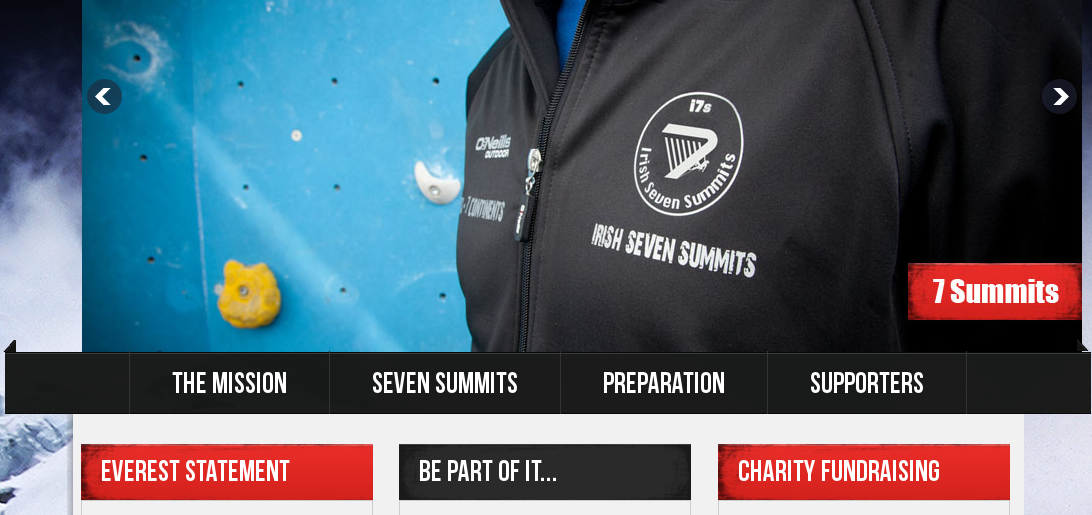
I tried the safe mode option, but there are no extensions active. There are three plugins disabled, Flip4Mac Windows Media Plugin, Java Plugin 2 for NPAPI Browsers and Silverlight Plug-in. Otherwise everything looks fine, but i still cannot see the top of my website with those additional menu items, social media links and login box.
I was not able to set the default mode in Appearances because it said all add-ins have been disabled by safe mode - not sure if that is relevant?
Seeing I have the same problem in Firefox(but not in other browsers) as Everest 2014, I feel sure that the problem is not his computer but somewhere between Firefox and the website.

Hi there. I went to your page. The top of the page is a sliding picture. But, from the looks of it, the picture is cut off at the top, maybe 10%.
OK. I now see what you mean. Some of the content seems to be missing because it is shifted up.
This style rule in Firefox for div .sub_container seems to fix it to compensate for the .banner {margin-top:-140px;} rule.
.sub_container {margin-top:140px;}
I don't know if there is a better way to position all elements in a better way.
I notice a lot of white space in the CSS file that doesn't make it easy to inspect this file.
Any advice how i fix the style rule issue for the div .sub?
Another good place to ask advice about web development is at the mozillaZine "Web Development/Standards Evangelism" forum.
The helpers at that forum are more knowledgeable about web development issues. You need to register at the mozillaZine forum site in order to post at that forum.
I think it is due to margin-collapsing: there appear not to be any elements in "normal flow" (not floated, not positioned) above #banner that would prevent the negative margin from being applied to the body element.
Another workaround is:
.header {height:140px;}
I suggested this: https://support.mozilla.org/questions/1004696#answer-588093
Hi jscher2000 - Where do i actually drop the .header {height:140px;} code?
Your current rules for the header class are in this file:
http://www.irishsevensummits.com/templates/killo_egaa/css/style.css
I'm not sure why there is so much blank space in that file.
If you don't want to modify the template file (for example, it gets routinely updated so you would need to keep modifying it) then you could put the CSS in one of the following places:
(1) style block in the page (2) inline in the tag
But I defer to Joomla experts on what is the most maintainable in the long run.
I am not sure why the initial developer had so much white space - i assume i could just tidy that up without any impact? In terms of the .header code issue, should i replace the current .header code in the style.css file (.header{ padding:0px 17px;z-index: 99999; position: relative;}) with the code you propose (.header {height:140px;})
Vald lösning
Hi Everest2014, you can add the one additional rule to the current set of rules:
.header{
  padding:0px 17px; z-index: 99999; position: relative;
  height:140px;
}
Well done jscher2000, thats completely solved it. Thanks a million for your help, greatly appreciated :-)