


how to get rid of pins on home page

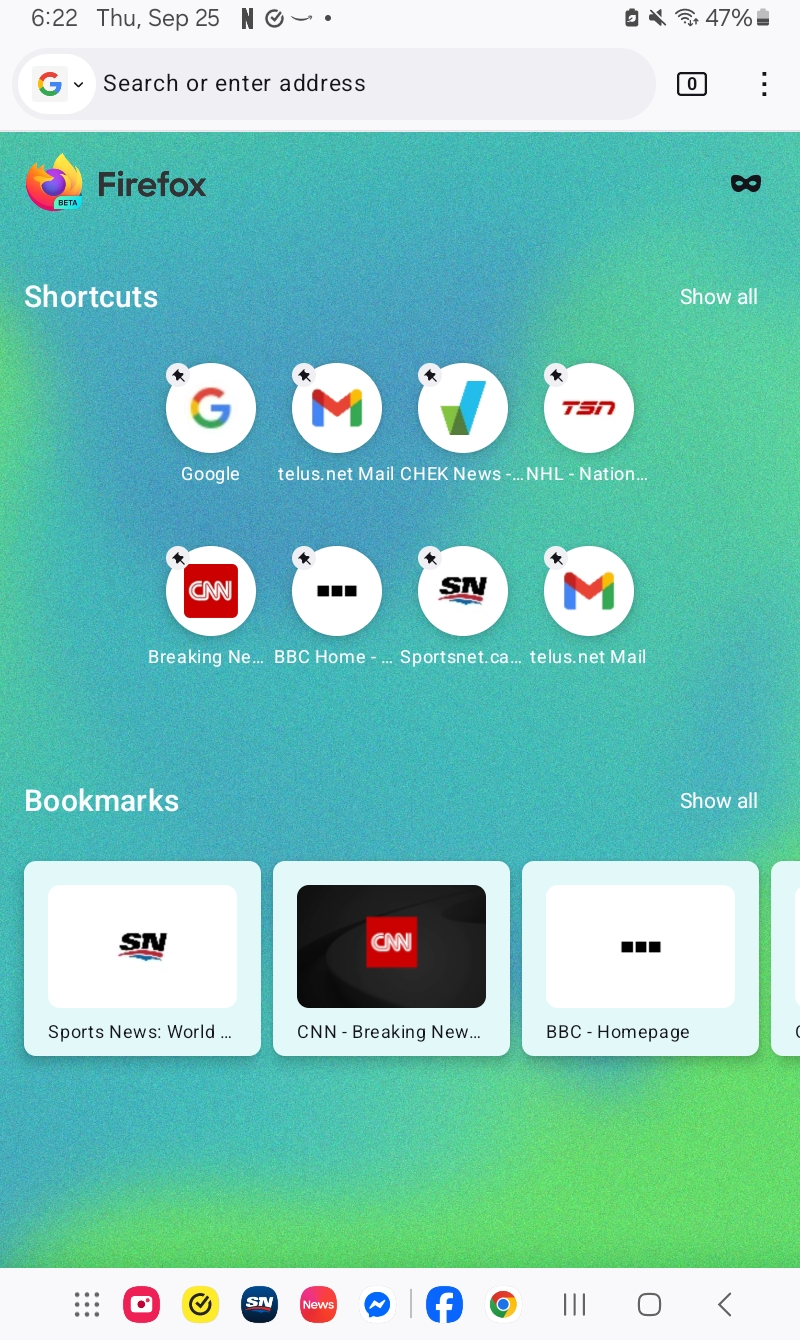
how do i get rid of the pins that have sudenly arrive on my home page. also i used to be able to retun to the home page by hitting the house in the top left corner, but that seems to have disappeared
Krejt Përgjigjet (5)

1. If you want to get rid of the home page pins, click on the Customize button at the bottom right corner and unselect Shortcuts. 2. To add the home page icon, go to the hamburger menu in top right -> More Tools -> Customize Toolbar -> Drag the Home icon onto your toolbar -> Click on the "Done" button to save your changes.
I don't want to get rid of the shortcuts, just the pins. Also I'm on an android and it doesn't show the hamburger menu, nor the customize button at the bottom of the page.
I only use a blank homepage due to privacy considerations. However if you can help me understand what you mean by "pins" and maybe a screenshot, I could try to help.
On Android you can get to the Homepage settings by Hamburger (3 vertical dots next to the tabs icon in the address bar) -> Settings -> Homepage
the pins on the shortcuts just happened a couple of weeks ago, and the home logo which used to be at the top left disappeared at the same time. here is a sreenshot
I only use blank page for Homepage. But my best guess is that "Shortcuts" and "Sponsored Shortcuts" are turned on. Refer to my above answer to get to the HomePage settings. It sounds like you want to turn off "Shortcuts" from that menu,