


Icon background in the Tab Bar

I have placed a 'Close All Tabs' button in the Tab Bar. I'd like it to have the same background as the default 'New Tab' gray tab-shaped background.
Do I have to change the following code in the xul file? toolbarpalette id="BrowserToolbarPalette" class="toolbarbutton-1"
Thank you.
Upravil(a) Yaron dňa
Všetky odpovede (7)
If you know the selector for the button, you can add a rule to userChrome.css or you can use the Stylish extension.
To get the selector, you could try the DOM Inspector extension feature of inspecting a chrome window.
If what I wrote presupposes too much, then I could try to research it for you. Where did you find a "Close All Tabs" button. Is it a built-in button or one added by an add-on?
Did you create an icon that is transparent?
Hi Jefferson,
Thanks for your help.
I am not a developer. I have an add-on for my personal use, and I've recently added the 'Close All Tabs' button.
I really appreciate your willingness to research. My question is not specific to a certain button. If you drag any button from the Toolbar to the Tab Bar, you could see the difference between the 'New Tab' and that button.
Hi cor-el,
Thanks for your help.
The icon is transparent.
My question is not specific to a certain button. If you drag any button from the Toolbar to the Tab Bar, you could see the difference between the 'New Tab' and that button.
I see, yes, other buttons do not have the appearance of being a tab. When the new tab button is the first button after the tabs, it is moved into the tabs. I don't think there is a simple way to do this with other buttons. I won't rule out a complicated way to do it. :-)
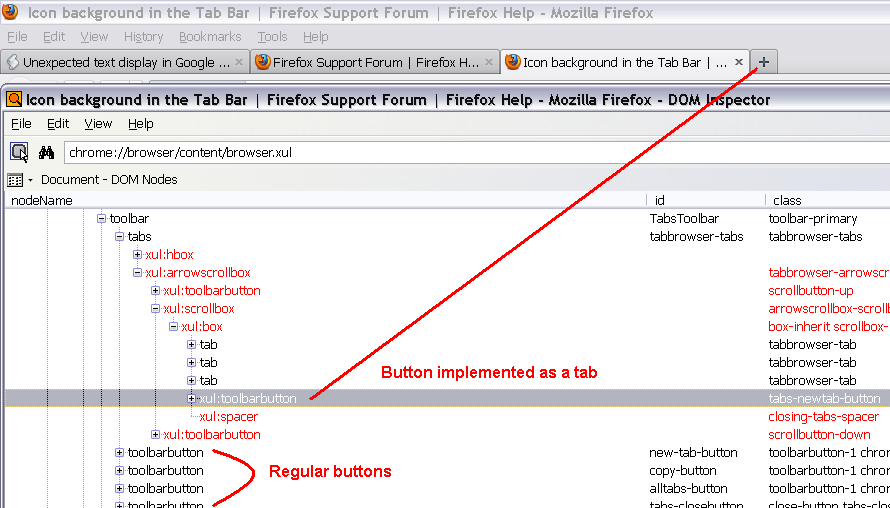
Thank you so much.
This is exactly what I meant. I think it has to do with drawing a border in a css file. If you have some idea, please let me know.
- TabsToolbar .toolbarbutton-1
{
 -moz-border-image: url("chrome://browser/skin/tabbrowser/tab.png")  4 3 0 / 4px 3px 0 !important;
 background-origin: border-box !important;
 padding: 0 !important;
}