Bad return address

Hi, I have 3 gmail addresses and 1 hotmail address working in my Thunderbird.
It seems that when I right click on a file, a .PDF for example, and select send to mail recipient, Thunderbird usually opens the first email account in Thunderbird, maybe the default email address - I don't know. Whatever.
In most circumstances the senders address is usually NOT the account I wish to send the attachment from so I change the senders (my) address to the name/account in the headers that I want to send the email & attachment from. Perhaps the last account my cursor was sitting at...
When that email is answered, it comes back to me by the first email address in my list. It DOES NOT return to the senders address. The sent (by me) copy goes into the "Sent" folder from the correct address.
This gives the receiver an email address I don't want them to have.
Please help me vix this problem.
btw, I am running Windows 11 Professional with most of the Microslush removed.
Thanks in advance.
Andrew L. Barfoot. albarfoot@gmail.com
Все ответы (7)
Sending a file from File Explorer will choose the default account, which is set in Account Settings (select an account in the left pane, Set as Default in the right pane).
If you don't have separate smtp servers for each account, you will encounter problems like the one you describe:
I am sending the file from my desktop. Right click on the file and selected Send To ~ Mail...
Not sure if that is file explorer but file explorer NOT running.
On checking the "Reply to" address, I change it from the default user to the one I want to appear on the receivers end.
Still, replies come back to my default user address.
If HAVE separate smtp servers for each account.
Problem unsolved.
A reply-to address is not intended to change the "from" address. It's just information to the receiver to say you want replies to go to somewhere different from the address you used to send the email.
When you send the email, do you see a dropdown after the address that it shows by default? And does that dropdown show the address of the server that you want to send the mail from?
It may also show an option to customise the from address. That would allow you to claim to be sending "from" an arbitrary address even though you're still using your default server. But this may or may not work. Most mail servers will only allow you to send mail that claims to be from limited pre-authorised addresses. If you use this method to send from an unauthorised address the mail will not send.
If you have several mail accounts then you probably have several accounts listed in tools > mail accounts. It is those accounts which populate the dropdown in the From address. If you don't already have an account for the address you want to use as the sender address, you should probably add one in tools > mail accounts rather than using a custom From address every time. But you will still need a mail server that is willing to use the From address that you want to use.
albarfoot said
I am sending the file from my desktop. Right click on the file and selected Send To ~ Mail... Not sure if that is file explorer but file explorer NOT running. On checking the "Reply to" address, I change it from the default user to the one I want to appear on the receivers end. Still, replies come back to my default user address. If HAVE separate smtp servers for each account. Problem unsolved.
Short version: if you send from gmail account A through gmail smtp B, gmail will automatically make the message appear to recipients to be sent from B, so recipients will reply to B.
I am NOT logged into ANY Gmail account. I have 4 email accounts, 3 of which are gmail accounts. The default email seems to be account 1. (Gmail) send to was email account 1. I changed the senders email address to account 3.
Replies come to account 1.
BAD!!!
harry Apr 8, 2026, 1:26:49 AM
This has only jist recently started happening. I think since I loaded Win 11 Pro.
Andrew
You need to check thunderbird's Tools > Account Settings
- In the left column, do you see an account for each of your email addresses? That would be normal
- If you have an email address that does not yet have its own account, click on + New Account to create one.
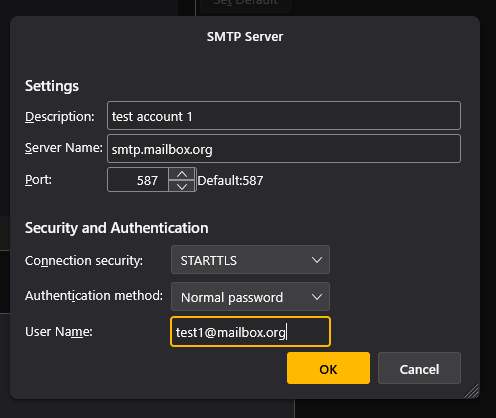
At the bottom of the Account Settings list, you should see an account for Outgoing Server. Although the title implies only one outgoing server, this is the place where you configure multiple servers to serve outgoing mail for each account.
If you are only seeing one outgoing server there, this will be the reason why all your messages go through the same outgoing mail server.
To add another, click on Add and see the attachment as an example. The important fields are:
- Server name must be the smtp server for the outgoing server you are adding
- User name should be the full email address of the account that you want sent via that server
- The description is just for your information and the other fields should be whatever parameters your mail host specifies for sending outgoing mail
You have more than one gmail account, therefore you
After completing the above, you should find when you create a new message that the From: field has a dropdown allowing you to select the account to use for sending that message.