


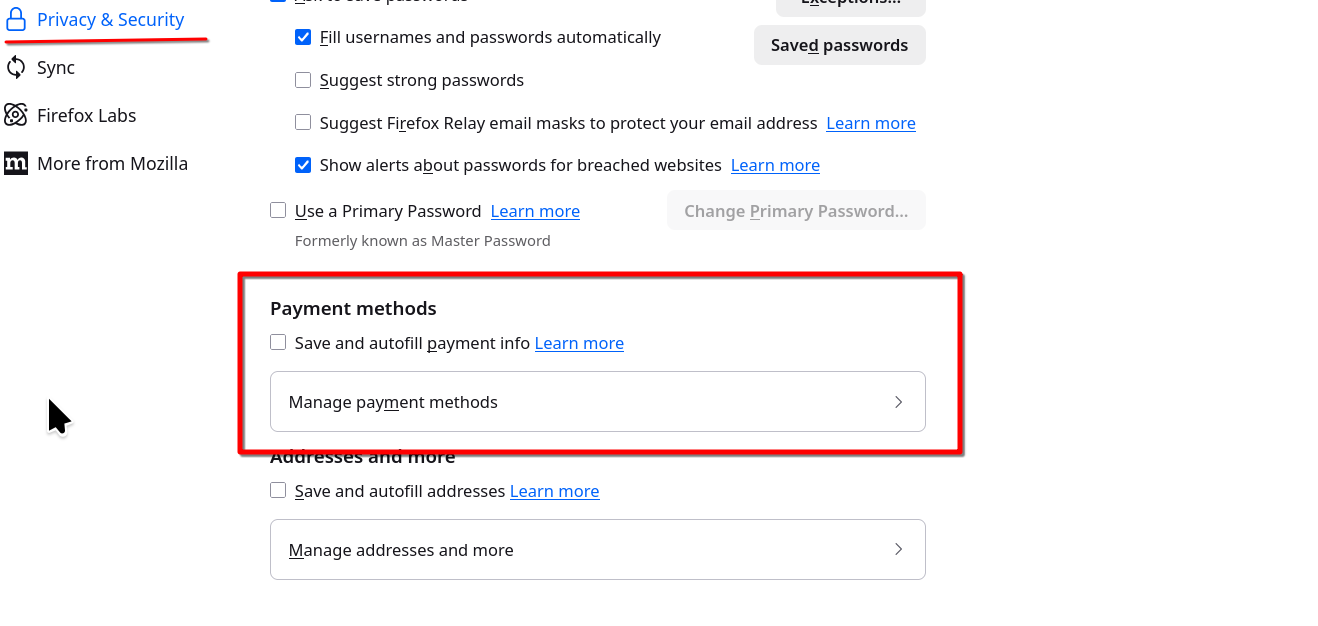
Missing edit payment methods button within the privacy and security section of settings

ive searched every article from here and beyond, but i cannot seem to find the button to edit my payment information. strange since it still prompts to autofill it
Все ответы (3)

Post a similar screenshot. see my screenshot Where did you get Firefox? What security software besides MS Defender are you running? What country are you in?
Выбранное решение
The marked section on the screenshot wasn't there for me, I was able to fix it by typing about:config in the URL bar, finding the settings "extensions.formautofill.creditCards.supportedCountries" and "extensions.formautofill.addresses.supportedCountries" and adding my country code to BOTH of them. Some said only doing this with the "creditCards" one was enough, but I needed both.
DJ_SANYEE said
The marked section on the screenshot wasn't there for me, I was able to fix it by typing about:config in the URL bar, finding the settings "extensions.formautofill.creditCards.supportedCountries" and "extensions.formautofill.addresses.supportedCountries" and adding my country code to BOTH of them. Some said only doing this with the "creditCards" one was enough, but I needed both.
this was indeed what fixed it! Thank you DJ_SANYEE