


Unable to send emails, but receiving emails OK

I have installed Thunderbird as a first-time user on a new computer. I am able to receive emails but cannot send. I have the correct outgoing server settings and confirmed this with my ISP. They recommended that I check to see if my antivirus software is preventing from sending, so I uninstalled Firewall and it's still not sending. Can you assist in any other options that I should try to get emails to send?
Все ответы (8)
Try posting a screenshot of the SMTP server settings pane and the complete text of error message.
I am not getting an error message...it just clocks for hours as if it's still trying to send the email but never sends. See screenshot attached. I have also attached my SMTP server settings and have confirmed this info with my local ISP.
Any suggestions?

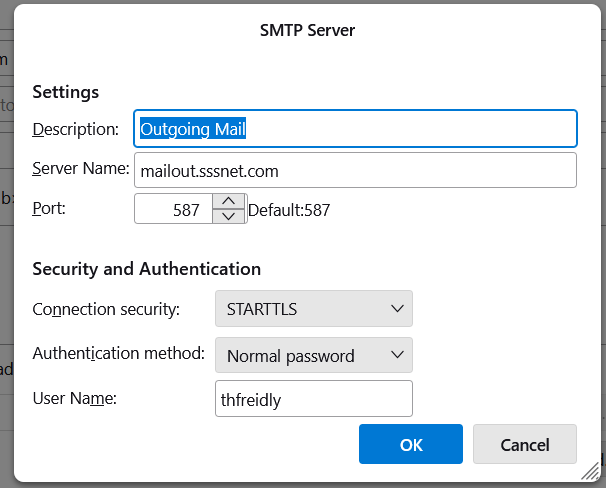
Just a possibility... change the user name to the full email address and try again
Still getting the same issue...clocking but won't send emails. My ISP is a local cable company and for some odd reason they state that the User Name not include the @domain after the name in the incoming & outgoing User Name fields. I do not use it in the Incoming POP3 server either, but it is receiving emails without, just not sending.
It looks like a timeout, often caused by antivirus that scans outgoing mail, or a VPN. What is the antivirus?
It is a new computer that came with McAfee that I uninstalled and it still is not sending. But Window Defender is installed. Any suggestions on if Windows Defender can be blocking emails from sending?

If it's any consolation, I have exactly the same problem - starting 11/24 mid-day unable to send emails via Thunderbird. My outgoing server settings are basically the same as yours. Spend all morning today messaging & speaking to cable co. trying to resolve - changed all kinds of settings including password to no avail. They told me to contact Thunderbird. Have being using Thunderbird for 20 years with no problems. I can go to my cable co. website and use the email app there and send emails successfully.
The error message from Thunderbird: Sending of message failed. ... Outgoing server [SMTP] error. The server responded: The connection from 69.119.30.125 refused
Defender generally doesn't cause issues with sending, but just the same I follow the usual recommendation to add the TB profile folder to Exclusions under Virus and threat protection in Defender settings.