


sign on failure

MY email ISP is CenturyLink. I CAN use their WEB email site, so I know the password works. My old email had a Q.COM suffix, but CenturyLink recently said that they are abandoning that domain and that I now have to use MYCTL.NET as a suffix. I changed that in TB and now TB Fails to sign in! I have looked and looked at the TB config and still it doesn't work. Using POP for incoming email, have the correct POP server name, PORT and Encryption (SSL/TLS). I CAN ping pop.centurylink.net ....
Any suggestions would be greatly appreciated!
Thanks Nigel
Все ответы (8)

Hi Nigel.
Are you using these settings? --
POP3 Server: pop.centurylink.net POP3 Port: 995 (SSL/TLS) Username: yourusername@myctl.net
I have not been able to learn which authentication method should be used. Which method are you using in Thunderbird?
What happens when you try to sign in? Would you please post a screenshot of any error message?
How are you pinging pop.centurylink.net?

Pinging using the Windows PowerShell (ADMIN). Yep, all those settings are what you mention.
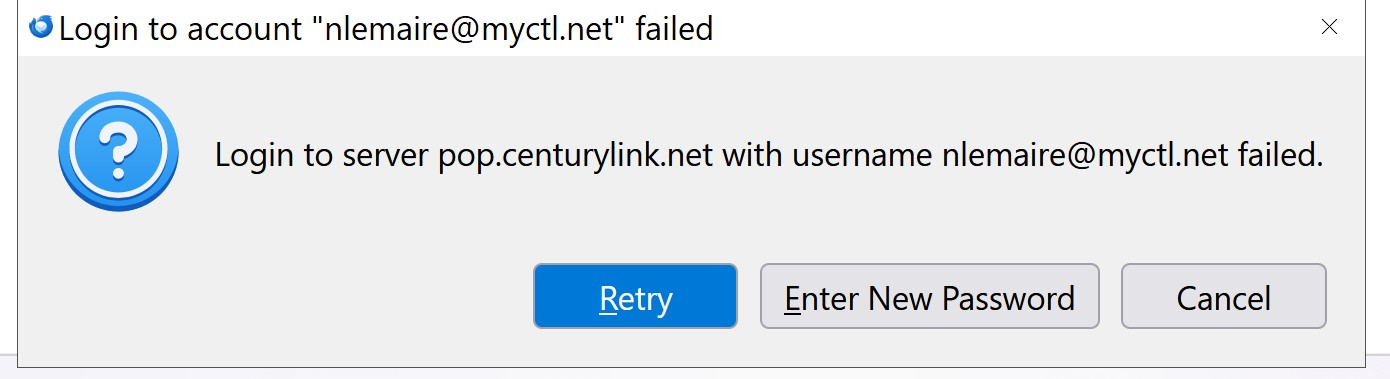
Authentication method?
Do you know which method the server uses?
Not specifically. I have tried STARTTLS and
the recommended TLS/SSL.
Strangely, for a while it was working….but maybe a SW update to TB caused this? BTW TB worked fine with the settings, the CenturyLInk pulled this BS. It occurred to me that their web mail isn’t using the server… If i am assured of NOT losing all my folders i might try uninstalling TB and reinstalling
Before thar i am going to try changing my PW on the web abd see if that might work…
Re-installing rarely fixes anything, and is very unlikely to fix a connection problem. The change from q.com to myctl.net is almost certainly the cause.
By authentication, I mean OAuth, password, or something else.
As far as I know, myctl.net does not require an app-specific password or security password. You might try to confirm that.
Thanks for your help Rick. I'm going to contact CenturyLink to discuss this today. This is most frustrating. I'll hold off on uninstall/reinstall. I think you are correct in that NOTHING at my end changed software wise so I now suspect CenturyLink. Hopefully I can speak to a "human" LOL Frankly, I'm extremely upset that Centurylink (or their new owners) are abandoning the Q.COM suffix. I checked my ROBOFORM and found that this email is in over 400 site logins! sigh
anyway, I'll let you know what I find out. Thanks again for your help! Nigel
I'm still interested in your authentication method. That setting could be making connections fail.
Would you please post three screen images?
- The error message that appears when you cannot sign in from Thunderbird.
- Your incoming server settings. To see them, go to account settings > server settings, and take an image from the top of the window to the heading "server settings" below authentication method.
- Your outgoing server settings. To see them, go to account settings, click on the name of the account, then click on "edit outgoing server". Take an image of that whole window.
now THIS is strange. I launched TB and IT WORKED!!!
I contacted Centurylink yesterday and they were kind of useless.
But I speculated to them that the Password updates were NOT being propagated to the POP server. The agent said he would escalate to their techs and I asked for an email that they found/fixed the problem
Lo and behold, TB works... PFM LOL
I'm SERIOUSLY looking for another ISP for my email. Centurlylink had gone through a few "owners" and I firmly believe that they are sabotaging their landline/DSL service to force customers away. This latest change from Q.COM to MYCTL.NET is another example.
Anyway, rant off! Thanks for your help/interest.
Nigel