


Lost folders after 144.0.1 update caused by multiple prefs.js
With the latest update 144.0.1 all the folders in TB disappeared. I tried installing earlier versions but this did not help. Any advice?
Изменено Wayne Mery
Все ответы (20)
A possibility: - click help>troubleshootinginformation - at 'profiles' in left column, click 'about:profiles' - your old profile may be there. click to launch it and see if the messing folders are there.

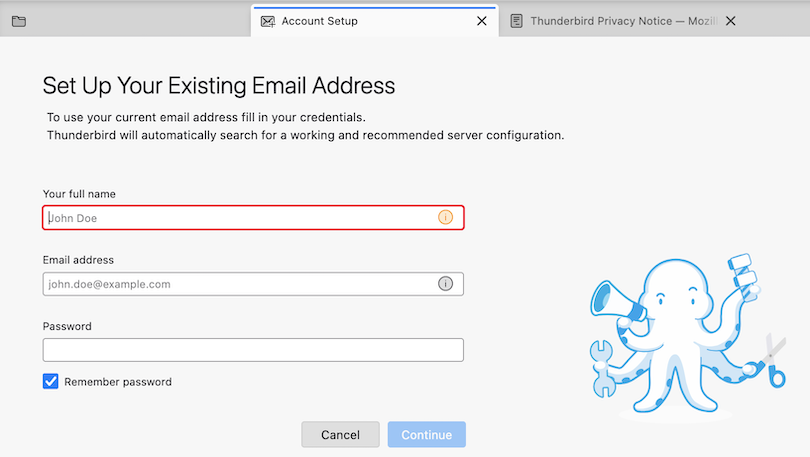
Actually when launching Thunderbird do you see a main window like in my joint image, with an "Account Setup" tab asking to "Set up your existing email address" ? If this is not the case please show us a screen shot of your Thunderbird start page.
Изменено Mapenzi
Thanks Mapenzi. Yes, this did appear and was set up. So mails are being received and sent. However there were many folders for filtered/stored mails received and these have all disappeared.
This is on my better half's computer which is identical to mine and we both use Thunderbird. Mine has worked fine but hers has been a mess with updates.
Ingwe said
Thanks Mapenzi. Yes, this did appear and was set up.
What caused this disappearance of your accounts etc in the main window is a corruption of the central file prefs.js in the Thunderbird profile. When this happens TB renames the damaged prefs.js file in prefs-1.js (sometimes invalidprefs.js) and creates a new virgin prefs.js file with a size of 5 to 7 kB which doesn't contain any account informations. So TB starts like after a first installation and asks to set up an email account. This not very rare issue is most times provoked by TB crashes, PC crashes or power failure. I have seen (and treated) this issue a few dozen times in forums but have never experienced it myself.
Do you have a backup copy of your Thunderbird profile folder? In this case you could copy the prefs.js from the backup and - Thunderbird closed - paste it in your wife's actual profile folder. Did your wife use POP accounts? This would explain why after recreating the account only new messages are downloaded.
Изменено Mapenzi
There are 5 profiles which is obviously causing the problem, see image.
Items 1,2,3 and 5 all have a prefs.js files but the 4th item has an invalidprefs.js file and a prefs.js file plus 73 prefs-* (*=the number of the file) numbered 1 to 73. Think this is going to take some sorting and trial and error to see what does and what does not work?
No back ups of the Thunderbird folder unfortunately and, yes, use POP accounts.
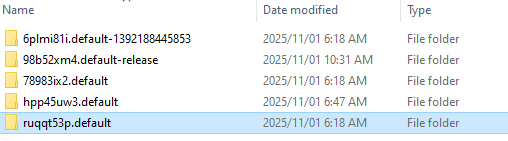
Five profiles is plenty, I would have preferred to treat with one only.... Nevertheless profile folder hpp45uw3.default will be my "usual suspect". Please open this folder and look up the sizes and the modification dates of both the "invalid.prefs" and the "prefs-73.js" files.
To be certain that hpp45uw3.default is the folder of the active profile open the Mail folder, open one of its "pop.xxx.xx" subfolders and look up the modification date of the Inbox file. It should be around the end of October, 2025. If there are several "pop.xxx.xx" subfolders in Mail, do this for several Inbox files.
Ingwe said
Only one POP subfolder and modification date is 21 October 2025.
This is OK. Now look up the data for the invalidprefs.js and prefs-73.js files
Apologies, only answered half your questions:
invalid.prefs modified 21 June 2021, size 42KB and prefs-73.js modified 4 August 2020, size 37KB
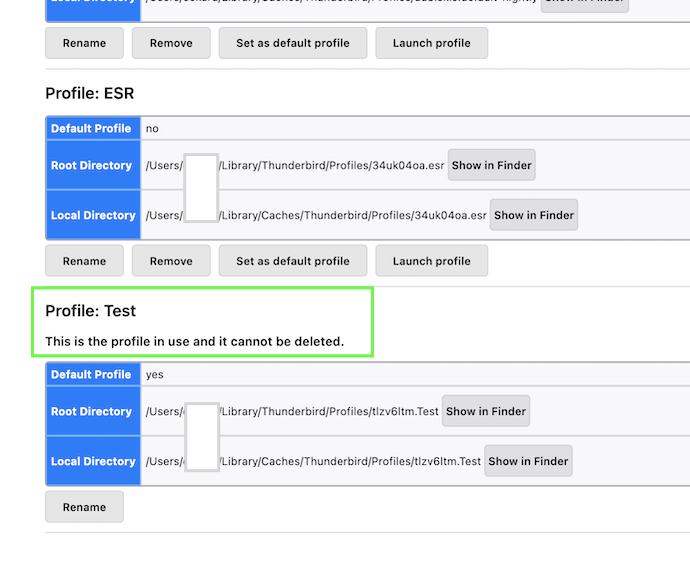
Unfortunately these are no good news. I had hoped that there would be e recently renamed prefs-xx.js file with a modification date from end of October... Now start Thunderbird, go to Help > Troubleshooting Information > Profiles > about:profiles .... This will open a tab "About Profiles" In the About Profiles tab you will see five profiles: look for the profile which is characterised by the annotation "This is the profile in use and it cannot be deleted" (such as you see in my image) Look up the name of this profile which can be somewhat like xxxxxxxx.default or yyyyyyyy. default-release. I also need one more screen shot of the contents of the folder "Profiles" in \AppData\Roaming\Thunderbird\ but this time I would like to see the "Created" date, too
Изменено Mapenzi
There is a prefs.js file with no number after which is dated 28 October 2025. Does this help?
There is always one "unnumbered" prefs.js file in each profile folder with the actual date, Thunderbird constantly recreates this file on startup. Which size in kB has it?
prefs file is 32KB.
screenshots of the "profile cannot be deleted" and the profiles folder herewith.


Thanks, this is a small progress. The default-release profile has been created three days ago, so it cannot contain your POP account ancient folders and messages. Theoretically this still leaves FOUR profiles to be the one you have been using before default-release was created.
Now we will launch other profiles via the Thunderbird profile manager as described in this Help article https://support.mozilla.org/en-US/kb/profile-manager-create-and-remove-thunderbird-profiles#w_start-the-profile-manager-when-thunderbird-is-closed When the profile manager windows opens select one of the default profiles: there might be four of them, choose the one at the bottom and click "Start Thunderbird". Report whether you see the POP account with its old folders and messages. If the selected profile doesn't contain them, quit Thunderbird, re-launch the profile manager, select the second "default" from the bottom, click "Start Thunderbird" and look for your old messages .... etc
P.S. Instead of restarting th profile manager each time you can also uncheck ⬜︎ "Use the selected profile without asking at startup". This way each time you launch Thunderbird it will first open the profile manager inviting you to choose a profile....
Изменено Mapenzi
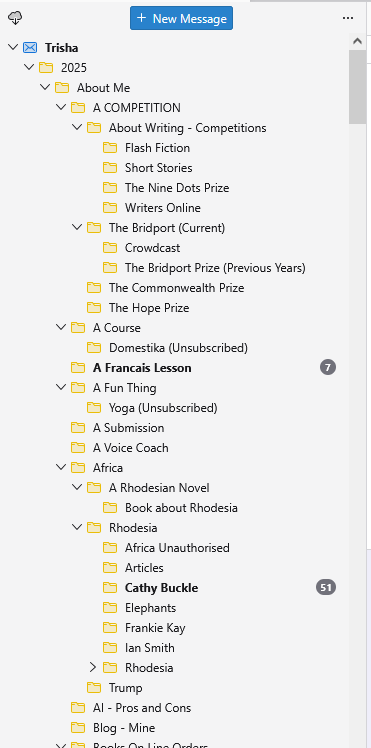
There were two profiles - "default" and "default-release." The "default" has all the folders but no inbox, etc. See image.
Изменено Ingwe
So the "default" profile shown in your screen shot seems to be the old profile with lots of folders and messages. The folder (Trisha) at the top is the Local Folders account which has been renamed to Trisha. It contains a big folder/subfolder hierarchy which seem st to be a kind of archive. I can't tell you where to find the Inbox folder neither the POP account to which it belongs. Your screen only displays the upper part of the Folder Pane and I don't know whether in View >Folders > ✔︎ All Folders is checked. Did you search in the lower part of the Folder Pane?
P.S. I have to correct myself. The Trisha account is not synonym with the renamed Local Folders. The account symbol is the one of an account and not of the Local Folders, it is a POP account which has been renamed. My bad!
Изменено Mapenzi
I only did a screenshot of the top part where the inbox is normally. She has hundreds of folders :)) Local Folders appears right at the bottom of the list. This is one of the problems that started all this - after an update a short while ago the inbox disappeared. To solve the problem I reloaded one of the previous versions which fixed it. Unfortunately the latest version of TB does not allow this any longer.
The All Folders is checked.